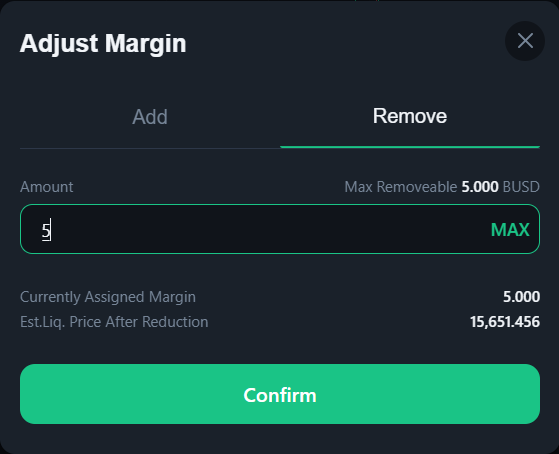
# Remove Margin
**Step 1:** Click the Edit button next to the margin to adjust margin
**Step 2:** Enter the amount of margin you want to remove from your position in the **Remove** tab
* The overwhelmed value beyond the maximum removable can discontinue your order. Please adjust the amount which maintains your margin ratio at 80% maximum to avoid this issue.
* **Currently assigned margin:** Current margin for the pair symbol refers to the margin amount deposited in the position
* **Est.Liq price after reduction:** liquid price can fluctuate when you remove margin
**Step 3:** Click **Confirm** button and confirm the action in your wallet
* The system is processing your transaction in a few seconds.
* Congrats! Your transaction is completed! The margin you’ve just removed from your position will be transferred to your wallet right away