# Position Exchange Introduction

![](/files/sjniKVhwuJrgpyW6iSTY)

## **What is Position Exchange?** <a href="#id-08f1" id="id-08f1"></a>

Position Exchange is a Decentralized Trading & Exchange platform designed to provide a transparent, trustless, and fully on-chain trading platform.

With the core being an on-chain orderbook matching engine, Position Exchange helps traders to have full control over their orders while reducing transaction costs and remains the same trading experience in a Centralized Exchange.

It is built for EVM blockchains and is completely permissionless. Partners can work with Position Exchange’s on-chain central orderbook to share liquidity and power unique features for a better user experience.

## What is Position Exchange trying to solve? Why on-chain Orderbook?

As the DeFi segment with the clearest application scenarios and the strongest demand, decentralized exchange (DEX) has always attracted the most attention and embodied the greatest competitiveness as well as the strongest capital efficiency.

According to the data by The Block, the growth in DEX total volume (only including spot transactions) over the past two years has been conspicuous. Since its low and stable performance in the middle of last year, DEX’s total trading volume has grown rapidly, and the monthly figure peaked at $162.8bn in May. Although it is still lagging behind the centralized exchange (CEX), its market size of hundreds of billions of dollars obviously can not be ignored.

When it comes to the rise and popularity of DEX, AMM plays a significant role because it quickly executes trades at a very low cost and instant liquidity.

AMM was first born in a paper "Improving Front Running Resistance of X \* Y = K Market Makers" written by Ethereum’s co-founder Vitalik, and has become increasingly popular with a number of projects. For example, Uniswap also adapts the model. The brand new AMM principle of "X \* Y = K" breaks DEX’s thinking tendency of copying CEX models and quotations and further provides DEX with an innovative approach.

However, several core functions of an order book, such as limit orders, bids, and offers, were missing. In addition, liquidity providers were required to provide liquidity to both sides, were not able to choose only to provide liquidity at a particular price, and could not provide liquidity at a price other than the current market price. So the benefits of an AMM model come with inevitable tradeoffs.

And due to the core design, AMM contains a vulnerability called "Sandwich Attack" that steals a hundred million dollars from DeFi users annually.

At the beginning of DeFi, the market was in need of an open and simple trading product that was easy to promote. AMM thus perfectly satisfies the requirements. But as the basic DeFi functions mature, users have an increasing demand for more diverse services, which appeals to the order book mechanism.

## What does Position Exchange offer?

**Position Exchange’s Orderbook matching engine - The Core**&#x20;

It represents an open-source matching engine written in the Solidity language that is suitable for any products, from options, futures, spots, lending positions, and any financial or non-financial instrument that can take advantage of Position Exchange's on-chain orderbook.

**On-chain Futures Trading**&#x20;

Leveraging the matching engine, Position Exchange offers a Futures Trading protocol with a central on-chain orderbook that ensures transparency, trustlessness, low cost, and high speed. In Futures trading, you can trade with leverage and are only required to fund the initial margin to open positions in a futures contract. It is a critical feature that makes the Futures market attractive, as it allows you to profit from relatively small changes in price movement.

**DEX with the On-chain Orderbook**&#x20;

Expected to be the heart of the whole ecosystem, Position Exchange offers a spot trading DEX with lower transaction costs, fully operating limit orders and higher quote rates. Using the Orderbook mechanism, not AMM like others, it can, therefore, eliminate the “Sandwich Attack”. Position Exchange’s spot trading works based on the orderbook mechanism; thus, in the future, as the number of transactions recorded on the orderbook increases, our slippage will be approximately zero.

**On-chain Derivatives Products & DeFi**&#x20;

Position Exchange also offers other Derivatives Products such as Bonds, Farms, Pools. Position Exchange protocol offers fully on-chain derivatives trading, and even beginners to the activity can buy and sell easily using the POSI token. POSI holders can stake the tokens in Staking Pools and generate rewards and transaction fees. Moreover, farming allows Liquidity Providers to earn rewards by staking LP tokens while bonds allow issuing, exchanging, buying, and selling bonds quickly and fully on-chain fueled by smart contracts.

**POSI & PTX**&#x20;

Acting as the backbone of the ecosystem, POSI is the native coin of the POSI Chain. It ensures network stability while paying the transaction cost. POSI is also the governance coin of the Position Exchange ecosystem. POSI coin also benefited users through the Futures Trading Revenue Buyback & Burn program. PTX is a new member of the Position Exchange ecosystem and will be fully integrated into the Position Exchange and benefit from buy/burn Spot DEX fees.

**POSI Chain**&#x20;

POSI Chain a fully layer 1 blockchain provides fast (2-second transaction) and high TPS (10k). Firstly, it will be implemented as the core of Futures Trading. POSI Chain also aims to become the top blockchain by users and volume in the future.

**Mobile Apps**&#x20;

With the vision to become a door of DeFi, Position Exchange Mobile App aims to bring a super app and wallet with the best UI/UX while remaining transparent and trustless.

## **Ultimate Vision**

The ultimate vision behind Position Exchange is to become the first exchange of choice. To accomplish this, we will continue to build, change, and strive to bring true decentralization while maintaining a great UX. One conceptualization of this goal includes the milestones of reaching a billion users and a trillion of on-chain value.

See more about our Roadmap and Development Plan here:&#x20;

{% content-ref url="/pages/6qr2Tjg2OfnrNHytxbmq" %}
[Position Exchange & Development Plan](/roadmap/position-exchange-and-development-plan)
{% endcontent-ref %}

## Contact Us

Learn more about Position Exchange and find us on the following platforms:

Website: [position.exchange](https://position.exchange/)

WhitePaper: <https://position.exchange/whitepaper.pdf>

Reddit: <https://www.reddit.com/r/PositionExchange/>

Medium: [https://positionex.medium.com](https://positionex.medium.com/)

Twitter: <https://twitter.com/PositionEx>

Telegram: <https://t.me/PositionExchange>

TG Channel: <https://t.me/PositionAnn>

Github: <https://github.com/PositionExchange>


# Getting started

![](/files/b93kMozBSDKpjfvmscCN)

## Setting up Position Exchange

Follow these guides to get everything set up to use Position Exchange, or feel free to jump to the guide you need if you've been doing okay but lost your way.

[Create a Wallet](/get-started/create-a-wallet)\
[Get BEP20 Tokens](/get-started/get-bep20-tokens)

## Guides for using Position Exchange features

Once you have a wallet set up and connected to Position Exchange, feel free to check our other how to guides below.

[How to Trade](/products/exchange/how-to-trade)\
[How to Add/Remove Liquidity](/products/exchange/how-to-add-remove-liquidity)\
[How to Use Farms](/products/farming/how-to-use-farms)

Check the menu for more documentation on the range of Position Exchange features and services, including more advanced guides.

If you can't find what you need, feel free to visit the [Position Exchange Telegram](https://t.me/PositionExchange) and ask for help there!


# Create a wallet

To get started on Position Exchange, the first thing you'll need is to set up a wallet that supports Binance Smart Chain (BSC). Wallets are available both on desktop computers and on smartphone devices. You'll need to choose the wallet that fits your needs best.

{% hint style="danger" %}
**When you're setting up a wallet, be sure to:**

* ✅ **Download and install only the latest version from an official source.**
* ✅ **Follow the setup guide carefully.**
* ✅ **Safely back up your recovery phrases.**
* ❌ **NEVER share your recovery phrases with anyone, under any circumstances.**
* ❌ **NEVER input your recovery phrase to a website or app, other than your wallet app.**
  {% endhint %}

## Smartphone/Mobile or Desktop wallet?

Mobile device wallets and desktop-based wallets have different strengths and weaknesses. Consider which fits your needs better to help decide which type of wallet to use.

|                                   | Mobile | Desktop |
| --------------------------------- | ------ | ------- |
| Use anywhere                      | ✅      | ➖       |
| Easy to use                       | ✅      | ➖       |
| More secure                       | ➖      | ✅       |
| Accessibility friendly            | ➖      | ✅       |
| Damage/loss/theft resistant       | ➖      | ✅       |
| Power/connection outage resistant | ✅      | ➖       |

## **Smartphone/Mobile wallets**

Smartphone/Mobile wallets allow you to access your crypto almost anywhere. Wallets are available on both Android and iOS devices.

### Which mobile wallet should I choose?

This comparison table gives an overview of the most popular mobile wallets.

|                                                          | Trust Wallet                  | MetaMask | Token Pocket | SafePal |
| -------------------------------------------------------- | ----------------------------- | -------- | ------------ | ------- |
| Binance Smart Chain support                              | ✅                             | ⚠️       | ✅            | ✅       |
| Built-in DApp browser                                    | <p>✅ Android</p><p>⚠️ iOS</p> | ➖        | ✅            | ✅       |
| Hardware wallet compatible                               | ➖                             | ✅        | ➖            | 🔶      |
| Open source (auditability)                               | ✅                             | ✅        | ✅            | ➖       |
| <p>Interact with BscScan</p><p>(for advanced users!)</p> | ➖                             | ✅        | ➖            | ➖       |

⚠️ Requires some setup\
🔶 Only supports SafePal hardware wallet

You can find more in-depth information about each wallet below, as well as download links and installation guides.

{% tabs %}
{% tab title="Trust Wallet" %}
![](/files/-MduEqINDJt5ZMmGgMIH)

Trust Wallet is a popular wallet for smart devices. It supports DApps, NFT collectibles (with Opensea.io support), and in-wallet staking.

**Pros:**\
\- Open source for auditability\
\- Backed by the Binance cryptocurrency exchange\
\- Easily switch between several crypto networks\
\- Includes networks by default\
\- Includes in-wallet staking options\
\- Has additional features such as NFT collection, BNB staking, and DApp access within the wallet<br>

**Cons:**\
\- Language tied to phone settings\
\- Limited DApps\
\- Transaction notifications can be delayed

[**Download Trust Wallet**](https://trustwallet.com/) (Automatically detects device)[\
**Trust Wallet Setup Guide**](https://www.binance.com/en/blog/421499824684901157/How-to-Set-Up-and-Use-Trust-Wallet-for-Binance-Smart-Chain)
{% endtab %}

{% tab title="MetaMask" %}
![](/files/-MduEvZPfCikU-yR93zf)

MetaMask is a very popular browser-based wallet plugin that supports ERC20 (Ethereum network) and BEP2 & BEP20 (Binance Chain and Binance Smart Chain networks).

​**Pros:**\
\- Open source for auditability\
\- WEB3 capable on BscScan\
\- A strong history of security and reliability\
\- A large amount of how-to guides and resources online\
\- Many tools and custom settings\
\- Offers ETH purchases with Transak\
\- Supports a very large number of languages\
\- Is also available a browser plugin for desktop devices

**Cons:**\
\- Longer setup time than other options\
\- Additional steps needed to use with Binance Smart Chain and PancakeSwap\
\- Extra information and settings may confuse beginners

[**Download MetaMask**](https://metamask.io/download.html) (Automatically detects device)\
[**MetaMask Setup Guide**](https://academy.binance.com/en/articles/connecting-metamask-to-binance-smart-chain)

{% endtab %}

{% tab title="Token Pocket" %}
![](/files/-MduF1aeeKe89UNxXM9a)

Token Pocket is a cryptocurrency management app that natively supports many cryptocurrency networks. It also has a desktop application available.

​**Pros:**\
\- Open source for auditability\
\- Allows users to easily switch between many crypto networks\
\- Supports many networks by default\
\- A less cramped user experience than browser plugin wallets \
\- Is also available as desktop software devices

**Cons:**\
\- Only supports Chinese and English languages\
\- Has some issues with the English translation\
\- Has fewer online resources than more established wallets

[**Download Token Pocket App**](https://www.tokenpocket.pro/en/download/app) (Automatically detects device)

### **Token Pocket Mobile Setup Guide**

1\. Visit the Token Pocket website and tap **Mobile**.

![](https://lh5.googleusercontent.com/fTsZdwOn3cgT7au7KaoTxY-Ib1KMEfVP9MifMszobGFJ6BTQ0iPlQLl01CYuS3vbAVPmTz9vC3Hnw1lApk1m1I1SDG2fIfi-nN3CIE4oImXU82WCcZWVhLhq2LqY79W1UuN3oefD)

2\. Your device will be automatically detected. Tap the **Google Play** or **App Store** button and install the Token Pocket app.

3\. Once Token Pocket is installed, open it. You’ll be met by a screen asking whether you have an existing wallet or would like to create a new one. Tap **No accounts, Create Now**.\
\
If you do have an existing wallet to import, use the top option instead.

![](https://lh3.googleusercontent.com/FdtGOB7N7ZKROD0EIKy5roklxcqtYwq26lZ4RX_8RxUdt-caGPAr03HNTdOtTqpD82hkBcX9umQI1VcL6n0jXky4uVy_dFDr8pReadLE80AHXkvm4mbvZZN2vxnzeaUmHXATx3GC)

4\. On the next page, find **Binance Smart Chain** in the list and tap it.

![](https://lh5.googleusercontent.com/TGpsjTq_B1rLK-A8Cqzq9sC0IACpDZFCbpwN5_GD4r8sCRmaqAdbswC-OmWAM7YiKATEaHTHviODFueMA6sCDSGlvNslYjGWQIrX5X8oR_5pGPuMJ6X7_Gz-rEoJwzmS9exEybbs)

5\. Next, on the “Create way” page, tap **Create Wallet**.

![](https://lh4.googleusercontent.com/AvN_ssg1eWtArzqvT0oaxWGC-GR6lfG6GjzhIbvIpYO6b2om9ZYtNa5GWlU7KW31cKjPqFmSsx8zSjvT_Bxw2zAqvVSMylbQWCCXYwnJOVM5jOxg9u7lt6_Yy5AySM72HSS99v0n)

6\. You’ll be asked to enter a password. For your security, make sure your password is judged as “Strong”. You can also add a hint, but make sure it’s something only you will understand. When you’re ready, tap **Create Wallet**.

And that’s it, all done!\
\
To connect to Binance Smart Chain and use PancakeSwap, you can follow the TokenPocket section of our Connect Your Wallet to PancakeSwap guide <https://docs.pancakeswap.finance/get-started/connection-guide>.

### Getting private key from mobile to import to desktop

Token Pocket lets you use both a desktop and mobile wallet. This section will cover how to get your private key from your mobile wallet to import into your desktop wallet.

{% hint style="warning" %}
Please be extremely careful with how you handle your private keys. Giving your private keys to someone will give them full access to your coins! Token Pocket is an open source project and will use your private key to import your wallet. Even so, only use your private key with applications you trust and can verify are legitimate!
{% endhint %}

1\. Tap the **Me** tab on the bottom ribbon and tap **Manage Wallets**.

![](https://lh3.googleusercontent.com/_DE3EO8bsI5wKZlkTeJv3zZ77LR8SVQYOwB4EXbY_GhKzz4PSZpo3MdlvrU8sLoLyPcRQjdjOA24VPjAa_UZdt-JaiRgPMk67uBs7JIi5gp9gV1_wDB7fW7FQoFogTMZ_EQJYxcQ)

2\. On the next page, tap the **Binance Smart Chain** entry. Be careful not to tap the address part, or you’ll only copy that to clipboard instead.

![](https://lh4.googleusercontent.com/jLhXL03uhZHBKbHaPvy3ZrD1EmYCR8ECqwMxQIzTKnUtxMNntaDA8Dx4oVlXSadoFhhJqZACsYWVPfvITBEpWfkCfwntcQY3Fw5EYgGH-tmva8PZbvYbBRCy_c5V7E1yQHvXiU0F)

3\. When the menu appears, find and tap the **Export Private Key** option. Type in your password to get your private key.

{% hint style="danger" %}
**NEVER, in any situation, should you ever give someone your private key or recovery phrase ("seed phrase"). This will give someone complete access to your crypto!**\
\
**The genuine PancakeSwap site and staff will never ask you to input your seed phrase.**
{% endhint %}

Now you have your private key ready to import your wallet into the desktop version of Token Pocket.
{% endtab %}

{% tab title="SafePal" %}
![](/files/-MduF89GofoM1KW010Hs)

SafePal is available as both a software and hardware wallet. The wallet is easy to install and create, and comes ready to support BEP2 (Binance Chain) and BEP20 (Binance Smart Chain) right away.

**Pros:**\
\- Easily switch between several crypto networks\
\- Offers 25% fee discount paying with BNB (requires login)\
\- Has the option for Google Authenticator built in\
\- Supports a large number of languages\
\- Setup process is very simple\
\- Is available as both a software and hardware wallet (work together)\
\- Supports NFTs on both the BSC and ETH networks

**Cons:**\
\- Isn't fully open source\
\- Has some features that are not yet ready for use (such as DeFi)\
\- Does not give user notifications\
\- Does not enforce strong security during initial setup and wallet creation\
\- Has fewer online resources than more established wallets

​[**Download SafePal**](https://safepal.io/download) (Automatically detects device)\
[**SafePal Setup Guide**](https://blog.safepal.io/binance-smart-chain-x-safepal/)
{% endtab %}
{% endtabs %}

## **Desktop/Web Browser wallets**

Desktop wallets are available on your home computer or laptop computer. Wallets on your computer can run as standalone applications, or as web browser plugins for popular browsers like Chrome and Firefox.

### Which desktop wallet should I choose?

This comparison table gives an overview of the most popular desktop wallets.

|                                                          | MetaMask | Binance Wallet | Token Pocket |
| -------------------------------------------------------- | -------- | -------------- | ------------ |
| Binance Smart Chain support                              | ⚠️       | ✅              | ⚠️           |
| Built-in DApp browser                                    | ➖        | ➖              | ✅            |
| Hardware wallet compatible                               | ✅        | ✅              | ➖            |
| Open source (auditability)                               | ✅        | ✅              | ✅            |
| <p>Interact with BscScan</p><p>(for advanced users!)</p> | ✅        | ➖              | ➖            |

⚠️ Requires additional setup

You can find more in-depth information about each wallet below, as well as download links and installation guides.

{% tabs %}
{% tab title="MetaMask" %}
![](/files/-MduFFoIio7jA_8V-UlG)

MetaMask is a very popular browser-based wallet plugin that supports ERC20 (Ethereum network) by default, and BEP2 & BEP20 (Binance Chain and Binance Smart Chain networks) with a little work.

​**Pros:**\
\- Open source for auditability\
\- WEB3 capable on BscScan\
\- A strong history of security and reliability\
\- A large amount of how-to guides and resources online\
\- Many tools and custom settings\
\- Supports a very large number of languages\
\- Is also available on mobile devices

**Cons:**\
\- Longer setup time than other options\
\- Additional steps needed to use with Binance Smart Chain and PancakeSwap\
\- Extra information and settings may confuse beginners

[**Download MetaMask**](https://metamask.io/download.html) (Automatically detects browser)\
[**MetaMask Setup Guide**](https://academy.binance.com/en/articles/connecting-metamask-to-binance-smart-chain)
{% endtab %}

{% tab title="Binance Wallet" %}
![](/files/-MduFKwQSkO-wsM-z7pa)

Binance Wallet is a browser-plugin wallet that natively supports the Binance Chain (BEP2) Binance Smart Chain (BEP20) networks. Binance Wallet was developed by the Binance cryptocurrency exchange.

​**Pros:**\
\- Open source for auditability\
\- Backed by the Binance cryptocurrency exchange\
\- Can be directly linked to a Binance or Gmail account\
\- A streamlined user experience\
\- Supports Binance Smart Chain by default\
\- Supports a large number of languages\
\- Hardware wallet compatible

**Cons:**\
\- Lacks some custom settings of other wallets\
\- Lack of additional tools makes some actions available in other wallets impossible\
\- Has fewer online resources than more established wallets

[**Download Binance Wallet**](https://www.binance.org/en) (Automatically detects browser)\
[**Binance Wallet Setup Guide**](https://docs.binance.org/smart-chain/wallet/binance.html)
{% endtab %}

{% tab title="Token Pocket" %}
![](/files/-MduFOTuOQ8vuVc5do51)

Token Pocket is a standalone application available for both Mac OS and Win64 devices. Token Pocket allows you to manage your cryptocurrency in software independent of your browser.

​**Pros:**\
\- Open source for auditability\
\- Independent of your browser and any of its permissions\
\- Allows users to easily switch between many crypto networks\
\- Supports many networks by default\
\- A less cramped user experience than browser plugin wallets \
\- Is also available on mobile devices

**Cons:**\
\- Asks users to enter their private key as part of desktop setup process\
\- Only supports Chinese and English languages\
\- Has some issues with the English translation\
\- Has fewer online resources than more established wallets

[**Download Token Pocket Desktop Wallet**](https://www.tokenpocket.pro/en/download/pc) (MacOS or Win64)

### **Token Pocket Desktop Setup Guide**

The desktop version of Token Pocket will ask you to import a private key. Please make sure you’re familiar with and understand the importance of a private key before you proceed.<br>

Token Pocket is an open source project, so the code is publicly visible and generally considered safe. Even so, your private keys are your responsibility, so only use them with applications you trust and can verify.

1\. Visit the Token Pocket website on your PC and click the **Desktop** button.

![](https://lh3.googleusercontent.com/8BvpBrdR19cHhjJq0_xOFQwpTDLaYUxqLAM03JPFzBPz93SHl3n84Dw_kICcfOR80iVZFS1QfYsexEUMNnchMLGSH11lHKMqBQWAJUZy7yd0LM6jaFrwRGt5EluBRo_uDqJBqbg2)

2\. On the next page, click the button for your operating system and wait for your download to finish. This guide uses Windows, but the process is largely the same on Mac OS.

![](https://lh3.googleusercontent.com/SrYkM-cFg_tO3RcTlYv2Rq4pViUzRSw5el_JR8SnQYDmvVYupjJveTUXHr8QPeo30Ooc4EHBKEuYjxM1JbtirRHitGJtZ-2ET_Xk5a5DRbhqwyJToToii-s6Ch195p5o3Eo4Ajnm)

3\. Run the installation file. It will ask you to choose between making Token Pocket available to everyone using the computer, or just the current user. For your security, we recommend current user only.

![](https://lh3.googleusercontent.com/EnmEle5PcVenTxE7jEtEHhQxeXwKjhzlOkZH67ByFLAIo4RMife2u4n36uDDGjTB8h64KxS0wmlI8FKAbxB6KvjvhD-WgCqdKpyUP1YM4tmxqTzjLGPuqDmf5ABTyY_5-wG7ppgG)

4\. Enter a destination folder to install to and click **Install**.

![](https://lh6.googleusercontent.com/ED7cl2_ZGBkUvM-A7CpE_bRNfdLQ8DcD2qmq6KaGAUIZTi_06f7BA_m-xBhoFzrczfTZQENsYji2Xlh_DNh0zWpmRnuo45HKX2r8zJxrBtqXkuPgxfCd4jAIvMytHu6iT_ZPRxmI)

5\. Once the installation is finished, click **Finish** and run Token Pocket.

6\. When Token Pocket opens, you may find yourself looking at a Chinese interface. You can change to English by clicking EN in the bottom-left corner.

![](https://lh6.googleusercontent.com/V3VS6TaN0rJtfqjzCo5QEtS1ywJn_bmmB2hKWLbUGRy_-Pk83kGfu9feB35VAi4TC7BHKTqkApDagBuWP7XS3tVNzhcMPmANGqLlsOecumQpMMisvUBiABqi05351e7cNUgktWsO)

7\. Token Pocket will be asking you to create a password. Make sure you use something that’s hard to guess; the longer the password is, the more secure. When you’re done, click **Confirm**.

![](https://lh5.googleusercontent.com/GQqBU7OEK7BQuJc4NiOHEqt3kjO-B6jM6AAv3PFD6DoYuXywuOz6365Z5rPmNtkigWSg3f1_zzvoHfWAUvqIpEKaAajkDxVwlaWAljIW1ZGdgSwqECVa2CwgtS_vOOcX8faW19gB)

8\. On the next page, Token Pocket will be asking you to import a private key. This may be intimidating, but Token Pocket will work as an interface for your existing wallet. You’ll need to get your private from whatever existing wallet you want to use.\
\
Here is a [guide for getting your private key from MetaMask](https://metamask.zendesk.com/hc/en-us/articles/360015289632-How-to-Export-an-Account-Private-Key). To import your private key from the mobile version of Token Pocket, see the Mobile Token Pocket tab higher up this page. If you use another wallet and don’t know how to get your private key, you’ll need to find a guide.

{% hint style="warning" %}
Please be extremely careful with how you handle your private keys. Giving your private keys to someone will give them full access to your coins! Token Pocket is an open source project and will use your private key to import your wallet. Even so, only use your private key with applications you trust and can verify are legitimate!
{% endhint %}

![](https://lh5.googleusercontent.com/1ZNrWBvjfL_1joVAxKQVdXbQnGFmbyw1PXAqgAGwaH73KAkrFgJR8N_pYBJwY_FTyXy-y_fRuks3Ne_n-9xJWVEvOg9NnNMup82smXwGYnDzPqV4Wc9E_CCE9WKPX9nAP-SoPhxM)

9\. Once you’ve entered your private key, click the **Ethereum** network for now.

![](https://lh5.googleusercontent.com/g_iZzJZAPhsBQUBgQqTvLO1HfuGnCGZDkRD3DFu4g4GPat901700Qk3aBx8Fx5AzY2PH7JYajGM4-4fXm6icPWB-8R5wQQst-W3NWJ6n0Rh_bbPKXnXrO4h_JEgu7wtey11EuCN-)

And that’s it, all done! You can follow our [Connect Your Wallet to PancakeSwap guide](https://docs.pancakeswap.finance/get-started/connection-guide) to connect to Binance Smart Chain and PancakeSwap.
{% endtab %}
{% endtabs %}

{% hint style="danger" %}
**NEVER, in any situation, should you ever give someone your private key or recovery phrase ("seed phrase"). This will give someone complete access to your crypto!**\
\
**Position Exchange site and team members will never ask you to input your seed phrase.**
{% endhint %}


# Get BEP20 Tokens

The native tokens of Binance Smart Chain (BSC) are **BEP20**.

To do most things on BSC, you will need to pay gas, which comes in the form of BEP20 BNB.

You will also need the BEP20 version of any token you want to trade, stake etc. on BSC.

You can go a few ways about converting your tokens to BEP20, but here are the ones we recommend:

{% tabs %}
{% tab title="🔒 SafePal" %}
[**SafePal** ](https://safepal.io/download) - You don't need an account, or to register etc. Execute cross-chain swaps directly from your wallet.

📖 [Here's a quick guide they made to help you out.](https://docs.safepal.io/safepal-app/cross-chain-swap-tutorial)
{% endtab %}
{% endtabs %}

{% tabs %}
{% tab title="🌉 Binance Bridge" %}
[**Binance Bridge**](https://www.binance.org/en/bridge)  - You don't need an account, or to register etc.&#x20;

📖 [Here's a quick guide they made to help you out.](https://docs.binance.org/smart-chain/guides/bridge-v2.html)
{% endtab %}
{% endtabs %}

{% tabs %}
{% tab title="💰 Binance.com" %}
[**Binance.com**](https://docs.position.exchange/get-started/www.binance.com) - You can withdraw tokens as BEP20 via your Binance account (if you have one). Bear in mind you need an account to do so.

📖 [Here's a quick guide they made to help you out.](https://www.binance.com/en/support/faq/85a1c394ac1d489fb0bfac0ef2fceafd)
{% endtab %}
{% endtabs %}

​

​[<br>](https://docs.pancakeswap.finance/get-started/wallet-guide)


# Business and Partnerships

## Collaboration Pools

Collaboration Pools are a way of distributing your tokens to BSC users who stake POSI NFTs in the pool. Position Exchange offers the possibility for other projects to open a Pool in the platform in which users can generate rewards in the partner's native token by staking POSI NFTs.\
\
Position Exchange NFTs is hot and new feature of the project. A guide to the feature can be found [here.](https://app.gitbook.com/@position/s/position-exchange/~/drafts/-Mhe4lTerRWuq_4LZF-a/products/nfts/how-to-stake-nfts)&#x20;

[Apply to run a Collaboration Pool](https://docs.google.com/forms/d/e/1FAIpQLSfqx79RrX0AFRh-eYEde-fwsHoZv6aGYiTI-rY8uRSgRLuYMw/viewform?usp=sf_link)

* Please don't email us to apply - we only respond to applications via the application form.
* Please don't chase us for a response on your application. We have a constant backlog of quality projects reaching out to us.

## For other proposals

You can send us an email at <Business@position.exchange> for other proposals.


# Community Leaders Referral Program

Position Exchange offers the possibility for Community Leaders and influencers to become partners and ambassadors of the project and enjoy many privileges and benefits.

![](/files/-MlJP5cuTa7wD-n7v8p0)

You have a YouTube channel dedicated to Crypto? You are an owner or an admin of a crypto community group/channel? You are looking to share Position Exchange with your community? No matter the number of followers/members. You've come to the right place. You can apply to become a partner of Position Exchange!\
\
Community leaders and influencers selected to become partners will be able to receive multiple incentives and very attractive rewards.\
\
The main task of the partner would be spreading the word about Position Exchange in their communities and be a representative of the platform. The more users you bring in, the higher your rewards will be.\
\
Feeling like this is for you? Fill the form [here](https://docs.google.com/forms/d/e/1FAIpQLSccZdo3mRxCKuArXXIhfOtf-opneTTBmYhrWDuQ2-Zrb6SDSw/viewform?usp=sf_link)\
\
After filling the form Position Exchange will select the partner and reach out to them. Make sure you leave your contact information and a detailed introduction about what you can bring to the project.


# What is POSI?

![](/files/UFxqwlNSErPe5Wd3y0N3)

### Token specs&#x20;

| Token Name       | Position Exchange Token                                                                                            |
| ---------------- | ------------------------------------------------------------------------------------------------------------------ |
| Token Ticker     | POSI                                                                                                               |
| Token Type       | BEP20                                                                                                              |
| Token Supply     | 100,000,000                                                                                                        |
| Contract Address | [0x5CA42204cDaa70d5c773946e69dE942b85CA6706](https://bscscan.com/token/0x5CA42204cDaa70d5c773946e69dE942b85CA6706) |
| Coinmarketcap    | <https://coinmarketcap.com/currencies/position-exchange/>                                                          |
| Coingecko        | <https://www.coingecko.com/en/coins/position-token>                                                                |

## What is POSI ? - A Token for the Community&#x20;

**POSI** is Position Exchange’s native BEP20 token empowering its ecosystem. In addition to being a utility token and providing **liquidity, holding** and **trading** incentives, **POSI** token is designed to facilitate and incite the decentralized governance of the protocol.&#x20;

#### **Cases of use:**

* **POSI** token holders can generate passive income by staking their tokens in the staking pools and receive rewards in return - See Staking section.
* **POSI** token can holders can farm LP tokens - See Farming Section
* **POSI** token can be used to cast NFTs - See NFTs section.
* **POSI** token holders can participate in the platform’s governance by proposing and voting for changes.
* **POSI** token holders will be sharing a 1% fee from transactions while just holding the tokens.
* **POSI** token holders can perceive Trading Protocol fee discounts&#x20;
* And much more to come.&#x20;

Learn more about "What is Position Exchange?"

{% content-ref url="/pages/-Mdp4isvx2I4SlgotHCz" %}
[Position Exchange Introduction](/)
{% endcontent-ref %}


# A Deflationary Token

![](/files/VvcA85m2ZRzigOPXUkxY)

Controlling the price of **POSI** as well as the total circulating supply of tokens will be our top priority. **Position Exchange**’s team is implementing several anti-inflation measures to keep **POSI** price stable, encourage holding and ensure the best benefits of the **holders**.

The measures include **Anti-whale** to prevent price manipulation, setting a **harvest lock-up period** to prevent farming arbitrage bots from constantly harvesting and dumping in addition to constant **buying back and burning** of **POSI** tokens, and reducing block emission.

**100%** of the fees generated from the Derivatives Trading Protocol will be used to **Buy Back and Burn** **POSI** tokens.

Our Smart Contract adds a 1% fee to each transaction that would be proportionally divided to all POSI holders, which would incentivize HODLing, using **RFI** technology.


# Buy back and Burn

Once the Derivatives Trading Protocol feature is operational, 100% of the Trading fees will be used to Buy Back and Burn POSI. The tokens are burnt in order to reduce the overall POSI tokens circulation, stabilize the token price and create deflation.

**Black hole address: Coming soon.**


# Anti-whale

Transfer more than 0.5% (current ratio) of the total supply will be rejected. As the total supply grows, this ratio will be reduced.

{% hint style="info" %}
Deposit or withdraw tokens to the farms will not be subject to this restriction.
{% endhint %}

You can view the max transfer amount on the website: [https://position.exchange](https://position.exchange/)


# Harvest Lock up

Harvest lockup is a  creative farming rewards lockup mechanism in order to help limit the frequency of harvesting to prevent farming arbitrage bots from constantly harvesting and dumping.

![](/files/-MgUdQ2TeGY5FZcF9OTf)

For example, the harvest lockup of the POSI-BUSD farm is 12 hours. It means that farmers who stake in the POSI-BUSD farm can only harvest (claim their rewards from farming) every 12 hours.

You can check the harvest lockup on each farm card.

To clarify, the harvest lockup only locks users' farming rewards. The tokens and LP tokens staked in farms can be withdrawn anytime.<br>


# RFI Technology

The RFI Technology allows 1% of the transaction to be shared among POSI holders. The more POSI you hold the more your share in the 1% increases.


# Buy POSI

![](/files/KJiu0Cv4sPhWy0Xy6z5p)

You can buy POSI on our website on the [Swap interface](https://app.position.exchange/swap) using BUSD or on PancakeSwap

Visit [Swap interface](https://app.position.exchange/swap):

![](/files/-MgUdlMxPI_dXit37I7z)

1. Click on **Unlock Wallet**
2. Click on **Approve** If it is the first time you use the interface

![](/files/-MgUeOFUE2Zys1UXEGVC)

&#x20;   3\. Click on **Add POSI to wallet**

![](/files/-MgUfXK5U7d92sLpBLT5)

&#x20; 4\. You can Customize settings if wished (Optional)

![](/files/-MgUeosFukjO7CticmP_)

&#x20;     5\. Select your desired amount and click on **Swap.**&#x20;

![](/files/-MgUf3Dwujva6-KABiPE)

&#x20;         6\. You will then see the transaction preview. Click **Confirm Swap.**

[ ](https://app.position.exchange/swap)


# POSI Tokenomics

![](/files/CBCrvDpYcgJR7fFYXxJM)

A crypto project without solid and sustainable Tokenomics is more likely to be disorganized and purposeless, because tokens serve two crucial primary functions: Capturing the value and incentivizing the growth. The Position Exchange's team is designing and will always design future token economy models with these key ideas in mind.

Position Exchange will be running highly cost-effective incentive programs and initiatives to help facilitate and ensure the continuous growth of the platform and the POSI community. In the meantime, the POSI token will be the perfect vehicle for encapsulating and representing the value of the Position Exchange’s economy and ecosystem, and the collective value of the platform will be shared equitably and very generously with our loyal supporters.

As outlined in Position Exchange's token distribution, 80% of the POSI total token supply is reserved for the community. This is a substantial proportion and amount of tokens and it is hard to plan out all the incentive programs at first. As our platform continues to grow and users number to increase and more product features mature, the subject of value encapsulation will become more challenging .&#x20;

This is why the Position Exchange's design is open to constructive suggestions and feedback from everyone, as we seek to grow alongside the community.

## **Token distribution**
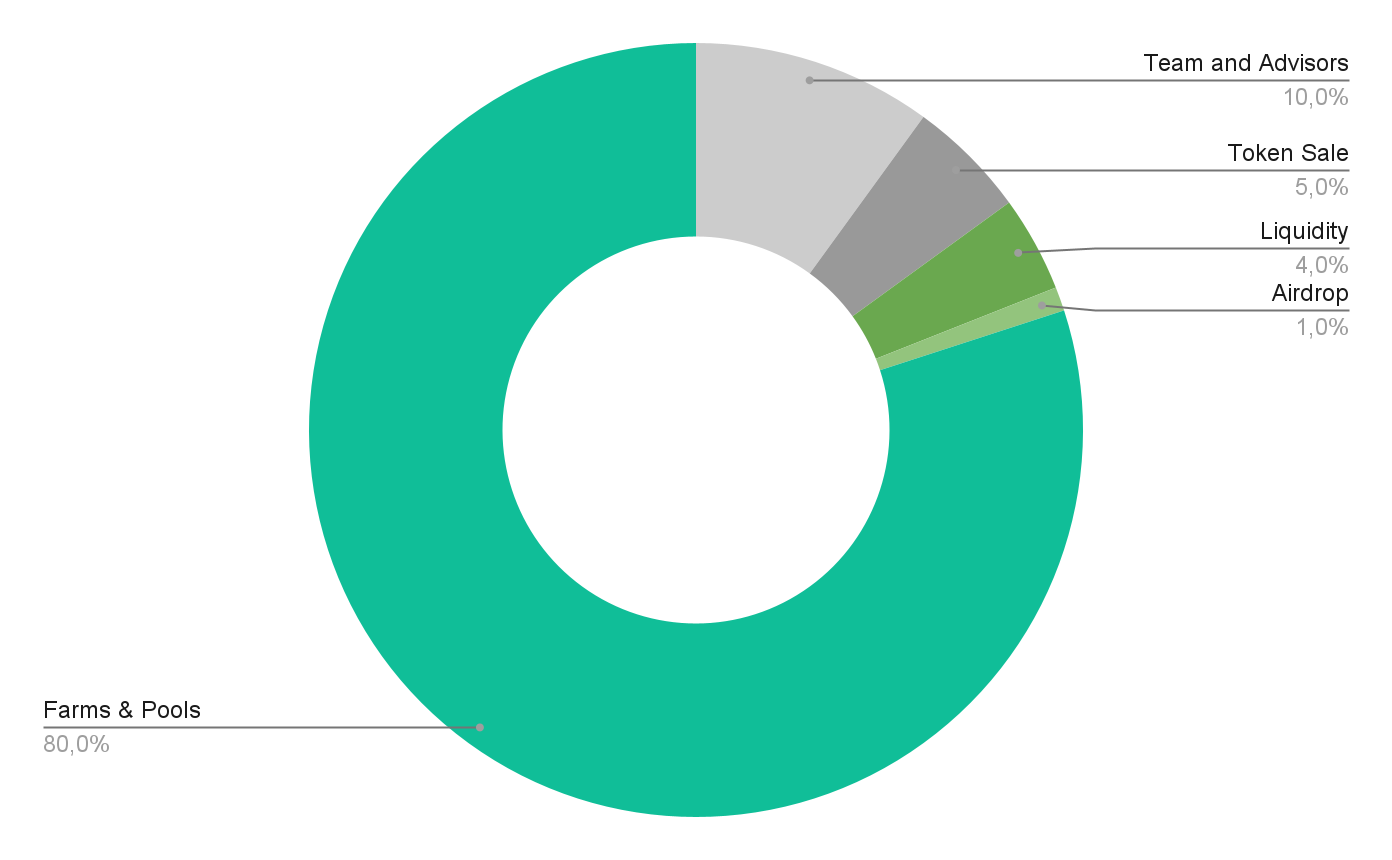
![](https://lh4.googleusercontent.com/5h_QpOpWDv5Vk_-JSMtHSETm1ZABLYlyhKAisiVZQjAviRUYHv4EtIstNqdj7HTnzQ79vmMP2keFt4zFAMpQhriaoBdJvp8_2E8N5n834q_-tZvwg-giZrbIinvmXmtncMktSqHn)

| Lot               | Description                                                                                                                                                                                                                                                                                 |
| ----------------- | ------------------------------------------------------------------------------------------------------------------------------------------------------------------------------------------------------------------------------------------------------------------------------------------- |
| Airdrop           | <p></p><ul><li>1,000,000 POSI tokens (1%)</li><li>Balancer LBP token launch, held September, 2020.</li></ul>                                                                                                                                                                                |
| For the Community | <p></p><ul><li>80,000,000 POSI tokens (80%)</li><li>The vast majority of the POSI tokens will be dedicated to the community through staking and farming rewards. This is one of the highest shares addressed to the community in the existing protocols!</li></ul>                          |
| Liquidity         | <p></p><ul><li>4,000,000 POSI tokens (4%)</li><li>The tokens will be immediately available for the general functioning of the platform.</li></ul>                                                                                                                                           |
| Team & advisors   | <p></p><ul><li>10,000,000 POSI tokens (10%)</li><li>The tokens will NOT be available to the team immediately but will rather be minted over time. Position Exchange’s team will retain a position of 10% of any new minted token ensuring a community driven and fair launch.<br></li></ul> |
| Public Sale       | <ul><li>5,000,000 POSI tokens (5%)</li><li>the tokens will be available for the public sale. The generated funds will be deployed to add Liquidity and support the Marketing strategy of Position Exchange.<br></li></ul>                                                                   |

The total **POSI** token supply is set at **100,000,000.**


# How is the TVL Calculated?

How is the TVL on the homepage of Position Exchange calculated?

Here is the code:

```go
stakedAmountInNaivePoolPOSI, err := s.evmAdapter.GetPOSIBalance(constants.POSIStakingManagerAddress)
if err != nil {
	return err
}
stakedAmountInNaivePoolPOSIV2, err := s.evmAdapter.GetPOSIBalance(constants.POSIStakingManagerV2Address)
if err != nil {
	return err
}
stakedAmountInNFTPoolsPOSI, err := s.getStakedAmountInNFTPoolsPOSI()
if err != nil {
	return err
}
stakedAmountInLPPairFarmsPOSI, err := s.getStakedAmountInLPPairFarmsPOSI()
if err != nil {
	return err
}
USDPriceOfPOSI, err := s.redisAdapter.GetUSDPrice(ctx, constants.PositionExchangeContractAddress)
if err != nil {
	return err
}

// stakedAmountInLPPairFarmsPOSI multiply 2 because LP value in USD is the same for the other token
// based on x.y = k formula
totalUSDValueLocked := stakedAmountInLPPairFarmsPOSI.Mul(decimal.NewFromInt(2)).Add(*stakedAmountInNaivePoolPOSI).Add(*stakedAmountInNaivePoolPOSIV2).Add(*stakedAmountInNFTPoolsPOSI).Mul(*USDPriceOfPOSI)
return s.redisAdapter.SetStatistics(ctx,
	constants.PositionExchangeContractAddress,
	constants.StatisticsTotalValueLockedFieldName,
	&totalUSDValueLocked)
```

Explain:

> (posi.balanceOf(POSIStakingManagerAddress) + posi.balanceOf(POSIStakingManagerV2Address)
>
> +posi.balanceOf(POSINFTMintProxyV1) + posi.balanceOf(POSINFTMintProxyV2) +&#x20;
>
> (posi.balanceOf(BUSDLP) + posi.balanceOf(BNBLP))\*2)
>
> \*posiUSD

Where:

| Variable                    | Value                                      |
| --------------------------- | ------------------------------------------ |
| POSIStakingManagerAddress   | 0x0c54b0b7d61de871db47c3ad3f69feb0f2c8db0b |
| POSIStakingManagerV2Address | 0xB02de8F384613d0aa2521B188b55c4D006dDB2D1 |
| POSINFTMintProxyV1          | 0x0Fb07a8527f45d7625Ab6486718910ce44a608b5 |
| POSINFTMintProxyV2          | 0xd8b6E267a0A46E13047056F105787dB9aFFb4b9a |
| BUSDLP                      | 0x00222D964a2077301309809Ab3bf56485C126A9C |
| BNBLP                       | 0xbb4CdB9CBd36B01bD1cBaEBF2De08d9173bc095c |

Let's verify by yourself!


# Perpetual Trading Protocol

Position Exchange Derivatives Trading Protocol details

![](/files/xFRLEGs0WGIslACPvVJh)

## Overview

Position Exchange is introducing its Decentralized Perpetuals Trading Protocol (DPTP). A protocol that runs FULLY On-chain where there is no need for a 3rd party to maintain the Orderbook, matching engine, and offers different types of orders (Limit, Market, leveraged trading...).\
\
There is no need for users to deposit funds on the smart contract, users can trade straight from their wallets. By using on-chain order books we aim to create an efficient, fair, and trustless financial market that is not controlled by any centralized organization.<br>

**Benefits of Trading on Position Exchange:**

* Highly Intuitive: Experience speed on our protocol. Trade quickly on an easy-to-use platform.
* Increased Privacy: No sign-ups required: Simply connect your wallet and you are all set.
* More Security: Trade directly with no intermediaries. More autonomy in a decentralized environment.
* Low fees: Experience low gas fees on transactions
* Easy access: Trade directly from your wallet without the need of depositing.

A detailed guide can be found here:

[**Perpetual basics**](/products/trading-protocol/position-exchange-protocol-and-vamm)\
[**Beginner's guide**](/products/trading-protocol/beginners-guide)\
\
You can find more details about Perpetual Trading [**here**](https://academy.binance.com/en/articles/what-are-perpetual-futures-contracts)**.**


# Perpetuals basics

Perpetuals, or Perps, short for perpetual futures contracts, are derivatives for trading the underlying asset with no future expiration date. It allows users to trade on margin (trade using borrowed funds).&#x20;

To give an example: Instead of needing a large capital to trade a notional value of an underlying asset, users can leverage their capital but just depositing a part of the notional margin.

Users can trade Perpetuals by buying (long) or selling (short) perpetual, which is very important under the current market volatility. In other words, users are using borrowed funds to bet on the future price of an asset. Position Exchange will offer a wide selection of tradable assets to its users, allowing them to trade contracts and get pay-offs without actually owning the assets.

You can find more details about Perpetual Trading [**here**](https://academy.binance.com/en/articles/what-are-perpetual-futures-contracts)**.**

* [Why Can't I Place a Futures Order?](/products/trading-protocol/position-exchange-protocol-and-vamm/why-cant-i-place-a-futures-order)
* [Leverage for Perpetual Futures Contracts](/products/trading-protocol/position-exchange-protocol-and-vamm/leverage-for-perpetual-futures-contracts)
* [Order Types](/products/trading-protocol/position-exchange-protocol-and-vamm/order-type)
* [Mark Price in Perpetual Futures Contracts](/products/trading-protocol/position-exchange-protocol-and-vamm/mark-price-in-perpetual-futures-contracts)
* [Perpetual Futures Contract Specifications](/products/trading-protocol/leverage)


# Why Can't I Place a Futures Order?

When trading perpetual futures, you may find that your order sometimes fails to be placed or doesn't get filled. Below are some potential reasons for this.

**Order cannot be placed:**

* **Insufficient margin**: You may need to add extra margin to open an order if you have other open orders using your available margin or if the order quantity is too high. The lower the leverage multiplier, the more margin you'll need. You can try raising the leverage multiplier to fix this issue.<br>
* **Smart contract limits:** In this version of the smart contracts and limitations of the EVM:
  * When a limit order is waiting to be filled, users cannot open a limit/market order with the side opposite to the current limit order (open multiple orders in the same direction are allowed). Eg. Bob opens a limit long order, Bob cannot open a short order unless he cancels the first one. (Bob is free to open more long orders)
  * Cannot open a reverse position with the opening position. Eg. Bob shorts a position with 5 BTC. Bob cannot open a market long position with a quantity of 10 BTC. Bob needs close his current position first.
* **Position limits**: The reverse position quantity may be too high, which causes insufficient margin in relation to net exposure. The maximum position size varies based on leverage.<br>
* **Insufficient contract quantity**: Different types of contracts have different minimum order quantities. You can learn more by reading the [Perpetual Futures Contract Specifications.](/products/trading-protocol/leverage)

**Order was not filled:**

* **No matching price:** The market price has not reached the price that was set for your order. Stop-limit orders are added to the order book when the market price reaches the trigger price, but the market price has to reach the order price before it will be filled.
* **Large deviation from the market price:** There are no orders in the order book that match the price that was set for your order. Very large orders may be only partially filled.


# Order type

**Limit Order**

A limit order lets you place an order at a specific price or a more favorable price. However, there's no guarantee that a limit order will be filled.

Limit buy orders are executed if the price of the asset hits the limit price or falls below that price.

Limit sell orders are executed if the price of the asset hits the limit price or rises above that price.

**Market Order**

A market order is a buy or sell order that gets filled right away at the best price currently available on the market. Market orders require liquidity to be filled, which means that the order is executed based on the limit orders that were previously placed on the order book.

**Stop-Limit Order**

In development

**Stop-Market Order**

In development

&#x20;


# Leverage for Perpetual Futures Contracts

Leverage refers to using borrowed capital to trade cryptocurrencies or other financial assets. It amplifies your buying or selling power so you can trade with more capital than what you currently have in your wallet. Depending on the crypto exchange you trade on, you could borrow up to 120 times your account balance.

The amount of leverage is described as a ratio, such as 1:5 (5x), 1:10 (10x), or 1:20 (20x). It shows how many times your initial capital is multiplied. For example, imagine that you have $100 in your exchange account but want to open a position worth $1,000 in bitcoin (BTC). With a 10x leverage, your $100 will have the same buying power as $1,000.

You can use leverage to trade different crypto derivatives.


# Mark Price in Perpetual Futures Contracts

The way the Mark Price is calculated is closely correlated with the funding rate and vice versa. We strongly recommend that you carefully read the two articles on "Mark Price" and "Funding Rate" to gain a full understanding of how the Futures trading system works.

As Unrealized PnL is the primary driver of liquidations, it's important to ensure that Unrealized PnL is accurately calculated in order to avoid unnecessary liquidations. The core basis of a Perpetual Contract is the intrinsic or "true" value of the Contract. The “Price Index,” which is the primary component of the Mark Price, is an average of the prices on the major mainstream markets.

The Price Index is a composite index derived from a basket of prices from various major Spot Market exchanges, weighted by their respective trading volumes. Referenced trading markets include: ***Binance, Huobi, Bittrex, HitBTC, Gate.io, Bitmax, Poloniex, FTX, and MXC.***

As Position Exchange's Perpetual Trading Protocol is running fully on chain. We're using the mark price source from Chainlink, because it is currently the most battle-tested Oracle solution on the market.


# Funding rates

Periodic funding payments are the most common mechanism used by exchanges to do perpetual swaps. Funding payments act to converge the **mark price** (the price on Position Perpetual Trading Protocol) and the **index price** (the average price from major exchanges - Chainlink price).

Position Perpetual Trading Protocol calculates funding payments every hour.

Position Perpetual Trading Protocol follows [FTX's method](https://help.ftx.com/hc/en-us/articles/360027946571-Funding) to calculate the funding payments, which is as follows:

$$
fundingPayment = positionSize \* fundingRate
$$

The *fundingRate* in the formula above is calculated by, firstly, subtracting the *hourly time-weighted average price (TWAP) of the index price* from the *hourly TWAP of the mark price*, and secondly, dividing the result from the previous step by 24. (Note: FTX's formula results in funding denominated in *position size*, whereas our calculation expresses funding in *quote asset*, ie. USDC.)

$$
fundingRate = {TWAP\_{perpetual} - TWAP\_{index} \over 24}
$$

We use the price feed from **Chainlink** as the data source for the index price because it is currently the most battle-tested Oracle solution on the market. Other oracles will be added as needed.

If the *fundingRate* is positive, long position holders need to **pay** the funding payment while short position holders will **receive** the funding payment, and vice versa if the rate is negative.&#x20;

The funding payment happens at the **end of each hour** on Position Exchange's Perpetual Trading Protocol.

##


# Beginner's guide

New to Perpetual Trading? Check out the following guide.

[Connect your Wallet](/products/trading-protocol/beginners-guide/connect-your-wallet)

[Open Position](/products/trading-protocol/beginners-guide/open-position)

[Adjust Margin](/products/trading-protocol/beginners-guide/adjust-margin)

[Set TP/SL](/products/trading-protocol/beginners-guide/set-tp-sl)

[Close Position](/products/trading-protocol/beginners-guide/close-position)

[Position Exchange's Futures Transaction Fees](/products/trading-protocol/beginners-guide/position-exchanges-futures-transaction-fees)

[How to adjust the Leverage](/products/trading-protocol/beginners-guide/how-to-adjust-the-leverage)

[Funding rate](/products/trading-protocol/beginners-guide/funding-rate)

[Crypto Perpetuals](/products/trading-protocol/beginners-guide/crypto-perpetuals)


# Connect your Wallet

### 1. Click **Connect Wallet** on the top right side.

![](/files/rUKEzwD0DjaW3WkjPZ5T)

### 2. Chose the Network "BNB Smart Chain"

<figure><img src="/files/h6yNjkw1clKMBpxHNzuk" alt=""><figcaption></figcaption></figure>

### 3. Choose and Click your wallet provider. (Make sure your network is on BNB Chain)

![](/files/g9S5fZLpndRkRaIyTF6s)

Make sure you are on BNB Chain.&#x20;


# Open Position

{% content-ref url="/pages/SRqmrqCcYEh0WQ5004CY" %}
[Open Limit Order](/products/trading-protocol/beginners-guide/open-position/open-limit-order)
{% endcontent-ref %}

{% content-ref url="/pages/7i9Z05fpKvRXhgOTtNW4" %}
[Open Market Order](/products/trading-protocol/beginners-guide/open-position/open-market-order)
{% endcontent-ref %}


# Open Limit Order

A limit order is an instruction to wait until the price hits a specific or better price before being executed. The limit order will create liquidity in the Order book. The trade will only be executed if the market price reaches your limit price (or better). Therefore, you may use limit orders to buy at a lower price or to sell at a higher price than the current market price.

**Step 1:** Navigate to tab [Derivatives](https://futures.position.exchange/USD-M/BTC/BUSD) and Select tab BUSD-M or COIN-M

* COIN-M Perpetual contract is settled in Cryptocurrency
* BUSD-M Perpetual contract is settled in BUSD&#x20;

<figure><img src="/files/W6oWrxNekLZI1IiDqHmO" alt=""><figcaption></figcaption></figure>

**Step 2:** Connect your wallet

* Click connect wallet
* Choose one of the Network and Wallet options as displayed below.&#x20;

  Check our guidelines on how to choose and connect your wallet [here](https://docs.position.exchange/get-started/create-a-wallet). &#x20;

<figure><img src="/files/yKb2rCNF5IAefjXa1das" alt=""><figcaption></figcaption></figure>

**Step 3:** Select the "Limit" order type

* Limit allows an investor to buy or sell assets at a predetermined price.&#x20;
* If you select Limit as the order type, you must enter your desired price.

<figure><img src="/files/c2roQOKAeoIfw5UYX3m3" alt=""><figcaption></figcaption></figure>

**Step 4:** Choose leverage

* Click to adjust leverage&#x20;

<figure><img src="/files/MkCtaLRoMygr8e6LjR5v" alt=""><figcaption></figcaption></figure>

* Manually enter your desired leverage or drag the slide bar to quickly enter the leverage and click Confirm.
  * Leverage amplifies your buying or selling power, allowing you to trade in larger amounts&#x20;
  * Leverage reduction is not supported in the Isolated mode.

<figure><img src="/files/ho0jKWbQOfOXeoFbb5gv" alt=""><figcaption></figcaption></figure>

**Step 5:** Place your order price

{% hint style="info" %}
Pro Tips: You can use “Last“ to fill in the last price
{% endhint %}

* For Long orders, you should set price **less than** the market price. If the price is **greater than** market price, the system will automatically match the order at the market price.
* For Short orders, you should set a price **greater than** the market price. If the price is **less than** the market price, the system will automatically match the order at the market price.

<figure><img src="/files/c2roQOKAeoIfw5UYX3m3" alt=""><figcaption></figcaption></figure>

**Step 6:** Choose the reference currency (optional)

* You can choose the reference currency to see your position

  Changing the reference currency allows you to easily place orders based on your configuration.

<figure><img src="/files/IJRteyxHLpMVG1VIRm4Z" alt=""><figcaption></figcaption></figure>

**Step 7:** Enter the quantity of your position

* Manually enter your desired quantity

<figure><img src="/files/3JED6OAY93K9YWCOYy96" alt=""><figcaption></figcaption></figure>

* You can also drag the slide bar to quickly enter the quantity.&#x20;

  This allows a quick selection of quantity based on the maximum percentage you can open.

<figure><img src="/files/xh3dYiEAXu5ljwpHzG4O" alt=""><figcaption></figcaption></figure>

* After entering the quantity, the system will automatically calculate the **Cost** needed to execute the order. The quantity entered must be less than **Max**.
  * **Cost:** The cost includes the margin required and the commission fee to execute this order. Reducing a position does not cost margin.
  * **Max:** Max quantity is calculated based on your balance, leverage, price, and max notional. In case your order is a ”Reduce only” order, it will allow you to reduce or close a current position you are holding.

> An example of a "Reduce only" order is when an investor wishes to close out a current position they are holding. For example, if an investor Buy (Long) 10 shares of BNB at $100 each, and the current market price for each share is now $110, their total notional value of the position would be $1,000. The investor may wish to reduce this position by half, so they could place a reverse (Sell/Short) order (default is "Reduce only") with a quantity of 5 shares. This would reduce the total notional value of the position to $550 and close out half the initial position size. The cost associated with this order would be zero since it is a reduction in the existing position size.

**Step 8:** Click Open Long or Short

* Long/ Short - Predict the rise and fall of price in the future. Open Long means you expect the price to go up. Conversely, Open Short predicts a fall. Opening a long or short position benefits users if the price goes as expected.&#x20;
* If you already have a position that is on the opposite side of the order you are placing, that order will become a "Reduce only" order. "Reduce only" will only allow you to reduce or close an existing position rather than open a new one.&#x20;

{% hint style="warning" %}
Due to some limitations on Ethereum Virtual Machine (EVM) and our smart contracts, you may have encountered a limitation that prevents you from having more than one pending limit order on either side. This can be very limiting as it means that if you have open “Long” limit orders, you cannot open any “Short” limit (also market orders) orders until all of the long orders are filled or canceled. We understand how frustrating this can be, and we’re working hard to remove this limitation as soon as possible.
{% endhint %}

> For Example:
>
> If you have 3 active limit "Long" (Buy) BTC orders. You cannot open Short (Sell) Limit and Market orders until these 3 active limit orders are fulfilled or canceled. If you try to submit it, you may faced error 22.

<figure><img src="/files/eJeBvFypzshacftsisgh" alt=""><figcaption></figcaption></figure>

**Step 9:** Confirm Pop-up

* Confirm the transaction in your wallet&#x20;
* After you confirm the transaction in your wallet, the system will transfer the Cost to our Smart Contract to open the order. If you cancel this order, the system will return the Cost to you.

<figure><img src="/files/IY4lNoEaSBifCLEGPG76" alt=""><figcaption></figcaption></figure>

&#x20;

**Checking your orders**

The order will be visible in **"Open Orders"** once it has been sent until it has been filled out.

* When the open order is canceled, it will disappear from the open order tab and be displayed.&#x20;
* When the open order is filled, the same thing happens, but it now appears in the Positions tab. And your Position will be opened.

<figure><img src="/files/pVYNg8WB5WX7bTf5iELG" alt=""><figcaption></figcaption></figure>

<br>

<br>


# Open Market Order

A market order is an order to buy or sell assets at the market's current best available price. Market orders are optimal when the primary goal is to execute the trade immediately.

**Step 1:** Navigate to tab [Derivatives](https://futures.position.exchange/USD-M/BTC/BUSD) and Select tab BUSD-M or COIN-M

* COIN-M Perpetual contract is settled in Cryptocurrency
* BUSD-M Perpetual contract is settled in BUSD&#x20;

<figure><img src="/files/W6oWrxNekLZI1IiDqHmO" alt=""><figcaption></figcaption></figure>

**Step 2:** Connect your wallet

* Click connect wallet
* Choose one of the Network and Wallet options as displayed below.&#x20;

  Check our guidelines on how to choose and connect your wallet [here](https://docs.position.exchange/get-started/create-a-wallet). &#x20;

<figure><img src="/files/aBbgMDMqZiCqBN2J2apW" alt=""><figcaption></figcaption></figure>

**Step 3:** Select the "Market" order type

* A market order instructs an investor to buy or sell assets at the best available price. Market orders are executed immediately.
* If you select Market as the order type, market orders are immediately matched at the best market price.

<figure><img src="/files/tmy2oT3Q328bj7RT75rx" alt=""><figcaption></figcaption></figure>

**Step 4:** Choose leverage&#x20;

* Click to adjust leverage&#x20;

<figure><img src="/files/MkCtaLRoMygr8e6LjR5v" alt=""><figcaption></figcaption></figure>

* Manually enter your desired leverage or drag the slide bar to quickly enter the leverage and click Confirm.
  * Leverage amplifies your buying or selling power, allowing you to trade in larger amounts&#x20;
  * Leverage reduction is not supported in the Isolated mode.&#x20;

<figure><img src="/files/9M8FNhVUZeVBN8SDYXPb" alt=""><figcaption></figcaption></figure>

**Step 5:** Choose the reference currency (optional)

* You can choose the reference currency to see your position

  Changing the reference currency allows you to easily place orders based on your configuration.

<figure><img src="/files/X9nglhDJUCsCP7A4Yr3x" alt=""><figcaption></figcaption></figure>

**Step 6:** Enter the quantity of your position

* Manually enter your desired quantity&#x20;

<figure><img src="/files/ORDXDggUeMTOKijNyYnk" alt=""><figcaption></figcaption></figure>

* You can also drag the slide bar to quickly enter the quantity.&#x20;

  This allows a quick selection of quantity based on the maximum percentage you can open. Because the market order depends on the liquidity of the order book Long or Short, when using the slide bar, you can only select % quantity based on Max Quantity

<figure><img src="/files/Gh8GIjFGMcSlON6kJvSC" alt=""><figcaption></figcaption></figure>

* After entering the quantity, the system will automatically calculate the **Cost** needed to execute the order. The quantity entered must be less than **Max**.
  * **Cost:** The cost includes the margin required and the commission fee to execute this order. Reducing a position does not cost margin.
  * **Max:** Max quantity is calculated based on your balance, leverage, price, and max notional. In case your order is ”Reduce only” order, it will allow you to reduce or close a current position you are holding.
  * **Slippage:** Slippage happens when traders have to settle for a different price than the current market price due to a movement in price between the time the order enters the market and the execution of a trade.

**Step 7:** Click Open Long or Short

{% hint style="info" %}

* Long/ Short - Predict the rise and fall of price in the future. Open Long means you expect the price to go up. Conversely, Open Short predicts a fall. Opening a long or short position benefits users if the price goes as expected.&#x20;
* If you already have a position that is on the opposite side of the order you are placing, that order will become a "Reduce only" order. "Reduce only" will only allow you to reduce or close an existing position rather than open a new one.&#x20;
  {% endhint %}

{% hint style="warning" %}
In the Ethereum Virtual Machine, there is a limitation when it comes to holding pending orders. Specifically, only one side of pending orders can be held at any given time. This means that if you have any active “long” limit orders, you are not able to open “short” market orders (or limit orders as well) until these long orders have been filled or canceled. We recognize the inconvenience this restriction may create and are actively working to remove it as soon as possible.
{% endhint %}

> For Example:
>
> If you have 3 active limit "Long" (Buy) BTC orders. You cannot open Short (Sell) Market and Limit orders until these 3 active limit orders are fulfilled or canceled. If you try to submit it, you may faced error 22.

<figure><img src="/files/eJeBvFypzshacftsisgh" alt=""><figcaption></figcaption></figure>

**Step 8:** Confirm Pop-up

* Confirm the transaction in your wallet&#x20;
* After you confirm the transaction in your wallet, the system will transfer the Cost to our Smart Contract to open the position.&#x20;

<figure><img src="/files/MndBk3eOsLUJSwVrmnR9" alt=""><figcaption></figcaption></figure>

**Checking your positions**

The order will be processed and become a position. You can view and manage your positions in the **“Positions”** tab below.

<figure><img src="/files/TiRfURdHfNQILAijlA3g" alt=""><figcaption></figcaption></figure>

<br>

<br>


# Adjust Margin

How to adjust margin of a position

Margin is the part of the total value of the specified commodity future bought or sold that the buyer or seller of a futures contract is required to deposit.

{% content-ref url="/pages/DWcAAdC84cQGZxVlHLOa" %}
[Add Margin](/products/trading-protocol/beginners-guide/adjust-margin/add-margin)
{% endcontent-ref %}

{% content-ref url="/pages/8dhKQ9cUN5sdGTPdI3F0" %}
[Remove Margin](/products/trading-protocol/beginners-guide/adjust-margin/remove-margin)
{% endcontent-ref %}


# Add Margin

The margin ratio is calculated as maintenance margin divided by margin balance.

To avoid liquidation, you need to pay close attention to your margin ratio. When the margin ratio is greater than or equal to 80%, you should add more margin to reduce your risk of getting liquidated.

**Step 1:** Click the Edit button next to the margin to adjust margin

<figure><img src="/files/wst8vpD2Ll5smWAHdqKd" alt=""><figcaption></figcaption></figure>

**Step 2:** Enter the amount of margin you want to add to your position in the **Add** tab

<figure><img src="/files/BA8fYPSRYlpKBLBJvYMi" alt=""><figcaption></figcaption></figure>

* The overwhelmed value beyond the maximum addable can discontinue your order. Please adjust the amount below your account balance to avoid this issue.
* **Currently assigned margin:** Current margin for the pair symbol refers to the margin amount deposited in the position
* **Est.Liq price after increase:** liquid price can fluctuate when you add margin

**Step 3:** Click **Confirm** button and confirm the action in your wallet

<figure><img src="/files/pZ9t7wT7luHyB3tuEwHv" alt=""><figcaption></figcaption></figure>

* The system is processing your transaction in a few seconds.&#x20;

<figure><img src="/files/fvAeHabaQKabfkCEp5oK" alt=""><figcaption></figcaption></figure>

* Congrats! Your transaction is completed! The added margin will be transferred from your wallet to your position.

<br>


# Remove Margin

**Step 1:** Click the Edit button next to the margin to adjust margin

<figure><img src="/files/BnFf9PWeKD3XN4Y2uQBi" alt=""><figcaption></figcaption></figure>

**Step 2:** Enter the amount of margin you want to remove from your position in the **Remove** tab

<figure><img src="/files/fQ1YjMQtUfvOWDwhJZ53" alt=""><figcaption></figcaption></figure>

* The overwhelmed value beyond the maximum removable can discontinue your order. Please adjust the amount which maintains your margin ratio at 80% maximum to avoid this issue.
* **Currently assigned margin:** Current margin for the pair symbol refers to the margin amount deposited in the position
* **Est.Liq price after reduction:** liquid price can fluctuate when you remove margin

**Step 3:** Click **Confirm** button and confirm the action in your wallet

<figure><img src="/files/yi4uVk5kIfIC0tbpZ55F" alt=""><figcaption></figcaption></figure>

* The system is processing your transaction in a few seconds.&#x20;

<figure><img src="/files/gX6T0WLBBB8BwzXQ9pDW" alt=""><figcaption></figcaption></figure>

* Congrats! Your transaction is completed! The margin you’ve just removed from your position will be transferred to your wallet right away


# Set TP/SL

**Step 1:** Click on the icon “Set TP/SL”

<figure><img src="/files/6Oy7QxIBKc27AwCDhNaB" alt=""><figcaption></figcaption></figure>

<figure><img src="/files/c58FAHi8boySQR6p6kf7" alt=""><figcaption></figcaption></figure>

**Step 2:** Enter Take Profit price

* Manually enter your desired Take Profit or click “Last” button to automatically fill market price &#x20;
* **Note:**&#x20;
  * When Market Price reaches Take profit price, it will trigger Take profit market order to close this position.
  * If TP of position Long is greater than market price, order would immediately trigger. Please try again with Take Profit greater than current price.
  * If TP of position Short is greater than market price, order would immediately trigger. Please try again with Take Profit less than current price.

<figure><img src="/files/1Y55Q5AXMiFg1UvpscAe" alt=""><figcaption></figcaption></figure>

**Step 3:** Enter Stop Loss price

* Manually enter your desired Stop Loss or click “Last” button to automatically fill market price&#x20;
* **Note:**&#x20;
  * When Market Price reaches Stop Loss price, it will trigger Stop loss market order to close this position.
  * If SL of position Long is greater than current price, order would immediately trigger. Please try again with Stop Loss less than current price.
  * If SL of position Short is greater than current price, order would immediately trigger. Please try again with Stop Loss greater than current price.

<figure><img src="/files/D8zahdkTKZhWEcH1zuFi" alt=""><figcaption></figcaption></figure>

**Step 4:** Click Confirm&#x20;

<figure><img src="/files/rKaIUkZihKCqubqENKVA" alt=""><figcaption></figcaption></figure>

<figure><img src="/files/Wm5c6CW9LZnHuVbt37Mw" alt=""><figcaption></figcaption></figure>


# Close Position

As soon as you have your position open, you will be able to monitor its status. You can track all of them in **Positions** tab.

<figure><img src="/files/zbf0otPHtfjjsMGtAIKW" alt=""><figcaption></figcaption></figure>

The definitions of some indexes are as below in case of need:

* Entry price refers to the price at which you bought an asset
* Last price refers to the latest trade price of the futures contract.
* Liquidation price refers to the price at which the margin drops to zero
* Margin ratio is calculated as maintenance margin divided by margin balance.
* Margin is the amount of money you are required to keep in your account to enter into a futures position
* Funding fee refers to payments between traders to make the perpetual futures contract price close to the index price
* PnL refers to profit and loss on a position

If you wish to close your position – you have two options. A market close is instant, and you close at the best available spot price. In contrast, a limit close lets you specify the price at which you would like to close the position.<br>

{% content-ref url="/pages/Y5laJd6FP4CsMRKUbm2u" %}
[Close Market](/products/trading-protocol/beginners-guide/close-position/close-market)
{% endcontent-ref %}

{% content-ref url="/pages/NjfLE1jw12wplbUz68Vk" %}
[Close Limit](/products/trading-protocol/beginners-guide/close-position/close-limit)
{% endcontent-ref %}


# Close Market

A market close is instant, and you close the position at the best available spot price.

Here’s the guideline to close a position by market order

**Step 1:** Choose the quantity you want to close

* Choose the percentage of quantity in your intention of closing (10%, 25%, 50%, 75%,100%).       &#x20;

<figure><img src="/files/ZymQem1jT9t7SFgJ3PxQ" alt=""><figcaption></figcaption></figure>

* The defaulted percentage is 100% which means closing the whole position. Otherwise, you can quickly choose other percentages of position quantity (10%, 25%, 50%, 75%), it just reduces the position.

{% hint style="info" %}

* If the quantity of market close plus the quantity of a limit close that you have had previously overwhelmed the quantity of the position, the system will cancel limit close order to execute the market close order.
* If the quantity of market close order is below the minimum quantity required corresponding to each pair, this order can not be executed. Filling a larger quantity can solve this issue.
* If the quantity of market close order is more than 100% of market dept which is informed in the order book,  this order can not be executed. Filling a smaller quantity can solve this issue.
  {% endhint %}

**Step 2:** Click **Market** button on the right side of the position.

<figure><img src="/files/dV8XRbXUxJX988yv6CsM" alt=""><figcaption></figcaption></figure>

**Step 3:** Confirm the action

* The system creates an order of closing with the quantity selected. Check the details in this pop-up before clicking **Confirm** button

<figure><img src="/files/qr9W8sYKJ2j7U8CCAM4T" alt=""><figcaption></figcaption></figure>

* If this pop-up interrupts your flow, please click “**Don't show this popup again**” to remove it the next time.
* Your wallet will ask you to confirm the action. Please confirm the transaction.

<figure><img src="/files/F5qTFnzcZ2QkNkMd2Rgc" alt=""><figcaption></figcaption></figure>

* Then, the system will work for a second.

<figure><img src="/files/3XuPwJftZP7EVLNGg3xT" alt=""><figcaption></figcaption></figure>

* Now, your transaction is completed.
* After matching orders on the order book, the system will update the position and transfer margin and PnL to your wallet.


# Close Limit

A limit close lets you specify the price at which you would like to close the position.

**Step 1:** Enter your preferred closing price into the Price textbox&#x20;

<figure><img src="/files/DFhKamuUhT7wDL8tFgis" alt=""><figcaption></figcaption></figure>

{% hint style="info" %}

* For closing Long order, you should set a price less than the market price. If the price exceeds the market price, the system will automatically match the order at the market price.
* For closing Short order, you should set a price higher than the market price. If the price is less than the market price, the system will automatically match the order at the market price.
  {% endhint %}

**Step 2:** Choose amount of position (10%, 25%, 50%, 75%, 100%) you want to close.&#x20;

<figure><img src="/files/MGR8nDvWeobD60vS6KJ6" alt=""><figcaption></figcaption></figure>

* The defaulted percentage is 100% which means closing the whole position. Otherwise, you can quickly choose other percentages of position quantity (10%, 25%, 50%, 75%), it just reduces the position.

**Step 3:** Choose the **Limit** button on the right side of the position.

<figure><img src="/files/loHkFGgHqqGclt0MeK8Q" alt=""><figcaption></figcaption></figure>

**Step 4:** Confirm&#x20;

* The system creates an order of closing with the quantity selected. Check the details in the confirmation pop-up before clicking **Confirm** button

<figure><img src="/files/abFYtGSYGnrdvadARyX6" alt=""><figcaption></figcaption></figure>

* If this pop-up interrupts your flow, please click “**Don't show this popup again**” to remove it the next time.
* Your wallet will ask you to confirm the action. Please confirm the transaction.
* Then, the system will work for a second.

<figure><img src="/files/3XuPwJftZP7EVLNGg3xT" alt=""><figcaption></figcaption></figure>

* After your transaction is completed, your order is placed into the **Open orders** tab while the pending order is added to the order book.

<figure><img src="/files/xT0CgBqi4sHEhzPeJ0Tr" alt=""><figcaption></figcaption></figure>

<figure><img src="/files/PHy3t3ay0fchvWMYr7Dc" alt=""><figcaption></figcaption></figure>

* After matching orders on the order book, the system will transfer the margin and PnL to your wallet and charge a commission fee. At this time, you can claim the total of your funds.


# Position Exchange's Futures Transaction Fees

**Futures transaction fees:**

The transaction fee is calculated based on your notional value

**How are transaction fees calculated?**

Formula for Perpetual transaction fees:

Transaction fee = Notional value × Transaction fee rate

Nominal value = Order Quantity × Order Price (Avg. Price for Market Order)

For Position Exchange users, Maker fees are 0.01% and Taker fees are 0.02%.

Buying 1 BTCBUSD Futures Contract using a Market Order and leverage of 10x:

> Suppose that the average filled price is 49,000 BUSD

Notional value

\= Order Quantity  × Order Price (Avg. Price for Market Order)

\= 1 BTC × 49,000

\= 49,000

Then, there is a transaction fee of 49,000 × 0.02% = 9.8 BUSD.

Initial Margin

\= Order Quantity / Leverage \* Order Price (Avg. Price for Market Order)

\= 1/10 \* 49,000

\= 4,900 BUSD

So the final amount you need to pay to open a Market order is 4,909.8 BUSD.

{% hint style="info" %}
Note: Before opening a position on Position Exchange, you should be aware that you will need to pay the gas fee for the blockchain because all transactions happen on-blockchain. The amount of the gas fee will depend on the source chain.
{% endhint %}


# Trading Perpetuals

By trading Futures, you can make a profit off of market price fluctuations by opening a long or short position on a given contract.

If you decide to go long, it means that you expect the price of the contract you're buying to go up in the future, whereas if you decide to open a short position, it means that you're selling contracts and you expect the price to go down in the future.

You can view your unrealized PnL (uPnL), estimated liquidation price, margin ratio, and other information about your current positions at the bottom of the candlestick chart.

You can also click Close All Positions to close all of your open positions using a market or limit order once you enable this feature in \[Preference].

**Further reading: How to Calculate Unrealized PnL & ROE for  Perpetual Futures Contracts**

* If you choose to use the [Mark Price](/products/trading-protocol/position-exchange-protocol-and-vamm/mark-price-in-perpetual-futures-contracts) as the benchmark price:

Unrealized PNL = Number of Contracts \* Order Direction \* (Mark Price - Entry Price)\
ROE% =Unrealized PNL in USDT / Initial Margin = ( ( Mark Price - Entry Price ) \* Order Direction \* Number of Contracts ) / (Number of Contracts\* Contract multiplier \* Mark Price\* Initial Margin Rate）\*Initial Margin Rate = 1 / Leverage Multiplier&#x20;

* If you choose to use the latest price as the benchmark price:

Unrealized PNL = Number of Contracts \* Order Direction \* (Mark Price - Entry Price)\
ROE% = Unrealized PNL in USDT / Initial margin = ( ( Mark Price - Entry Price ) \* Order Direction \* Number of Contracts) ) / (Number of Contracts \* Contract Multiplier \* Mark Price\* Initial Margin Rate）Order Direction: 1 for long order；-1 for short order


# How to adjust the Leverage

\
Click on the Leverage icon on the right of the screen.

![](/files/1RMCIhlLl1KPAI6xoHdK)

Use the slider to select your Leverage.

![](/files/e8yQtdyzvVpnbnx1f4Av)

Please note that the maximum amount of position will decrease with higher leverage.


# Funding rate

**1.** **The role of the Funding Rate**

The key role of the Funding Rate is to narrow the price difference between the perpetual futures market and the corresponding spot market (price regression).

**2. Why is the Funding Rate so important?**

Traditional futures contracts are settled on a monthly or quarterly basis, depending on contract specifications. At settlement, the contract price converges with the spot price, and all open positions expire. Perpetual futures contracts are widely used by crypto derivatives exchanges and are designed to be similar to traditional futures contracts. However, perpetual futures contracts have one key difference.

Unlike traditional futures contracts, perpetual futures allow traders to hold contracts in perpetuity, without expiration dates or the need to track unused delivery months. For example, a trader can keep a short position open indefinitely until the position is closed. In this way, trading perpetual futures is very similar to trading spot market pairs. However, perpetual futures do not use a traditional method of settlement. Because of this, crypto exchanges have created a mechanism to ensure that perpetual futures contract prices match the index price. This mechanism is called the Funding Rate.

**3. What is the Funding Rate?**

A Funding Rate is a periodic payment made to long or short traders based on the price difference between the market price of the perpetual contract and the spot price. When the market is bullish, the Funding Rate is positive and long traders pay a funding fee to traders who are short. Conversely, when the market is bearish, the funding rate is negative and short traders pay the funding fee to long traders.


# Crypto Perpetuals

**What are Perpetual Contracts?**

Futures contracts are an important part of traditional finance: They are highly complex financial instruments used by advanced or technical investors. Investors, companies, and governments use derivatives such as futures contracts to safeguard their exposure to risk and asset price volatility.

A derivative is a type of financial contract that derives its value from an underlying asset. Traditionally, derivatives are used in markets such as commodities, currencies, stocks, or bonds. These contracts can be traded over-the-counter or through exchanges.

**What are Cryptocurrency Futures?**

In the crypto industry, the futures market is a rapidly growing sector that generates trillions in trading volume every month. Like stock options or commodity futures contracts, crypto futures can guard against volatility and adverse price changes. Crypto futures also act as a tool that investors can use to speculate on future crypto prices or hedge against changes in the price of a cryptocurrency.

**Advantages of trading Crypto Futures**

**Flexibility:** Non-crypto holders can speculate on the price of a cryptocurrency to make a profit. You can use USDT to open a crypto futures position, and you can choose to settle your profit in USDT.

**Leverage:** Gain significant exposure to a specific cryptocurrency with only a fraction of its total cost. With leverage, you can magnify small price movements to create profits that justify your time and effort.

**Liquidity:** Crypto Futures markets are extremely liquid, with transaction volumes reaching trillions in US dollars. Liquid markets are less risky because traders can enter and exit positions easily with minimal slippage.

**Portfolio Diversification:** Diversify your trading strategies to generate more profit. Traders are able to develop complex trading strategies, such as short selling, arbitrage, pair trading, and so on.


# Perpetuals Specs

Coming soon.


# Smart Contract Reverted Error Code

<table><thead><tr><th width="121">Reverted Message</th><th>Reason</th><th>Resolve Steps</th></tr></thead><tbody><tr><td>3</td><td>Invalid Quantity (May <a data-footnote-ref href="#user-content-fn-1">exceed</a> min quantity)</td><td><ul><li>Try another quantity.</li><li>Quantity must >= min quantity</li><li>Quantity must be a multiple of Min Quantity (Eg minQty = 0.01, quantity must be 0.02, 0.03, or 0.1)</li></ul></td></tr><tr><td>4</td><td>The leverage of the increasing orders is lower than the leverage of the opening position</td><td>Try again with the leverage >= leverage of the opening position or close the position before trying to increase the leverage</td></tr><tr><td>5</td><td>The reduce quantity > opening position quantity</td><td>Our Smart contracts now only support “Reduce only” orders, which means the quantity of the reverse order must be less than or equal to the quantity of your opening position. If you enter a higher quantity, you will receive an error 5. Please make sure to stick to the required quantity limit.</td></tr><tr><td>6</td><td>Attempts to claim funds but the opening position is not closed.</td><td><ul><li>This error may happen if the website is lagging, so please try to refresh the website and wait for the positions to load</li><li>Make sure your current position is closed before attempting to claim funds</li></ul></td></tr><tr><td>8</td><td>Trying to remove margin on non-exist positions.</td><td></td></tr><tr><td>9</td><td>Trying to add margin on non-exist positions.</td><td></td></tr><tr><td>10</td><td>Invalid initial margin</td><td></td></tr><tr><td>11</td><td>Insufficient liquidity</td><td><ul><li>This error happens when there is not having sufficient liquidity on the order book</li><li>Try to open an order with a lower quantity</li></ul></td></tr><tr><td>12</td><td>Invalid remove margin</td><td><ul><li>This error may happen if the website is lagging. Wait for the removable margin to be loaded</li><li>Or try to use a lower quantity</li></ul><p></p></td></tr><tr><td>18</td><td>Order quantity = 0</td><td>Try to open the order with quantity != 0</td></tr><tr><td>20, 21</td><td>Invalid cancel order</td><td>This error may happen if the website is lagging or try to reload the website/mobile apps</td></tr><tr><td>22.1</td><td>Try to open long orders when having active limit shorts.</td><td><ul><li>Currently, only one side order is supported at any given time.</li><li>Cancel your limit short orders before trying to open long orders</li></ul></td></tr><tr><td>22.2</td><td>Try to open short orders when having active limit longs.</td><td><ul><li>Currently, only one side order is supported at any given time.</li><li>Cancel your limit long orders before trying to open short orders</li></ul></td></tr><tr><td>24.1</td><td>Exceeds max short price</td><td>Try to set the limit price > max short price</td></tr><tr><td>24.2</td><td>Exceeds max Long price</td><td>Try to set the limit price &#x3C; max long price</td></tr><tr><td>25</td><td>Exceeds max slippage </td><td>Try to use a smaller quantity</td></tr><tr><td>26</td><td>Exceeds max notional</td><td>Try to use a smaller quantity</td></tr><tr><td>32</td><td>Immediately trigger TP, SL</td><td></td></tr><tr><td>42</td><td>An Internal error in the processing chain</td><td><ul><li>Invalid transaction data</li><li>Should contact our dev team</li></ul></td></tr><tr><td>43</td><td>An Internal error in the processing chain</td><td><ul><li>Exceeds some limitation</li><li>Should contact our dev team</li></ul></td></tr><tr><td>51</td><td>An internal error in the relayer</td><td><ul><li>Internal error in relayers</li><li>Should contact our dev team</li></ul></td></tr></tbody></table>

Other Frequently Asked Questions:

**Q: Why are my positions or orders not showing up?**&#x20;

**A:** If your positions or orders aren't showing up, make sure you're connected to the correct wallet address. Additionally, check the order history to make sure that the position or order is closed. If these steps don't help, contact customer service for assistance in resolving the issue.

**Q: Why errors 22.1, 22.2?**

**A:** In the Ethereum Virtual Machine, there is a limitation when it comes to holding pending orders. Specifically, only one side of pending orders can be held at any given time. This means that if you have any active “long” limit orders, you are not able to open “short” market orders (or limit orders as well) until these long orders have been filled or canceled. We recognize the inconvenience this restriction may create and are actively working to remove it as soon as possible.

> For Example:
>
> If you have 3 active limit "Long" (Buy) BTC orders. You cannot open Short (Sell) Market and Limit orders until these 3 active limit orders are fulfilled or canceled. If you try to submit it, you may faced error 22.

[^1]: exceed


# Futures Referral

Make the most out of trading futures by using the Futures Referral program! Invite your friends and **earn attractive commissions** when they make trades on Position Exchange.

Learn more:

[Futures Referral for Referrer](/products/trading-protocol/futures-referral/futures-referral-for-referrer)

[Futures Referral for Referee](/products/trading-protocol/futures-referral/futures-referral-for-referee)


# Futures Referral for Referrer

A referrer is defined as one who refers or recommends eligible friends to the BUSD-M Futures trading.

## How do I join Futures as a referrer?

**Step 1:** Navigate to [Position Exchange Futures Referral.](https://position.exchange/futures/referral)

**Step 2:** Connect your wallet and get a referral link/ code

* Click connect wallet to start generating your referral link/ code in the Referral section.
* Choose one of the Network and Wallet options as displayed below.\
  Check our guidelines on how to [create a wallet](https://docs.position.exchange/products/trading-protocol/beginners-guide/connect-your-wallet) and [connect your wallet here](https://docs.position.exchange/products/trading-protocol/beginners-guide/connect-your-wallet).

**Step 3:** Invite your friends by link or code.

* Your referral link/ code is automatically generated. Click “Invite”&#x20;

{% hint style="info" %}
Each user has only one referral link/code. Each link/ code is unique and cannot be modified.
{% endhint %}

* You can now share your referral link/ code on your social media channels or generate a QR code.

**Step 4:** Earn commission

* Click “Claim” to collect your referral commissions from your referee’s positions.&#x20;

{% hint style="info" %}
The referral commission is paid in BUSD, not BUSD Bonus.
{% endhint %}

* Review your referral commissions and referral history in the Commission Statistic section.

## Commission details&#x20;

* After the referees sign to confirm your referral relationship, every time the referee places a Limit or Market order on Position Exchange Futures successfully (which means the order is filled), you will receive the corresponding commission.

{% hint style="info" %}
If the referee opens a position with BUSD Bonus, the referrer will not receive the commission.
{% endhint %}

* The Referral section will provide you with an easy look and access to the details of your referral commissions and referral history. Scroll to review your referral statistics and earned history.&#x20;
* The commission amount depends on the notional value of your referee’s position.
* The referral commission rate based on each referee's transaction is specified as follows:&#x20;

<table><thead><tr><th width="455" align="center">Referees’ notional value per transaction</th><th align="center">Commission received by referrers </th></tr></thead><tbody><tr><td align="center">10 BUSD &#x3C;Notional Value&#x3C;= 100 BUSD</td><td align="center">0.0005 BUSD</td></tr><tr><td align="center">100 BUSD &#x3C;Notional Value&#x3C;= 1.000 BUSD</td><td align="center">0.01 BUSD</td></tr><tr><td align="center">1.000 BUSD &#x3C;Notional Value&#x3C;= 3.000 BUSD</td><td align="center">0.1 BUSD</td></tr><tr><td align="center">3.000 BUSD &#x3C;Notional Value&#x3C;= 5.000 BUSD</td><td align="center">0.3 BUSD</td></tr><tr><td align="center">5.000 BUSD &#x3C;Notional Value&#x3C;= 10.000 BUSD</td><td align="center">0.5 BUSD</td></tr><tr><td align="center">10.000 BUSD &#x3C;Notional Value&#x3C;= 50.000 BUSD</td><td align="center">1 BUSD</td></tr><tr><td align="center">50.000 BUSD &#x3C;Notional Value&#x3C;= 200.000 BUSD</td><td align="center">15 BUSD</td></tr><tr><td align="center">200.000 BUSD &#x3C;Notional Value&#x3C;= 500.000 BUSD</td><td align="center">60 BUSD</td></tr><tr><td align="center">500.000 BUSD &#x3C;Notional Value&#x3C;= 1.000.000 BUSD</td><td align="center">150 BUSD</td></tr><tr><td align="center">1.000.000 BUSD &#x3C;Notional Value&#x3C;= 10.000.000 BUSD</td><td align="center">500 BUSD</td></tr><tr><td align="center">10.000.000 BUSD &#x3C;Notional Value&#x3C;= 100.000.000 BUSD</td><td align="center">1500 BUSD</td></tr></tbody></table>

{% hint style="info" %}

* The notional value measures the value of the assets controlled by a derivatives contract.
* Notional value = initial margin \* leverage.
* For example, when the referee places a Limit or Market order on Position Exchange Futures with a notional value of 2000 BUSD (20 BUSD Initial Margin x 100 Leverage) successfully (which means the order is filled), you will receive the corresponding 0.1 BUSD as shown in the table above.
  {% endhint %}

## Terms and conditions

* The referrer must have at least 10 BUSD of commission to be able to claim to the wallet.&#x20;
* You can see your referees only once they connect their wallets and sign to confirm your referral relationship.
* There is no limit on the number of friends a single account can invite.
* Position Exchange reserves the right to change the commission rate at any time without prior notice.&#x20;

## Extra rewards

Seize the opportunity to earn additional rewards with our promotion program.&#x20;

You will receive a **10 BUSD Bonus** for the first time your referee opens a position with a required volume and holds the position for 30 minutes.

The required volume differs for each trading pair:&#x20;

* 2,000 BUSD for BTCBUSD
* 1,000 BUSD for ETHBUSD
* 500 BUSD for other pairs

Those transactions must be maintained by your referee for not less than 30 minutes. During this period, the value of the position must be equal to or greater than the required volume, as mentioned above. In case, you do not maintain the rule, the transaction will not be counted as valid.

{% hint style="info" %}
Using BUSD Bonus to open positions is not counted as valid in this program
{% endhint %}

Learn more about [BUSD bonus](/products/trading-protocol/futures-referral/futures-referral-for-referee#what-is-busd-bonus).

Position Exchange reserves the right to amend the duration together with the terms and conditions of the program at any time without prior notice.

####

<br>


# Futures Referral for Referee

A new user who is invited by an active user is called a referee.

### How do I join Futures as a referee?

**Step 1:** Click the referral link or enter the referral code&#x20;

* You can access BUSD-M Futures via the referral link which you receive from your friend.
* You can also enter your friend's referral code on the Futures referral page or when you enable trading. Click on “**Enter referral code & get 10 BUSD**”

<figure><img src="/files/E53I3WPVNvfXvGdE8oGL" alt=""><figcaption></figcaption></figure>

* Enter the referral code you have been given from your friend in this pop-up

<figure><img src="/files/hEfZfgWvJMTCbznje6rX" alt=""><figcaption></figcaption></figure>

{% hint style="info" %}

* You can not enter your own referral code.
* You can use only one referral code or link to a wallet address
* You can not cancel a referral code or link to be a referee of another wallet address once it is linked.
  {% endhint %}

**Step 2:** Sign Transaction

Once you click on the next step button, the website will ask you to sign the contract.

Now click **Confirm** to confirm that you will be a referee of your friend.&#x20;

The system will confirm the referral relationship between your wallet address and your referrer’s wallet address.

### How do you & your friend receive commissions every time you open a position?

After the referral relationship is confirmed, your referrer can receive a commission each time you open a position. For more details, please refer to ["Futures Referral for Referrer"](/products/trading-protocol/futures-referral/futures-referral-for-referrer).

### Extra Bonus

After you open the first valid position, both you & your friend will receive a 10 BUSD Bonus. Here are the criteria:

* Open a position with the minimum position notional size as described below
* Hold the position for at least 30 minutes

The required position notional size differs for each trading pair:&#x20;

| Futures Pair | Required Notional Size | Position Holding Duration |
| ------------ | ---------------------- | ------------------------- |
| BTC/BUSD     | >= 2,000 BUSD/Position | >=30 minutes              |
| ETH/BUSD     | >= 1,000 BUSD/Position | >=30 minutes              |
| other pairs  | >= 500 BUSD/Position   | >=30 minutes              |

{% hint style="info" %}

* The opened position must be held for at least 30 minutes from the time orders are filled. During this period, the value of the position must be equal to or greater than the required volume as mentioned above. In case, you do not maintain the rule, the position will not be counted as valid, so you and your friend won't receive the Bonus.
* You can also place multiple orders to accumulate the position size, and the time will start once the position size is met the criteria.
* "Hold Position" means you do not reduce, or close the position over a period of time.
* Using BUSD Bonus to open positions is not counted as valid in this program.
* The extra reward only counted for the first valid position (only one).

For example trade on BTC/BUSD:

* You place a limit/market order with a size of 2000 BUSD and hold the position (no reduction or closure) for more than 30 minutes, you and your friend will be rewarded with a 10 BUSD bonus.
* You place a limit/market order size of 1500 BUSD, the order is filled, then your position will not be counted for rewards. Now, you open another order with the size of 500 BUSD, and you hold (do not close, or reduce the size) the position for more than 30 minutes (from the second one is filled). You and your friend will receive a 10 BUSD bonus.
* You place a limit/market order with 2500 BUSD and reduce the position volume to lower than 2000 BUSD after 15 minutes, your position will not get counted for rewards. When you increase it again to at least 2000 BUSD, the position will be re-counted but the time will start again from the moment of increase.
  {% endhint %}

If you want more guidelines to open limit/market orders, please access the following:&#x20;

[How to open limit ](/products/trading-protocol/beginners-guide/open-position/open-limit-order)

[How to open market](/products/trading-protocol/beginners-guide/open-position/open-market-order)

### **What is BUSD Bonus?**

BUSD Bonus is an out-of-the-box token recently launched by the Position Exchange team. You can use BUSD Bonus to pay the initial margin to open positions on Position Exchange BUSD-M Futures and enjoy profit in BUSD (real) from those orders. However, BUSD Bonus cannot be transferred to other wallets or be used in other services.

> For example:
>
> You have 10 BUSD Bonus, you pay 10 BUSD Bonus + 1 BUSD to open a 1,000 BUSD BTC/BUSD position (leverage x100). Once the position shows profit of 100 BUSD and you close it, you will receive the original 10 BUSD Bonus plus an additional real-currency payout of 100 BUSD.
>
> In case, the position suffers losses, the initial BUSD will be deducted first.
>
> For example:
>
> You open a BTC/BUSD position costed 10 BUSD Bonus + 10 BUSD, once your position is lost with -5 BUSD. You close it, you would receive 10 BUSD Bonus + 5 BUSD.

### BUSD Bonus Rules Updated (28 January 2023 Release)

This release introduces a major change to the way BUSD Bonus is used to open trading positions. Now, the BUSD Bonus will only be taken as a discount towards the initial margin requirement for all trading pairs. This means that you can still use the full amount of your bonus but it will not cover your entire margin cost; you will need to pay the remaining margin with BUSD from your wallet.

When opening a trade, if you do not have sufficient BUSD in your wallet, then you may encounter an issue where the transaction reverts and returns with an error message saying:

```
Execution reverted: Insufficient collateral, you need BUSD to open this order
```

Additionally, all trading fees must be paid in BUSD when opening new positions.

While it may seem like all hope is lost if your margin falls short, there is still an option available to help you use full of your BUSD Bonus. **You can still be able to use the whole BUSD bonus to add additional margin and thus keep your position safe.**

**Initial Margin Discount**

<table><thead><tr><th>Volume/Notional (BUSD)</th><th width="299.3333333333333">Pay by BUSD Bonus (Discounted)</th><th>Pay in BUSD</th></tr></thead><tbody><tr><td>&#x3C;= 500 BUSD</td><td>90% * Min(Bonus Balance, Initial Margin)</td><td>Remaining Margin + Maker/Taker Fee</td></tr><tr><td>&#x3C;= 1,000 BUSD</td><td>70% * Min(Bonus Balance, Initial Margin)</td><td>Remaining Margin + Maker/Taker Fee</td></tr><tr><td>&#x3C;= 10,000 BUSD</td><td>50% * Min(Bonus Balance, Initial Margin)</td><td>Remaining Margin + Maker/Taker Fee</td></tr><tr><td>&#x3C;= 20,000 BUSD</td><td>30% * Min(Bonus Balance, Initial Margin)</td><td>Remaining Margin + Maker/Taker Fee</td></tr><tr><td>&#x3C; 30,000 BUSD</td><td>20% * Min(Bonus Balance, Initial Margin)</td><td>Remaining Margin + Maker/Taker Fee</td></tr><tr><td>>= 30,000 BUSD</td><td>10% * Min(Bonus Balance, Initial Margin)</td><td>Remaining Margin + Maker/Taker Fee</td></tr></tbody></table>

{% hint style="info" %}

1. These configs can soon be changed via the Governance (implementing).
2. The discount percentage is calculated by Min(Bonus Balance. Initial Margin).
3. Min(Bonus Balance, Initial Margin) means the lesser of either the bonus balance or initial margin amount associated with your order/account.
4. This discount is applied to each position increase order, which means whenever you go to place an order, the amount of the discount will be recalculated.
   {% endhint %}

> For example:
>
> \
> You have 100 BUSD in Bonus balance, you may want to open a BTC position at the current price of 23,000 with leverage x10 and quantity of 0.1 => Notional = 2,300 (You'll be discounted 50%/100 BUSD)
>
> In order to do so, you will need to pay an initial margin of 230 BUSD. However, with your current Bonus balance, you can use up to 50% of it, which is 50 BUSD, to take advantage of the discount. Additionally, you must pay 180 BUSD plus any fees associated with the transaction for a total cost of 230 BUSD. Then now you can use 10 BUSD left add to the position margin.\
> \
> If you have a Bonus Balance > Initial Margin, then the discount amount will be calculated based on the Initial Margin.
>
> To illustrate this with an example, let's say you have 10 BUSD Bonus and open a position that costs 8 BUSD and has a notional value of 2,000 BUSD. In this case, you'll pay 4 BUSD in Bonus and 4 BUSD in cash to cover the cost of the position.

To gain more rewards, let's become a referrer and invite more friends to trade Futures on Position Exchange.

{% hint style="warning" %}
Position Exchange may adjust the proportion of referrals at any point and reserves the right to adjust the rules of the Futures Referral program.
{% endhint %}

<br>


# Futures Task

Complete Futures tasks and achieve attractive rewards!

### What Is Futures Task?

Futures task is a list of tasks that users must complete to receive rewards.

**1. Referral task**

Refer your friends and receive 3 BUSD Bonus when your referee opens the first position with a volume of at least 100 BUSD and holds for at least 30 minutes.

In case you want to know more about Futures Referral, access our [Future Referral Guideline for Referrer](/products/trading-protocol/futures-referral/futures-referral-for-referrer)

**2. Open The First Position task**&#x20;

Open positions with an accumulated volume from 1000 BUSD and hold for at least 30 minutes to receive 5 BUSD Bonus.

In case you want to know more about How to open a position on Position Exchange Futures, access our [Open Position Guideline](/products/trading-protocol/beginners-guide/open-position).

{% hint style="info" %}

* You can open either a single order valued at 1000 BUSD or several orders until the total volume accumulated reaches 1000 BUSD. There will be a process bar updating the accumulated value of your positions.
* The position must be held in not less than 30 minutes. In case, you do not maintain as the rule, the transaction will be not counted as valid.
* Using BUSD bonus to open positions is not counted as valid in this program
  {% endhint %}

### Futures Task Rewards

**Reward:**

* Referral task: 3 BUSD Bonus
* Open the first Position task: 5 BUSD Bonus&#x20;

**When can I receive rewards?**\
As you finish the task, rewards will be transferred to your wallet immediately.

**Which currency is the reward?**\
You will be awarded in BUSD bonus.

{% hint style="info" %}
BUSD Bonus is only used for trading on Position Exchange and can not be withdrawn into your wallet. However, you can claim the profit of the position that you open in BUSD bonus. Learn more about [BUSD Bonus](/products/trading-protocol/futures-referral/futures-referral-for-referee#what-is-busd-bonus).
{% endhint %}

### FAQs

**Can I do the task many times?**\
You can do a task only one time.

**Can I use BUSD Bonus to open positions to receive a reward?**\
You can only use BUSD to finish the task. BUSD Bonus is not accepted for this task.

**Where can I view my Futures task list?**\
On the [Futures](https://position.exchange/futures/USD-M/BTC/BUSD) interface, click on the Futures Task section, and a pop-up will show you the details and the process status of your futures tasks.

<br>


# DEX 2.0


# Spot Trade 2.0 User Guideline

Enhance DEX experience with CEX-like features.

### Spot Trade 2.0 Guideline <a href="#h.kohujyxeb606" id="h.kohujyxeb606"></a>

Spot trading is one of the safest ways of investing. Compared to other types of trading, spot trading is relatively simple and can be done by anyone with basic market knowledge. Spot trading is also a good way to hedge against future price fluctuations in the underlying asset. Think the price of a crypto is about to go to the moon? You can use a spot market to buy. Think a crypto is about to tank? Head to a spot exchange and sell.

Let’s start!

### Order types on Position Exchange Trade <a href="#h.21fomvs3jd2o" id="h.21fomvs3jd2o"></a>

#### Market order <a href="#h.jvqioeslsu4k" id="h.jvqioeslsu4k"></a>

A market order is an instant kind of order which is executed at the current market price as quickly as possible when you place the order. You can use it to place both buy and sell orders.

For example, if you want to buy a certain quantity of USDT with a certain amount of BUSD instantly, you can place a market order to buy, which means that you agreed to buy it with the recent market price.

#### Limit order <a href="#h.vcihqrkw0aqb" id="h.vcihqrkw0aqb"></a>

A limit order is an order that you place on the order book with a specific limit price. It will not be executed immediately like a market order. Instead, the limit order is only filled if the market price reaches your limit price (or better). Therefore, limit orders are useful to buy at a lower price or sell at a higher price than the current market price.

For example, you place a limit order to sell PTX/POSI at the price of 1, and the current PTX/POSI price is 0.8. Your limit order will be filled when the market price of 1 PTX/POSI is 1 or more.

Similarly, if you place a limit order to buy PTX/POSI at the price of 1, and the current PTX/POSI price is 1.5. Your limit order will be filled when the market price of 1 PTX/POSI is 1 or lower.

### How to place orders on Trade? <a href="#h.qpr90oqqiqyk" id="h.qpr90oqqiqyk"></a>

#### Step 1: Visit Trade tab on Position Exchange and connect your wallet <a href="#h.s96zvtp8xrwo" id="h.s96zvtp8xrwo"></a>

<img src="/files/gYcHxjvM5SmCqDVFZKtf" alt="" data-size="original">

#### Step 2: Choose pair <a href="#h.4j6j7vceytof" id="h.4j6j7vceytof"></a>

You can view the pair list by opening the Menu button on the left side of the Trade interface.

![](/files/aoEoxKDO089Z91YQLpAQ)

The pair list is in order of descending order of trading volume. You can see the most on-trend pair first in the list. You can also add some pairs to your favorites list to choose faster.

![](/files/X29jQ86gRZsDVUcw3Svq)

Position Exchange supports both stable tokens such as PTX/POSI, USDC/BUSD, USDT/BUSD, DAI/BUSD, and also bonds in Trade.

Click on the pair that you want to trade.

#### Step 3: Enter order details <a href="#h.44q2ikv6zrw5" id="h.44q2ikv6zrw5"></a>

* Choose order direction

![](/files/Xl2j9yosay2VEFxlORyv)

The system will open Buy tab as default.

If you want to sell, please navigate to the Sell tab.

In case you have not approve a token yet, click on Approve button and confirm the action in your wallet to continue trading.

![](/files/XjIUbz9UvnZiMwxcEhKc)

![](/files/9vCTSHEFFuadR3NBe1Sf)

* Choose order type

The default order type is market order.

![](/files/lNGxKxeaGxkVoVVWDCiG)

If the market price of PTX/POSI is at 0.650, but you want to buy at a specific price, for example, 0.600, you can place a \[Limit] order. When the market price reaches your set price, your placed order will be executed. Or if you want to sell assets at a higher price than the market price, a limit order is a good idea.

* Enter limit price (only applied for limit order)

When you choose limit order, you can enter your desired price in the price box.

![](/files/S8blLu4wXarMHF4MyUiv)

* For a limit buy order, you should set the price less than the market price. If the price exceeds the market price, the system will automatically match the order at the market price.
* For a limit sell order, you should set the price greater than the market price. If the price is less than the market price, the system will automatically match the order at the market price.

For example: At the time PTX/POSI price is 0.0750, you place a limit buy order with the amount of 150 POSI and the desired price of 0.0900 Your order will be matched at the price of 0.0750.

Conversely, at the time PTX/POSI price is 0.0750 you place a limit sell order with the amount of 150 POSI and the desired price of 0.0700. Your order will be matched at the price of 0.0750.

* Enter the amount

Enter the amount of assets you want to buy or sell.

![](/files/yF2E0Tbw5GD1sPh8gL2u)

The order can not be completed if the payment amount calculated corresponding to the chosen amount overwhelms your available balance.

![](/files/7P0uOdndBsFZgCq1ZxKI)

Your available amount is displayed above the pay amount box. Please adjust the lower amount to keep on the transaction.

#### Step 4: Confirm <a href="#h.p2aqgtymgcg8" id="h.p2aqgtymgcg8"></a>

When you finish the information, click Buy \[ \_ ] or Sell \[ \_ ] button to complete the transaction.

![](/files/z5B46kCGcOnSKAkjOlDW)

Please confirm the action in your wallet.

Your market order will be filled immediately and placed in the Order History section.

Your limit order will be executed only when the market price is equal to or better than your limit price. The limit order will remain open if the market price doesn’t reach your set price placed in the Open orders section.

### How to keep track of my trading activities <a href="#h.rr16hi4pw2h7" id="h.rr16hi4pw2h7"></a>

You can check your spot trading activities from the panel at the bottom of the Trade interface. Simply switch between the tabs to check all of your orders consisting of your open order status and previously executed orders.

1\. Balance

Balance displays your available balance of each token and its equivalent value in USD.

2\. Open orders

Under the \[Open Orders] tab, you can view details of your open orders, including:

* Order date
* Trading pair
* Order type
* Order side
* Order size
* Order price
* Filled order amount

3\. Order history

Order history displays a record of your filled and unfilled orders over a certain period. You can view order details, including:

* Order date
* Trading pair
* Order type
* Order side
* Order size
* Order price
* Filled order amount
* Average filled price
* Order status
* Transaction ID

4\. Trade history

Trade history shows a record of your filled orders over

&#x20;a given period. You can choose the period you want to track (1 day/week/month)


# Concentrated Liquidity

Position Exchange introduced Liquidity V3 which is concentrated liquidity. This means that liquidity providers (LPs) are given the ability to concentrate their liquidity by “bounding" it within an arbitrary price range.

### Benefits Concentrated Liquidity V3 Brings about <a href="#h.suo43zkebphb" id="h.suo43zkebphb"></a>

* Concentrated liquidity in Position Exchange can help to increase overall liquidity on the platform, leading to better prices for users and tighter spreads.
* Liquidity concentration improves the pool’s capital efficiency
* Concentrated liquidity can also help to reduce volatility in the prices of assets listed on Position Exchange, making it easier for users to trade and execute orders.
* It allows LPs to approximate their preferred reserves curve, while still being efficiently aggregated with the rest of the pool.
* You can add or remove liquidity whenever you want.
* In case you decrease all liquidity out of Liquidity NFTs, your NFTs still exist. This means you do not need to open new NFTs with high costs to add the same token later.
* It helps to decrease your impermanent losses. The limited range means you earn fees if the market price is within your selected range. In this new system, the key to optimizing returns is that liquidity providers will need to update their price ranges according to the price changes in a volatile market. You can change the price range anytime you think you should.

### Capital Efficiency of Concentrated Liquidity V3 <a href="#h.z2is57zu656" id="h.z2is57zu656"></a>

We want to bring the main function of concentrated liquidity as a mechanism to advance capital efficiency and to make up for the shortage of the original x\*y = k formula underlying the standard automated market maker model.

Within Liquidity V3, liquidity can be spread across price intervals, resulting in so-called concentrated liquidity positions. Liquidity providers can open any number of positions in the pool and thus create their own price curve based on their personal market view using what are known as called range orders.

Concentrating liquidity around the current price and updating custom positions as prices change has proven to maximize profits while exposing much less capital to the risk of asset depreciation. It's a purposeful and effective strategy. The narrower the range you set for your concentrated liquidity position, the more fee revenue you can earn and vice versa. LPs can choose to provide liquidity across the curve, but they won't earn as much trading fees as they would by choosing a smaller price point. However, less capitalized providers may have to pay higher costs to provide liquidity due to gas costs associated with price adjustments.

Here is a guideline on how to interact with Position Exchange Concentrated Liquidity:

[Initialize a new pool](/products/dex-2.0/concentrated-liquidity/initialize-a-new-pool)

[Add and Remove Liquidity](/products/dex-2.0/concentrated-liquidity/add-and-remove-liquidity)

[Shift range](/products/dex-2.0/concentrated-liquidity/shift-range)

[Increase Decrease Liquidity](/products/dex-2.0/concentrated-liquidity/increase-decrease-liquidity)


# Initialize a new pool

### Initialize pool <a href="#h.mt03x5qsmjju" id="h.mt03x5qsmjju"></a>

If you want to add tokens to the pool that has not been created before, you have to initialize it first. Let’s follow some simple steps below to initialize your pool.

Step 1: Access Liquidity section and connect wallet on Position Exchange

![](/files/bUzNc5QN0H4Gfs53pTUV)

Step 2: Initialize pools

![](/files/yZenJKMtfp6LRetvvhx1)

In case you import a token pair that has not existed, the system will ask you to initial the pool before adding liquidity. Then, click Initialize Pools Now button.

![](/files/JMJ79j0G6qOVVIPiYz39)\[a]

Fill in the amount you want to deposit at initial.

Next, complete the price range and tick space section with the number larger than 0.

The price range is the difference from the lowest price to the highest price in an index, which is described in the liquidity chart.

Tickspace is an indicator used on smart contracts, responsible to switch from liquidity to orders on the order book.

Tickspace around 1000 will create about 30 orders on the orderbook

Click Initialize Pool when you finish choosing.

![](/files/l5dP0CXoWtoQEOBLctkk)

Confirm the action in your wallet and wait a second for the system process.

![](/files/PhpMlrPeLXhJSSn7RhYT)

Congratulations! You created the pool successfully. Now you can add liquidity into the pool and enjoy the return.


# Add and Remove Liquidity

### Add liquidity <a href="#h.muz11z3nznxw" id="h.muz11z3nznxw"></a>

Now, on Liquidity V3 you can concentrate your liquidity within a particular price range based on your personal market view. You will receive a Liquidity NFT corresponding to each Liquidity Pair token that you deposit.

Adding liquidity to enjoy fee revenue on Position Exchange is never too complex. Let’s follow the below simple steps.

Step 1: Connect wallet

Access the Liquidity section on Position Exchange and connect your wallet

![](/files/23E1Y6AM38RaJJ0TfRVy)

Step 2: Choose pair

Click Add Liquidity button and select a pair of tokens you wish to provide as liquidity

![](/files/yFZgdGDxZcZsDCsX3Dg1)

![](/files/YA4MDLM6foYnoh4Rasdv)

To decide which pair of token to deposit as liquidity, you may consider factors such as TVL, trading volume, and your evaluation of the risk that these token prices diverge in the future.

Then click Approve \[token] button to finish choosing.

![](/files/QireC0fLB0BaWV3ArquM)

Step 3: Select the price range and fill in the amount

![](/files/q2GbyrKdb2y5KHDibSvz)

You need to choose the price range you want to provide liquidity for. You can adjust your range by sliding the price range left-right along the chart or dragging scroll bar below the chart.

When determining the price range, you should consider the expected price fluctuations during the lifetime of the position. You should also actively manage your positions as the market fluctuates.

If the price moves outside the specified range, the position will be concentrated in one of the two assets and no transaction fee will be charged until the price moves back within the range.

Next, decide how much capital to contribute to this position. Fill in the amount of one token then the system will automatically calculate the other by the current currency rate.

Step 4: Confirm

![](/files/iRzahZKWS4vUqTsKvKQR)

Click Add liquidity button. Confirm the action in your wallet. After the transaction is submitted, a pop-up box will appear to ask you to accept price. Click Accept

![](/files/Pzfe3Ohnvo1ItuqLaLoM)

Next, confirm add liquidity.

![](/files/3L0zxRV2TNSSVnUkSRwY)

![](/files/ZWWpFfaN4Ykmf3G65UP8)

![](/files/bjN6PoIi4OwzcsPfRYiM)

Congrats! Once that transaction confirms, your assets now providing liquidity to POSI traders and your position is earning fees. You can monitor and manage your position on the Pool page.

### Remove <a href="#h.cd5646ciclzk" id="h.cd5646ciclzk"></a>

To delete liquidity.

Step 1: Visit the Liquidity page.

Step 2: Choose the pair you want to delete

Click on the pair you want to remove liquidity from your liquidity list and choose Remove button

![](/files/Lfs6jC8cvHyPZnSfurc0)

Step 3: Confirm

Click Remove and confirm the action in your wallet.

![](/files/jZ6X2gHrrcT2RNYysAMd)

![](/files/sLZre29bUqpIogbygbtT)

After the transaction is confirmed and there is a successful transaction notification. You will receive two of the tokens from your pair.


# Shift range

Shift range

### Case 1: Your initial range is in the active range <a href="#h.fnvxw4v0lhaf" id="h.fnvxw4v0lhaf"></a>

* Step 1: Log in to[ ](https://www.google.com/url?q=https://position.exchange/\&sa=D\&source=editors\&ust=1677397661513554\&usg=AOvVaw3kgxLIGABtVInlpsOBpCq1)[Position Exchange](https://www.google.com/url?q=https://position.exchange/\&sa=D\&source=editors\&ust=1677397661513799\&usg=AOvVaw0BuN9ysXOpY-RnnwRLBszq) and connect your wallet. Choose tab Liquidity

![](/files/7lyUnOetwXR69v07cPbe)

![](/files/EE6eOX3sySHJkiCYB17X)

* Step 2: Swipe left or right to shift the price range and click Shift Range

![](/files/QWWybhkrdavBXnAFjjQ3)

Note: If your selected range is out of the active range, you will be unable to earn fee rewards.

### Case 2: Your initial range is out of the active range <a href="#h.k411wi1iqxwa" id="h.k411wi1iqxwa"></a>

1. The current active range cross-up is greater than your initial range

* Step 1: Log in to[ ](https://www.google.com/url?q=https://position.exchange/\&sa=D\&source=editors\&ust=1677397661515299\&usg=AOvVaw19OE6QKyOkZyGUH4JruDoD)[Position Exchange](https://www.google.com/url?q=https://position.exchange/\&sa=D\&source=editors\&ust=1677397661515490\&usg=AOvVaw03z9JNgxr6orrEk6CSuJfk) and connect your wallet. Choose tab Liquidity

![](/files/6NELUdoCCJN4iWRl9Ur6)

* Step 2: In this case, the system will suggest the active range for you.

To shift the price range, you can either:

* You can click “Shift Range” to move into the suggested active range

or

* Swipe to select the active range and click “Shift Range”.

![](/files/mJbi1fJPgYzgA1ZaAprr)

2. The current active range cross-down is smaller than your initial range

* Step 1: Log in to[ ](https://www.google.com/url?q=https://position.exchange/\&sa=D\&source=editors\&ust=1677397661516498\&usg=AOvVaw2sFB-wJGwaXTxPTHPeOqiG)[Position Exchange](https://www.google.com/url?q=https://position.exchange/\&sa=D\&source=editors\&ust=1677397661516663\&usg=AOvVaw2mxa8dJfZd2Tv1jZI2QvRS) and connect your wallet. Choose tab…

![](/files/Um9vodrNHaD8IdVttwWb)

* Step 2: In this case, the system will suggest the active range for you.

To shift the price range, you can either:

* You can click “Shift Range” to move into the suggested active range

or

* Swipe to select the active range and click “Shift Range”.

![](/files/yjJpGMwnTDbNl4qmEPE6)

Note: If you select a range that is smaller or greater than the active range, you will have to deposit more tokens to shift to the range you want and click “Confirm”.

![](/files/TS4glLTyOn2PFQMMKdre)


# Increase Decrease Liquidity

Increase/ Decrease Liquidity

### Increase Liquidity <a href="#h.rsu6jvcbzzh9" id="h.rsu6jvcbzzh9"></a>

* Step 1: Connect wallet

Log in to[ ](https://www.google.com/url?q=https://position.exchange/\&sa=D\&source=editors\&ust=1677397666036192\&usg=AOvVaw1MAvJnYUMTiTX-wA6zbEhN)[Position Exchange](https://www.google.com/url?q=https://position.exchange/\&sa=D\&source=editors\&ust=1677397666036647\&usg=AOvVaw1BUvG_eCBrBLzk7_IGYjZo), choose tab Liquidity and connect your wallet.

![](/files/GZ2gwtyTqJLZjebFYjuK)

* Step 2: Choose the pair to increase liquidity

In the Liquidity section, you can see all the liquidity you have already deposited displayed on the board as follows. Choose the pair you want to increase liquidity and click Modify

![](/files/p7eqJ5Hh9nlwh2jzBr1L)

* Step 3: Click Increase

![](/files/z494Wy8Z06XgueE2T2zX)

* Step 4: Fill in the amount

Enter the number of tokens you would like to add and click Increase

![](/files/dNzk5UOIHHVopt4PQ6g9)

When you enter a number on either of the two tokens. The other will be calculated automatically according to the current rate in the pool.

* Step 5: Confirm the transaction on MetaMask

When your liquidity is increased successfully, the number of tokens you have in the pool and the liquidity will be recalculated.

![](/files/29JYvcxZeLjvJhtxKESQ)

Note:

* You can only increase your liquidity once you have added liquidity and the pair's range is in the active range.

### Decrease Liquidity <a href="#h.53xi7q5hloox" id="h.53xi7q5hloox"></a>

* Step 1: Choose the pair to decrease liquidity.

In the Liquidity section, you can see all the liquidity you have already deposited displayed on the board as follows. Choose the pair you want to increase liquidity and click Modify

![](/files/p7eqJ5Hh9nlwh2jzBr1L)

* Step 2: Click Decrease Liquidity

![](/files/PcBnSvoyoKwPRB04Pqhy)

![](/files/2LT2if5l9OkGCkNVccH2)

* Step 3: To decrease liquidity, you can either:&#x20;
* Enter the LP amount you would like to withdraw

![](/files/7MQZt0PfySQmF3Cvm4qL)

* Drag the slide bar to choose the percentage of liquidity you would like to withdraw

![](/files/nipJFNnuEjTHjgShPsZS)

* Step 4: Click Decrease

When your liquidity is decreased successfully, the number of tokens you have in the pool and the liquidity will be recalculated. The number of withdrawn tokens will be returned to your wallet.

* Step 5: Confirm the transaction on MetaMask

When your liquidity is decreased successfully, the number of tokens you have in the pool and the liquidity will be recalculated.

![](/files/W4PoM9Mn8YFeaL3J1pU8)

Note:&#x20;

* You can only decrease your liquidity once you have added liquidity.
* You can enter the maximum LP amount or drag the slide bar to 100% to withdraw all.


# DEX Referral Rules

Dex Referral Rules

### DEX Referral Mechanism  <a href="#h.pivknvm7o5uu" id="h.pivknvm7o5uu"></a>

#### General Rules <a href="#h.uj0vs9uidyy5" id="h.uj0vs9uidyy5"></a>

* The referral relationship is established once your friends join Position Exchange by your referral link/ code and confirm you as their referrer.
* After the confirmation, when the referee opens a Limit or Market order in Trade or Swap successfully (which means the order is filled) for the first time with a minimum value of $10, both you and your referee will receive 5 POSI welcome bonus. You also receive 80% trading fee derived from the referee’s transactions.
* Note: The referee's referral reward will be limited to the first order being filled. From the second time onwards, only the referrer receives 80% of the trading fee while the referee earns nothing.
* Tips: Spread the joy by inviting more friends and becoming one’s referrer to keep earning!
* To specify, when a Limit order placed by a user is filled, he/she will have to pay a 0.2% trading fee on the total value being filled.

Taking advantage of the Position Exchange's DEX Referral program, when the referee's Limit order is filled for the first time with a value of $100, both you and your referee will earn 5 POSI as the welcome bonus.

You as a referrer will earn a commission of 80% trading fee

\=> ($100 \* 0.2%) \* 80% = $0.16.

You can only earn a commission if the value of the referee's filled order is equal to or greater than $10.

* Example: If your referee’s filled order has a value of $9, you will not receive any commission.

From the referee's second filled order onward, you will still receive 80% of the trading fee while your referee earns nothing.

* Example: If your referee’s second filled order has a value of $10, the commission you will receive is 10\*0.2%\*80% = $0.016.

Your referee will earn nothing.

In conclusion, with the first order being filled, the referee will receive 5 POSI welcome Bonus when the referrer will earn 5 POSI welcome Bonus and a commission of 80% trading fee derived from the referee’s transactions. From the referee's second filled order onward, the referrer will still receive 80% of the trading fee while the referee earns nothing.

* Please note that you will be able to claim the rewards at the end of the campaign, after March 30th, at 00:00 UTC+0. You can only claim your rewards after the aforementioned date and time.
* Position Exchange reserves the right to change the rules without prior notice.

#### User guide for referrer and referee <a href="#h.3tw3dmx9m720" id="h.3tw3dmx9m720"></a>

Invite friends to join Position Exchange to earn welcome bonus and commission.

**For referrer**

* Step 1: Navigate to the Referral Campaign page&#x20;

![](/files/1kcnWvlezdJ321cmenbt)

* Step 2: Connect your wallet and get a referral link/ code
* Click connect wallet to generate your referral link/ code in the Referral section.
* Choose BNB Smart Chain and Wallet options as displayed below.\
  Check our guidelines on how to choose and connect your wallet[ ](https://www.google.com/url?q=https://docs.position.exchange/get-started/create-a-wallet\&sa=D\&source=editors\&ust=1677397763984906\&usg=AOvVaw3grba92yYFrEY7QwkCT9KK)[here](https://www.google.com/url?q=https://docs.position.exchange/get-started/create-a-wallet\&sa=D\&source=editors\&ust=1677397763985291\&usg=AOvVaw1glLsqterC_-PQkOk5hhPb). &#x20;

![](/files/s1LZSJEbWdLEHjMEglx6)

* Step 3:  Invite your friends by link or code.
* Your unique referral link/ code is automatically generated. Click “Invite”

![](/files/loOPNIpkxCRv0s8r6R1x)

* You can now copy and share your referral link/ code to invite your friends via social media channels.

![](/files/gT4Kd9Sz5goeKFYOQYXY)

* Step 3:  Claim POSI
* You can claim your Earning at the end of the campaign, which is at 00:00 UTC+0 30/03.
* Click Claim and the reward will be transferred to your wallet.

![](/files/PHlcKVnH0hEcopOEr99f)

**For referee**

* Step 1: Join Position Exchange by clicking the referral link or entering the code.
* You can click on the referral link which you receive from your referrer to access Position Exchange and click “Confirm” your referral relationship.
* Or enter the referral code you’ve been given by your referrer and confirm your referral relationship.

![](/files/VziPxtDknfoyzlxDCAzH)

* You can also enter the code in the Swap and Trade tab.

![](/files/VLnvV7XnmWqbJTKJLBnd)

* Step 2: After the confirmation, open a Limit or Market order in Trade or Swap with a minimum value of $10. When your order is filled for the first time, you will receive 5 POSI as reward.
* Step 3: Claim POSI
* You can claim your Earning at the end of the campaign, which is at 00:00 UTC+0 30/03.
* Click Claim and the reward will be transferred to your wallet.

![](/files/PHlcKVnH0hEcopOEr99f)

### Terms and Conditions <a href="#h.wc5kv7ca6vad" id="h.wc5kv7ca6vad"></a>

1. Referrers will start earning commissions when a referee joins Position Exchange and whenever their referee completes a trade on the Position Exchange platform.
2. POSI welcome bonus and referral commissions will be calculated on the Detail Earning board in real-time. Referral commissions are derived from the referee's Trading Fee.&#x20;

![](/files/1pk2A144lE8ErU6FF82G)

3. Position Exchange reserves the right to disqualify a participant if he/she engages in any inappropriate, dishonest, or abusive activities (such as wash trading, volume faking, participating using multiple accounts, market manipulation, etc.) during the event.
4. Participants who violate these terms will not be eligible for referral incentives; any fraudulent or abusive behaviors will result in the immediate termination of all associated accounts.
5. Position Exchange reserves the right to amend the terms and conditions of the referral program at any time without prior notice.
6. The campaign starts at 00:00 UTC+0 on February 24th and ends at 00:00 UTC+0 on March 30th. Please note that the rewards will be distributed following [this schedule](/products/dex-2.0/incentives-programs/reward-distribution-schedule). You can only claim your rewards after the aforementioned date and time. For more details about your commissions, please head to your Detail Earning board.

### FAQs <a href="#h.bcl3xnmcvck8" id="h.bcl3xnmcvck8"></a>

1. What is a qualified referee?

A qualified referee refers to a friend who has to confirm the referral code via your referral link or enter code at Swap page or Trade page and whose Limit or Market order in Trade or Swap is filled with a minimum value of $10. Noted that this is only applied to the Position Exchange DEX Referral campaign.

2. Where can I see my earned rewards history?

Your referral statistics and earned history are available for viewing on the Detail Earning board, including Welcome Bonus history and Commission history.

3. When can I claim my rewards?

Your POSI welcome bonus and referral commissions are calculated and recorded on the Detail Earning board in real-time. However, you can only claim your rewards at the end of the campaign, on March 30th, at 00:00 UTC+0.

4. Can I enter more than 1 referral code?

A single wallet address is restricted to being the referee of only one other wallet address. It is not possible to use more than one referral code.

5. How many friends can I invite?

There’s no limit on the number of your referees. You can simply increase your earnings by having more friends join Position Exchange. The more, the merrier!


# Incentives Programs

Welcome to the Position Exchange Incentives Programs documentation! We are excited to offer our users multiple ways to earn rewards on our platform. Here's a breakdown of what we have to offer:

* Lucky Fees: Increase your transaction activity to collect the sufficient fee required to join the Lucky Wheel and have the chance to win unlimited rewards.
* LP Incentives: Provide liquidity on Position Exchange and earn fee commissions, as well as a share of the prize pool.
* Task Bounty: Complete Trade/Swap/Add Liquidity tasks to receive instant rewards.
* Pancake Migrant Airdrops: Migrate to Position Exchange now and receive unlimited rewards, as well as a share of the LP prize pool of 2,500,000 POSI.
* Referral Program: Refer your friends to Position Exchange and earn rewards together.

Please refer to the specific guidelines and terms and conditions for each campaign to ensure you are eligible to participate and receive rewards. Happy earning!

{% content-ref url="/pages/Jst94hMTkoX9CsTQXpVm" %}
[Lucky Fee](/products/dex-2.0/incentives-programs/lucky-fee)
{% endcontent-ref %}

{% content-ref url="/pages/hXLagcu6YTeA1vWs4qam" %}
[DEX Airdrop Referral Rules](/products/dex-2.0/incentives-programs/dex-airdrop-referral-rules)
{% endcontent-ref %}

{% content-ref url="/pages/lsROQLh569CriLl6I5LK" %}
[How to join Pancake Migrate Airdrop](/products/dex-2.0/incentives-programs/how-to-join-pancake-migrate-airdrop)
{% endcontent-ref %}

{% content-ref url="/pages/qhyoyVSlQBcUkvqqlVdy" %}
[How to join the Liquidity Providers Incentive Program](/products/dex-2.0/incentives-programs/how-to-join-the-liquidity-providers-incentive-program)
{% endcontent-ref %}

{% content-ref url="/pages/DYI5rTOcZQNhdTTEE6zN" %}
[How to join the Lucky Fee Program](/products/dex-2.0/incentives-programs/how-to-join-the-lucky-fee-program)
{% endcontent-ref %}

{% content-ref url="/pages/J1mMyEz4ZO706q8CLr2w" %}
[Reward Distribution Schedule](/products/dex-2.0/incentives-programs/reward-distribution-schedule)
{% endcontent-ref %}


# Position Exchange DEX Airdrop Introduction

We are excited to offer our users multiple ways to earn rewards on our platform.

<figure><img src="/files/7cLeGUuZLoPiDuxmewZX" alt=""><figcaption></figcaption></figure>

Attention, all crypto enthusiasts! The wait is now over as **Position Exchange DEX 2.0** is finally here!

To celebrate this exciting milestone, we are thrilled to introduce our **Airdrop** **Incentives Campaign**. We want to incentivize both our current and new users to join our product and experience the exceptional trading experience we have to offer.

Our **Airdrop** **Incentives Campaign** consists of various small campaigns that will allow you to earn rewards while trading on our DEX 2.0. Join us now by clicking on the following link:

<https://position.exchange/dex/campaigns>&#x20;

Here's what you can expect from our **Incentives Campaign:**

1. **Liquidity Provider Incentives:** Add liquidity to our DEX and share a pool prize of 2,500,000 POSI based on the proportion of liquidity added. Join in the first 7 days to earn more.

How to join:

* Step 1: Access Position Exchange website and connect your wallet. Navigate to the Airdrop Campaign page.&#x20;
* Step 2: Find the Liquidity Pool program and click Join now.&#x20;
* Step 3: View the Liquidity Pools and add Liquidity in the pool you prefer to start contributing liquidity.&#x20;
* Step 4: Lock your liquidity at least 30 days and claim your reward on June 5th.&#x20;

Detailed instructions: <http://bit.ly/3IE5njJ>

2. **Pancake Migrant Airdrop:** Migrate liquidity from Pancake Swap to Position Exchange and earn 5 POSI per $100 migrated while also earning on the Liquidity Provider prize pool.

How to join:

* Step 1: Access Position Exchange and connect your wallet. Navigate to the Airdrop Campaign page.
* Step 2: Find the Pancake Migrants Airdrops program and click Join now.&#x20;
* Step 3: Migrate your liquidity from Pancakeswap to Position Exchange’s liquidity pools.
* Step 4: Lock your liquidity at least 30 days and claim your reward on April 17th.

Detailed instructions: <https://bit.ly/3SK3oza>

3. **Lucky Fee:** Spin to earn rewards by accumulating $200 transaction fees.

How to join:&#x20;

* Step 1: Access Position Exchange and connect your wallet. Navigate to the Lucky Fee page.
* Step 2: Click “Spin” to win rewards in POSI.&#x20;
* Step 3: Accumulate transaction fees by performing transactions (swap, liquidity, trade, futures)
* Step 4: Claim rewards when the accumulated transaction fees reach a total of 200$.

Detailed instructions: <https://bit.ly/3J6hqb2>&#x20;

4. **DEX Referral:** Invite your friends to fill a $10 Swap/Trade order on our DEX and you both will receive a welcome bonus of 5 POSI. Additionally, you will earn a commission on each successful $10 Swap/Trade order completed by the invitee. Notably, we shall provide you with “Detail Earning” table to monitor every eligible transaction, thereby enabling you to effectively administer your earnings with ease."

How to join:&#x20;

* Step 1: Access Position Exchange and connect your wallet. Navigate to the Referral page.
* Step 2: Generate your referral link/ code in the Referral section and invite your friends.
* Step 3: Claim your earnings on May 1st.

Detailed instructions: <http://bit.ly/3ICiQZy>

5. **Task bounty:** Four uncomplicated tasks can be performed to earn up to 50 POSI daily:

* Opening a limit order with at least $10
* Executing a token swap with at least $10
* Increasing liquidity with at least $10.&#x20;
* Adding liquidity for the first time with at least $10.\
  It is imperative to note that if liquidity is reduced or withdrawn before the campaign's conclusion, the task will be reset.

How to join:&#x20;

* Step 1: Access Position Exchange and connect your wallet. Navigate to the Task Bounty Airdrop campaign page.
* Step 2: Complete the listed tas ks to earn rewards
* Step 3:  Claim your rewards on May 29th.&#x20;

Join now: <https://position.exchange/dex/campaigns/task-bounty>&#x20;

To join any of our small campaigns, simply click on the link and follow the instructions provided.

Our **rewards distribution schedule** can be found in this Google Spreadsheet: <https://bit.ly/rewarddistributionschedule>

We believe in transparency, which is why we have provided this spreadsheet for our users to track their rewards and their distribution status.

We encourage all users to join our **Incentives Campaign** and earn rewards while trading on our DEX. With our new infrastructure and exciting campaigns, we are confident that you will have an **exceptional trading experience** with us. **Don't miss out** on this opportunity to earn rewards and join us now!

<br>


# DEX Airdrop Referral Rules

### General Rules

* A successful referral is counted when your friends join Position Exchange DEX Airdrop by your referral link/ code and sign to confirm you as their referrer.
* Each user has only one referral link/code. Each link/ code is unique and cannot be modified.&#x20;
* A single wallet address can only be the referee of one other wallet address.
* Once the referral relationship has been established, it cannot be changed.&#x20;
* There’s no limit on the number of your referees. You can simply increase your earnings by having more friends join Position Exchange.&#x20;
* If you invite a user who has previously been another user’s referee, the invitation will be invalid. In other words, the invitee will be ineligible to become your referee in this program.&#x20;
* Please note that you will be able to claim the rewards following the Rewards Distribution Schedule, after June 12th, at 00:00 UTC+0. You can only claim your rewards after the aforementioned date and time.&#x20;
* The referrer’s commission is based on all of their referee’s **unrealized earnings** from Position Exchange Airdrop campaigns (Liquidity Provider, Early Birds, Pancake Migration, Lucky Fee, Task Bounty, DEX Referral).&#x20;

Formula:&#x20;

Referrers’ commission = 10% \* (Referees’ unrealized earnings).

### Referral Rewards Calculation

* When you refer 2 friends, namely friend A and friend B to Position Exchange DEX Airdrop and your referral relationships are established once they sign to confirm you as their referrer.&#x20;
* Referee A joined the Liquidity and Pancake Migration campaign and got rewarded with unrealized earnings of 50 POSI. Meanwhile, referee B gets 100 POSI by participating in the Lucky Fee campaign and 50 POSI by joining the Liquidity Provider campaign.&#x20;

\=> The total unrealized earnings of your referees (A and B) are: 50 + 100 + 50 = 200 POSI.&#x20;

\=> The amount of unrealized commission you can receive is: 10%\*(200 POSI) =20 POSI

* The estimated earnings will be recalculated if your referees’ rewards change during the airdrop. For example, in the Liquidity and Pancake Migration Airdrop, the rewards will change when one adjusts the amount of added liquidity.

Example:&#x20;

When referee A’s rewards from the Liquidity and Pancake Migration campaigns decrease from 50 POSI to 25 POSI → your unrealized commission will be: 10%\*(25+100+50) = 17.5 POSI

Please note that after the airdrop ends, the unrealized earnings will be converted to realized earnings.

### How to join?

#### For referrer&#x20;

**Step 1:** Access [Position Exchange](https://position.exchange/) and connect your wallet. Navigate to the Airdrop Campaign Page.

* Choose BNB Smart Chain and choose a wallet option to connect your wallet. Check our guidelines on how to[ create a wallet](https://docs.position.exchange/products/trading-protocol/beginners-guide/connect-your-wallet) and[ connect your wallet here](https://docs.position.exchange/products/trading-protocol/beginners-guide/connect-your-wallet). &#x20;

\
![](https://lh3.googleusercontent.com/ACIOI0aPB-o71qrIwsNM1QB4kjijltCqClyyJXJXsHIXBu4opEcievPFoKs9wNXdsj5S3l3nOsVV-TpaYz-vO0YHMASHeT4eVuw1r74SEwuaarl8yLDU1OM97_4lpQEZaX21krZpNbCutcVH8a1Xekg)

**Step 2:** Invite your friends by link or code.

* Your referral link/ code is automatically generated. Copy your link and share with your friends.

{% hint style="info" %}
Each user has only one referral link/code. Each link/ code is unique and cannot be modified.
{% endhint %}

* You can now also share your referral link/ code on your social media channels.

![](https://lh4.googleusercontent.com/YxjOL7EqXiSJGsYGUXGZq3PZBTkmXQ7z66EiHvzMXpdyfNrGCdPKo3VT-Qp9oQUJjimk-xMaid_NXsOFV7kjjWxRBBg_YIJUUYNCFLyPdAqmuh40m8XkQm4Qz59hdPg7w2UZB4XM6vktGu-BKnIHf9M)

**Step 3:** Earn Commissions

* The referrer’s commission is based on the referee’s unrealized earnings from Position Exchange airdrop campaigns (Liquidity, Early Birds, Pancake Migration, Lucky Fee, Task Bounty, DEX Referral).&#x20;
* Scroll down to view your total friends referred and your total earnings.
* When it’s reward distribution time, click “Claim” to collect your referral commissions from your referee’s realized earnings.  &#x20;

![](https://lh5.googleusercontent.com/D3XWczd7BVmnWatZACdcj97GDQYM1_yCfIixY9DckhNE8ong0P2DQ9W1PwZ94vSxy_-6etHMSuoldDyNwndULIbN3m0nuDUMDeqGYiSobIU50up68XawI8NXh0WU-2JGVtPnrHg6zUEl19PmMUDTfUI)

#### For referee

**Step 1:** Join Position Exchange by clicking the referral link or entering the code.&#x20;

You can either:

* Click on the referral link you received from your referrer to access Position Exchange. Next, connect, or create a wallet if you don’t have one.
* Or access [Position Exchange](https://position.exchange/) and create or connect your wallet. Navigate to the Position   Exchange campaign page and enter the referral code you’ve been given by your referrer to confirm your referral relationship.

![](https://lh5.googleusercontent.com/RiahsF83r6mCTv5fvCbex0apjAXLpRCNKj5WfMIOb7xESWtQdgHfcmBL2dmRp2H9gkTRaFX-zy20O-9V5p2Pn66n6NJVD9zZyAuY2ggY4QPB7hNLqoqdIGGTDL1ocI8kvZL3JCm-_fLGOPTYv9yUJwo)

<br>

**Step 2:** Sign to confirm your referral relationship

You will receive one signature request. Signing is free and will not trigger any transaction(s).&#x20;

![](https://lh6.googleusercontent.com/Gz21q9c-PlG753HxNm82WmK4Vr6kllWzsXVEbM1jxmQpiuU1TuHtUUKL83_RlwiOKzCJ-qczWsNtVgup13VmJYlepDRKTTcNW6Aw9ayT_wefuLC_dgPHY-SjiLoMo5P7QWDRAIRluaID98vHs7IOt1M)

\ <br>

**Step 3:** After the confirmation, join Position Exchange campaigns (Liquidity, Early Birds, Pancake Migration, Lucky Fee, Task Bounty, DEX Referral) to receive attractive rewards. Details about how to participate can be found [here](https://docs.position.exchange/products/dex-2.0/incentives-programs/position-exchange-dex-airdrop-introduction).&#x20;

**NOTE:** &#x20;

* You can only use the referral code once. In other words, the referral code can only be applied once on a single device, regardless of how many wallets the referee has.
* You can’t have more than one referrer, but the number of your referee is unlimited.
* Tips:  Spread the joy by inviting more friends and becoming one’s referrer to keep earning!&#x20;

<br>


# Lucky Fee

Lucky Fee

Lucky Fee is an incentivized campaign aimed at encouraging users to trade on Position Exchange and increase liquidity. Spin every day and complete the corresponding tasks to earn POSI. Spin to win!

### General Rules: <a href="#h.ve46wq40tapv" id="h.ve46wq40tapv"></a>

* You will have 4 spins every day
* Spins will not be accumulative. When it's time for a new spin, the old, unused spins will be lost (except for the Extra turn).
* You must accumulate 200$ of transaction fees from your transactions to claim rewards to your wallet.  &#x20;
* Only transaction fees and commission fees derived from swaps, liquidity, trades, and futures will be counted in the total accumulated fees.
* The gas fee (in BNB) and commission fee (in BUSD) derived from your transactions will be converted into USD and recorded in the “My Fee History” section.
* Once the 200$ of transaction fees is reached, you cannot spin anymore.
* At the end of the campaign, if you don’t accumulate enough 200$ of transaction fees, you will be unable to claim rewards.

### How to play  <a href="#h.bz5zdhgkgbtn" id="h.bz5zdhgkgbtn"></a>

* Step 1: Connect wallet
* Step 2: Click “Spin” to win rewards in POSI. The prize is now considered unrealized and will be saved in the "Rewards" section.
* Step 3: Accumulate transaction fees by performing transactions (swap, liquidity, trade, futures)
* Step 4: Claim rewards
* You can claim rewards to your wallet when the accumulated transaction fees reach a total of 200$.

### Rewards: <a href="#h.7xazkx2sbbc5" id="h.7xazkx2sbbc5"></a>

* Lucky Fee allows you to spin and receive POSI rewards in your wallets.
* The Lucky Spin consists of 8 boxes displaying the following prizes:
* 1 POSI
* 2 POSI
* 5 POSI
* 10 POSI
* 20 POSI
* 30 POSI
* Good luck
* Extra turn

### Rewards Distribution Timeline

{% content-ref url="/pages/J1mMyEz4ZO706q8CLr2w" %}
[Reward Distribution Schedule](/products/dex-2.0/incentives-programs/reward-distribution-schedule)
{% endcontent-ref %}


# How to join Pancake Migrate Airdrop

Step 1: Access [Position Exchange](https://www.google.com/url?q=https://position.exchange/\&sa=D\&source=editors\&ust=1677397171692176\&usg=AOvVaw2rHi9q7Ky4eiX-0Uch69F3) and connect your wallet. Navigate to the Airdrop Campaign page.

Step 2: Scroll down to the Pancake Migrants Airdrops program section. Click Join Now to start.

![](/files/rSTCBVTaIHJjgTtbUc0P)

Step 3: Read the rules carefully before migrating

![](/files/sB8KBeLKrRC0w3EkVNb0)

![](/files/41pO9hKRl89CN5e2q3tN)

Step 4: Migrate

Click Migrate button to migrate your liquidity from Pancakeswap to the listed liquidity pools below to Position Exchange.

![](/files/1P8woO9aKHQpgqgT4fAa)

Only when your LP tokens from Liquidity Pool PancakeSwap exist prior to the start of the campaign, will you be eligible for the migration reward to Position Exchange.

Fill in the amount that you want to migrate from PancakeSwap to Position Exchange.

Then, click Approve to approve the LP token and confirm the action in your wallet to complete the migration process.

![](/files/XlZHHJs9OGJZcDWbVw8Q)

Now you can enter a referral code from your friend to receive more rewards.

![](/files/4FHQfOqxA9TSuHUC110v)

The process will take a couple of seconds.

To be eligible to earn airdrops, please lock your migrated liquidity in at least 30 days.

Step 5: Claim Rewards

When the campaign ends and your migrated liquidity is locked in not less than 30 days, you will be able to claim your rewards.

Navigate to the My Earnings sections to view your commissions.

![](/files/QBlqw9GoIRfs7Yk2fw4I)

Click on the “Claim” button to view Claim Schedule where you can claim your eligible rewards ( the rewards that have met the lock time requirement)

![](/files/ej8KbMVhZqCX38b5ZAjS)

Now you can claim the rewards of valid migrations.

Click the Claim button and Confirm the action

![](/files/9tJ6E6JnGC3qkYUEtyUh)

![](/files/2XzI471jjkasPwStWH7b)

Your rewards will be transferred to your wallet address on the POSI Chain. You can click on the Tx Hash for more details of the transactions.

Please click on the Contact us button for assistance in case of any error.


# How to join the Liquidity Providers Incentive Program

Step 1: Access [Position Exchange](https://www.google.com/url?q=https://position.exchange/\&sa=D\&source=editors\&ust=1677397193336656\&usg=AOvVaw1PUTXPfxpDMQAS87kN14k-) and connect your wallet. Navigate to the Airdrop Campaign page.

![](/files/DQA7jkeaUASk8egUI22s)

Step 2: Scroll down to the Liquidity Pool program section. Click Join Now to start.

![](/files/Jhb0PyPYPn4JbjZ7FR9r)

Step 3: View the rules

The interface will switch to the Liquidity pool program page.

![](/files/67KNGbjD5DZxcCB9DcOA)

Click View Rules to get the rules clearly and be the winners of the game.

![](/files/iKxRttOrAa3w2JTwbw0t)

Step 4: Add liquidity

Now, scroll down to the liquidity pool list

![](/files/poQBpFU1ngw1jTG5ltPK)

Click Add Liquidity in the pool you prefer to start contributing liquidity.

Fill in the amount and confirm the action in your wallet to finish the transaction.

Please lock your liquidity NFT in the pool in at least 30 days.

The more liquidity you provide, the more reward portion you will share.

Step 5: Claim the reward

When the campaign ends and your liquidity is locked in not less than 30 days, you can receive your rewards.

If you join the campaign in the first 7 days, you can claim the early bird rewards by the following way:

Navigate to the My Earnings sections and click Claim to view your rewards.

![](/files/8Yyqnk149lbMnoUBOcAz)

![](/files/apecez8RFCKrbv5hnmbu)

Now you can claim the rewards of valid liquidity locked in an equivalent time.

Click the Claim button and confirm the action.

![](/files/uWV2hnxsw7qiwhB97uW0)

![](/files/7fAoa9pZ3PNgKakALXys)

After the transaction is submitted, your rewards will be transferred to your wallet address on POSI Chain. You can click on the Tx Hash for more details of the transactions.

Please click on the Contact us button for assistance in case of any error.

For more details, please check the rules HERE carefully not to dismiss any reward!


# How to join the Lucky Fee Program

Step 1: Access [Position Exchange](https://www.google.com/url?q=https://position.exchange/\&sa=D\&source=editors\&ust=1677397183891397\&usg=AOvVaw2Ru1Il1Z77rqWV2iFbHZ0h) and connect your wallet. Navigate to the Airdrop Campaign page.

![](/files/9cZqVciW0mBnp6UE99M6)

Step 2: Scroll down to the Lucky Fee program section. Click Join Now to start.

![](/files/XqFv7HXNksRBi8uVGEjv)

Step 3: Read the rules carefully and spin the reward wheel

![](/files/tYfhHxqPBqmnx3b1yT8x)

Click the Spin button to try your luck and receive a random presents from 1 to 30 POSI

![](/files/IddRkrXPoZ2fKNcZE6Z2)

The prize is now considered unrealized and will be saved in the "Rewards" section.

Step 4: Collect transaction fees by performing transactions (swap, liquidity, trade, futures).

Step 5: Claim rewards

You can claim rewards to your wallet when the accumulated transaction fees reach a total of 200$.

![](/files/D4X56Fn7bHrJkN4GPCER)

At this time, the Claim button is active. Please click on the Claim button and confirm the action to receive all rewards that you’ve pinned.

![](/files/yaqcrPBcOq2uYMSBgbaI)![](/files/vBkpACZXk2Gx0Z9OE0mm)

Your rewards will be transferred to your wallet address on POSI Chain.

![](/files/52mbxbwA6ovKfgVeiYnZ)

Please click on the Contact us button for assistance in case of any error.


# Reward Distribution Schedule

We value our community and aim to ensure a fair distribution of rewards. To achieve this, we will unlock the tokens in phases. This is to avoid a large amount of tokens being unlocked all at once, which could potentially impact the token price and disrupt the market.

We understand that you may have questions about the reward distribution schedule, and we want to make the process as transparent as possible. Therefore, we have provided a rewards distribution schedule for your reference. You may access it by clicking on the link provided.

<https://docs.google.com/spreadsheets/d/1qAFKfx8-urW3F19WAQQgsvykooodRjvH0qsYLvS1UY8/edit?usp=sharing>

Please note that we will be distributing rewards according to the schedule specified in the document. In addition, we would like to remind you that rewards will only be claimable after the scheduled time, as described in the guide.

{% hint style="info" %}
Please note that the amount of rewards for our airdrop campaigns will be paid from the core team's pocket. Additionally, please be aware that the rewards distribution schedule may be subject to change if our POSI holders request a review and go through a voting governance process.
{% endhint %}

We appreciate your understanding and support in this matter. Thank you for being a part of our community!


# Exchange

![](/files/gxqStbPQGllbKRlfdj18)

Position Exchange Exchange is using Pancakeswap router which is an Automated Market Maker (AMM). We will develop and build our Decentralized Exchange platform in the coming months.

The Exchange offers several features that support decentralized trading:

### Swapping/Trading

The exchange lets users trade without the need to go through a Centralized Exchange. Everything you do on Position Exchange is routed directly through your own wallet—no need to trust someone else with your coins!

### Liquidity Pools

You can only swap tokens on the exchange if there is enough liquidity for those tokens. If nobody has added much liquidity for the tokens or tokens you want to swap, it will be difficult, expensive, or impossible to do so.

Providing liquidity will get you LP Tokens, which will earn you rewards in the form of trading fees for making sure there's always liquidity for the exchange to use.

### Yield Farming

Yield farming lets users that are providing liquidity earn POSI rewards by locking their LP tokens into a smart contract. The incentive is to balance out the risk of [impermanent loss](https://academy.binance.com/en/articles/impermanent-loss-explained) that comes along with locking in your liquidity.

Currently, Position Exchange offers:

* [Classic Swap](https://app.position.exchange/swap)
* [Exchange Pro](https://pro.position.exchange/en/POSI/BUSD)

The Exchange Pro offers a broader view of trading and provides users with the necessary information concerning the Trade of tokens. It will serve as the base of our own Decentralized Exchange.

### Exchange Pro Roadmap:

* **Release V1 Exchange Pro (Released)**
* Release our Aggregator for best price matching&#x20;
* Release our own DEX with zero slippage, high liquidity, supporting limit orders fully on-chain &#x20;
* Release our own Cross-Chain Swap


# Token Swaps

Token Swaps on Position exchange are a simple way to trade one BEP-20 token for another via automated liquidity pools.

![](/files/-MgUgDpubniB2U7Zsu6F)

As our Liquidity is on PancakeSwap, when you make a token swap (trade) on the exchange you will pay a **0.25% trading fee**, which is broken down as follows:

**0.17%** - Returned to Liquidity Pools in the form of a fee reward for liquidity providers.

**0.03%** - Sent to the PancakeSwap Treasury.

**0.05%** - Sent towards CAKE buyback and burn.


# How to trade

Trading on Position Exchange is very simple and easy. You aren't going to be overwhelmed by charts or jargon, and calculations are all handled for you.

### Getting set up to trade <a href="#getting-set-up-to-trade" id="getting-set-up-to-trade"></a>

Before you can trade, you will need a Binance Smart Chain-compatible wallet. You can learn how to get one [here](/get-started/create-a-wallet). You will also need to have some BEP20 tokens to trade with. You can learn how to get some [here](/get-started/get-bep20-tokens).

### Swapping on Position exchange <a href="#trading-on-the-pancakeswap-exchange" id="trading-on-the-pancakeswap-exchange"></a>

1\. Go to the exchange page [here](https://exchange.pancakeswap.finance/#/swap).

2\. Unlock your Binance Smart Chain-compatible wallet by clicking **Unlock Wallet** (you can also **Connect** in the top right-hand corner).

3\. Choose the token you want to trade from the dropdown menu in the "From" section. The default setting is BUSD.

![](/files/-Mf7GJ33-lzigSCrFSo_)

Whichever token you choose, you will need to make sure you have some to trade with. Your balance is shown above the token dropdown menu.

4\. Choose the token you want to trade to in the "To" section as above. Next, type an amount for your "To" currency by clicking inside the input box.

![](/files/-MgUeosFukjO7CticmP_)

Your "From" currency amount will be estimated automatically. You can also type your "From" amount and have the "To" amount estimate automatically if you like.

5\. Check the details, and click the **Swap** button.

6\. A window with more details will appear. Check the details are correct.

![](/files/-MgUf3Dwujva6-KABiPE)

When you are ready, click the **Confirm Swap** button. Your wallet will ask you to confirm the action.

7\. Done! You can click **View on BscScan** to see your transaction details on the explorer.

![](/files/-MgUgf2JFC3GDJbvuEHC)


# Liquidity pools

When you add your token to a Liquidity Pool you will receive Liquidity Provider (LP) tokens and share in the fees.

## LP Tokens

As an example, if you deposited **POSI** and **BUSD** into a Liquidity Pool, you'd receive **POSI-BUSD LP** tokens.

The number of LP tokens you receive represents your portion of the **POSI-BUSD** Liquidity Pool.&#x20;

You can also redeem your funds at any time by removing your liquidity.

![](/files/-MgUh-1-_AAEx4XzFIaN)

## Liquidity Providers earn trading fees

Providing liquidity gives you a reward in the form of trading fees when people use your liquidity pool.&#x20;

Whenever someone trades on Position Exchange, the trader pays a 0.25% fee, **of which 0.17%** is added to the Liquidity Pool of the swap pair they traded on.

For example:

* There are 10 LP tokens representing 10 POSI and 10 BUSD tokens.
* 1 LP token = 1 POSI + 1 BUSD.
* Someone trades 10 POSI for 10 BUSD.
* Someone else trades 10 BUSD for 10 POSI.
* The POSI/BUSD liquidity pool now has 10.017 POSI and 10.017 BUSD.
* Each LP token is now worth 1.00017 POSI + 1.00017 BUSD.

To make being a liquidity provider even more worth your while, you can also put your LP tokens to work whipping up some fresh yield on the Position Exchange farms while still earning your 0.17% trading fee reward.

## Impermanent Loss

Providing liquidity is not without risk, as you may be exposed to impermanent loss.\
[“Simply put, impermanent loss is the difference between holding tokens in an AMM and holding them in your wallet.” - Nate Hindman](https://blog.bancor.network/beginners-guide-to-getting-rekt-by-impermanent-loss-7c9510cb2f22)


# How to Add/Remove liquidity

"Liquidity" is central to how Position Exchange swap works. You can add liquidity for any token pair by staking both through the Liquidity page.

In return for adding liquidity, you'll receive trading fees for that pair, and receive LP Tokens you can stake in Farms to earn POSI rewards!

### **Adding liquidity**

To provide liquidity, you’ll need to commit an amount of any token pair you like. Your lowest value (in USD) of the two tokens will be the limit to the liquidity you can provide.

You can easily trade for any tokens you need. Visit our [How to Trade ](/products/exchange/how-to-trade)Position Exchange guide if you need to.

In this example, we will add liquidity using BUSD and POSI.<br>

1\. Visit the [Liquidity page](https://app.position.exchange/liquidity).

![](/files/-MgLnUjVIVCOvwchoPQp)

2\. Click the **Add Liquidity** button.

![](/files/-MgUViqdYlsqK4wkdnBh)

3\. For the top Input, leave POSI as it is.

![](/files/-MgUVy9rHWqT5-tB_XpT)

4\. For the bottom input, click ‘Select a currency’ and pick BUSD.

![](/files/-MgUWILB2O21hciBk4CU)

5\. Enter an amount on one of the tokens under “Input”. The other will calculate automatically.

![](/files/-MgUWZ4RvEhRy61NWqlK)

(If your balance is too low on one pair enter a lower amount.)

6\. Click the **Approve POSI** button if it the first time. Your wallet will ask you to confirm the action.

![](/files/-MgU_6dk_3xyZ1REmZRO)

7\. The **Supply** button will light up. Click it

![](/files/-MgUY3tNGRqPYZ7xPsOW)

![](/files/-MgUWzzRwEOLD4cu4wNb)

8\. A window will appear saying how much you will receive. Click the **Confirm Supply** button. Your wallet will ask you to confirm the action.

![](/files/-MgUXb7Y3UpbiJAmDuLk)

9\. After a short wait you will see your LP Token balance at the bottom of the page.

You can repeat the steps above to add more liquidity at any time.

### **Removing liquidity**

To remove liquidity.

1\. Visit the [Liquidity page](https://app.position.exchange/liquidity)**.**

![](/files/-MgUYA27Yyq8OBHF5Zxj)

2\. Click on your pair under “Your Liquidity”.

![](/files/-MgUYUsakBMQjY1AzrIu)

3\. Click **Remove**. A new window will appear.

![](/files/-MgUYgRg_OWnaWh01nq2)

4\. Use the buttons or slider to choose what percent to remove. Choose **MAX** to remove everything.

![](/files/-MgUYsbU33Cg4dYSixqS)

5\. Click **Approve**. Your wallet will ask you to confirm the actio&#x6E;**.**

![](/files/-MgUZMGyBTC8-FqzAw_e)

6\. The **Remove** button will light up. Click it.

![](/files/-MgUZTLQE1Er8reWLlLq)

7\. A window will appear saying what you will receive. Click **Confirm**. Your wallet will ask you to confirm the action.

8\. After a short wait you will see your new LP Token balance at the bottom of the page.


# Position Bonds (Crypto Bonds)

### What is a Bond? <a href="#cf31" id="cf31"></a>

A bond is a fixed-income instrument that represents a loan made by an investor to a borrower (typically corporate or governmental). A bond could be thought of as an I.O.U. between the lender and borrower that includes the details of the loan and its payments. Bonds are used by companies, municipalities, states, and sovereign governments to finance projects and operations. Owners of bonds are debtholders, or creditors, of the issuer.\
Learn more: [What Is a Bond?](https://www.investopedia.com/terms/b/bond.asp)

Position Bonds will work similarly to traditional bonds, but run fully on blockchain and will stackable. How is that? Check this out below.

### The Story behind Position Bonds <a href="#id-13fb" id="id-13fb"></a>

Position Exchange is a Decentralized Crypto platform aiming to bring different DeFi features under one big projects with its goal to become a hub for Decentralized Crypto Trading and Exchange. As we are focusing on Derivatives Products, Bonds are a great financial instrument that has a stable and predictable income stream and big market demand.

Looking at the current DeFi products and projects, there is an abundance of Lending Protocols providing Automatic Pools where lenders and borrowers interact. This design is efficient to ensure there is always liquidity available and funds to borrow. However, the return on investment remains very low.

Bonds follow a similar format but provide higher/stable return and is targeted for a bigger market. Users can go from individuals to organization or companies. Bonds also have broader use-cases and purposes, it can be exchanged, used for governance, financing and much more. It is a highly useful financial instrument and integrating it in the Blockchain is game breaking!

Position Exchange is introducing its first Derivative Product, the fully on-chain and **stakeable bonds.** Users can purchase bonds and stake it in the Bond Pool with a stable and fix APR for a determined duration and once the bonds reach maturity, the issuer will pay back the investment plus interest. The bonds will be backed by assets as collateral and will be locked in smart contracts. Payment to investor when bonds reach maturity will be ensured and guaranteed by **Position Exchange.**

They can also exchange bonds in the “Position Bond Exchange” and even issue their own. Individuals, companies, projects can lock their assets (tokens, coins, NFT or even real estate) as collateral and issue Position Bonds to borrow the money from the investors.

Position Exchange is creating a complete feature, providing financial solutions to DeFi users and introducing bonds to blockchain.

### How do Position Bonds work and what does “stakeable” mean? <a href="#ae91" id="ae91"></a>

Position Bonds can be stake in the bond Pool with a stable and fixed APR.

**Example: (please note that this is just an example)**

Position Exchange (issuer) decides to issue bonds:

* Issue price: $1.0
* Underlying asset: 500,000 POSI
* Face value (par value): $1.2 (Price returns at maturity)
* Supply: 1,000,000 units
* Duration: 3 years
* Stake APR: 250%

Imagine **A** — an investor interested in purchasing the bonds with $1,000,000 as investment, the issuer will receive $1,000,000, **A** receives 1,000,000 bond units. Then **A** decided to stake all the bond into to the staking pool to earn with a fixed 250% APR.

After 3 years, the issuer must pay back the investor $1,200,000 (face value $1.2) then the issuer can claim the underlying asset, investors can claim the face value from the smart contract.

In case of payment default of the face value, the underlying will be distributed among investors.

Leveraged by the staking pool, investors now could earn up to 770% YTM (yield to maturity).

### Position Bonds Development <a href="#de10" id="de10"></a>

User will be able to experience the fully on-chain Crypto Bonds. Issue, Purchase and Earn high yield with Position Bonds.

The Bond feature will developed on 3 main phases:

**Phase 1:** Position Bonds implementation powered by smart contracts. Purchase and Stake Position Bonds with High & stable returns.

**Phase 2:** Bond Exchange. Buy and Sell Bonds easily and fully on-chain on the Bond exchange.

**Phase 3:** The Bonds Launchpad. Whether you are an individual, project or companies seeking financing and investment, you can issue your own bonds easily on Position Exchange by applying and providing a collateral.


# Position P2P Bond

## What is Position P2P Bond?&#x20;

Position P2P Bonds can be used as a financial instrument, allowing users to borrow assets from other users by issuing Bonds. They’re also integrated on-chain and powered by smart contracts like Position Bonds.&#x20;

Issuers can use P2P Bonds to exchange and earn fixed income from bond interest. Individuals, companies, and projects can raise funds for their businesses and projects by simply locking their assets (tokens, NFTs) as collateral.&#x20;

## Why Position P2P Bond?&#x20;

* **Risk-free**&#x20;

The issuer will have to mortgage a sufficient amount to ensure the holder does not suffer a loss when holding the bond.&#x20;

* **No process required**&#x20;

No process and approval are required. Easy to raise funds with only 1 step. Issuing P2P bonds is the simplest fund mobilization with flexible loan terms and interest rates.&#x20;

* **Fast and easy fundraising**&#x20;

P2P Bonds allow issuers to raise funds faster and easier since it is **fully on-chain with no intermediaries** and operated in a fully decentralized, trustless, and transparent system powered by smart contracts.&#x20;

* **Safe and stable earning**&#x20;

Holders can claim earnings for P2P Bond safely and stably. Users can choose to hold bonds according to their attractiveness (price, YTM, duration,.. etc.)

## Main phases of Position P2P Bond&#x20;

There are 4 status phases of Position P2P Bond:

* **Pending Phase**&#x20;

In this first phase, bonds are pending to be approved and set up. Whether you are an individual, project or company seeking financing and investment, you can issue your own bonds easily on Position Exchange by applying and providing collateral.

* **On-sale Phase**&#x20;

Position Bonds implementation powered by smart contracts. Bonds are ready to be purchased.

* **Active Phase**&#x20;

Bonds can only be active once sold out or after the "On-sale" phase is over. Bondholders can now Exchange or Stake your bonds which are available on pools with fixed APR.

* **Maturity Phase**&#x20;

Once the Bond reaches its maturity date, the issuer will pay back the investment plus interest. Payment to investors when bonds reach maturity will be ensured and guaranteed by Position Exchange. Bond holders can claim back face assets at this point.

Bond can be liquidated in the on-sale phase or maturity if its LTV reaches 80% or users can no longer trade it on Bond Exchange


# Sale rules

## Sale Rules for Issuer&#x20;

### Repay rule&#x20;

* Issuers must repay face assets within 7 days before the maturity date.&#x20;
* If the repayment is not completed within 7 days before the maturity date, issuers’ bonds will be liquidated, which means the collateral will be distributed to bondholders.&#x20;

### Bond maintaining rule&#x20;

* To maintain the bond, issuers should ensure that the LTV is less than or equal to 65%.&#x20;

### Liquidate rule&#x20;

* The bond will be liquidated when its LTV reaches 80%.&#x20;
* When a bond is liquidated or matured, you can no longer trade it on Bond Exchange.&#x20;
* The system will distribute the issuer’s collateral to the holder as a percentage of holding.&#x20;

### Claim Assets rule&#x20;

* Issuers are able to claim assets when bonds are bought.&#x20;
* Issuers must pay issue fee when claiming asset.&#x20;
* Use face assets to purchase the bonds with the issue price.&#x20;
* Bonds will be on-sale when it reaches the on-sale phase.&#x20;
* Bonds will be active once sold out or at an active date. Therefore, the maturity date may be sooner than expected.&#x20;
* When bonds are liquidated, you can claim the underlying assets of bond issuers even though it has not reached the maturity date.&#x20;
* In case the issuers do not pay investment plus interest when bonds reach maturity, the bond will be liquidated, and their collaterals will be used for payment to investors.&#x20;
* Exchange your bonds on tab [Exchange](https://position.exchange/bond-exchange/PBOND-002/POSI?type=bond) after bonds are active.
* In normal cases, bondholders can claim face assets when the bond reaches maturity.

## Sale rules for holders&#x20;

* Use face assets to purchase bonds&#x20;
* Bonds can be sold when it reaches the on-sale phase&#x20;
* Bonds are only active once sold out or at an active date&#x20;
* Bonds can be liquidated when the price reaches the liquidation price.&#x20;
* In this case, you can claim underlying assets of bond issuers even though it has not reached the maturity date&#x20;
* Exchange your bonds on tab [Exchange](https://position.exchange/bond-exchange/PBOND-002/POSI?type=bond) after bonds are active&#x20;
* In case the issuers do not pay investment plus interest when bonds reach maturity, their collaterals will be used for payment to investors&#x20;
* YTM is the fixed interest rate of a bond that you are guaranteed to receive at the maturity date


# User's guide


# How to issue a bond

1. Go to the [Bond ](https://position.exchange/bonds)tab and select P2P bond&#x20;
2. Choose **“Issue Your Bond”**

<figure><img src="/files/gxr41SAB07fQZ9Uw21jE" alt=""><figcaption></figcaption></figure>

3\. Fill in the **Input Field information**:

With each field required, users must adhere to the following criteria to be able to issue bond successfully:&#x20;

**1. Bond Name:**&#x20;

* Bond name has to contain no more than 30 characters

**2. Bond symbol:**&#x20;

* Bond token name has to be no more than 6 characters (unique, no space, no special character)&#x20;

**3. Description:**&#x20;

* The description has to be no more than 30 characters

**4. Collateral Amount:** Your value for collateral with 10k POSI minimum

* You can either choose POSI or NFTs as collateral&#x20;
* If you choose POSI as collateral: The collateral amount has to be greater than or equal to 10,000 POSI&#x20;
* If you choose NFTs as collateral: You can select 1 or more NFTs in the wallet (except birthday NFT, disable birthday NFT)&#x20;
* You can choose a maximum of 30 NFTs&#x20;
* Value of NFTs will be calculated according to the Par value&#x20;
* When you enter the collateral amount, the system will automatically calculate the value to borrow based on the token you want to borrow and vice versa.&#x20;

**5. Actual Collateral Amount**&#x20;

* \[Actual Collateral Amount] = \[Collateral Amount] - Fee value
* If Fee = 0 → \[Actual Collateral Amount] = \[Collateral Amount]
* When you enter the collateral amount, the system will automatically calculate the actual collateral amount

**6. Value to borrow:** The amount you want to borrow&#x20;

* Default = Max = 65% Collateral TWAP value
* You can borrow up to 65% of the mortgage amount
* You can choose face assets = BUSD, USDT, DAI, USDC, BNB

**7. Units:** Your number of bonds to issue by an integer.&#x20;

* \[Units] = \[Value to borrow] / Issue price
* The required units must be greater than 0
* When you enter units, the system will automatically calculate the value to borrow, issue price, and collateral amount if one is blank

**8. Issue Price:** The price you want to sell&#x20;

* Max price to display entered is equal to 8 characters.
* You can enter or the system will calculate the issue price based on YTM and Face value

**9. Face value:** The price you will pay for each bond at the maturity date

* The face value  has to be greater than the issue price

**10. YTM:** Your bond’s **yield to maturity** - the estimated rate of return

* \[YTM] = (\[Face value] - \[Issue Price]) / Issue Price\* 100%

For example: When you choose issue price = 1 and face value = 2 => YTM = (2-1)/1 \* 100% = 100%

**11. Interest repayment terms:** Form of interest payment.

* You can choose to Face assets - Daily - Monthly (Currently: Only allow “Face value“ for current)

**12. Bond duration:** Estimated time from active to maturity.&#x20;

* You can choose the time unit: month - year.

**13. Time for each phase**

* Active Date] > \[On-Sale Date]. You cannot choose the date time of \[Active Date] sooner than \[On-Sale Date].
* \[Maturity Date] = \[Active date] + \[Bond duration]

For example:&#x20;

If you choose bond duration = 1 year, the On-sale phase will be default at Current time + 1h .

You can choose the time of the Active phase but it must be after the On-sale phase.&#x20;

For example: if Active phase is on October, 1st 2022, the maturity phase will be on October, 1st 2023.

**14. Checkbox confirm**

* If you don't check on the "Terms of services and Privacy Policy" checkbox --> Disable button Issue.&#x20;

<figure><img src="/files/HEx9N3T6XWhgKIPIkfEL" alt=""><figcaption></figcaption></figure>

4\. Tick to agree to the terms of services and privacy policy and click **“Issue Bond”**

<figure><img src="/files/jIGSSXmeOu26SNHSZCwm" alt=""><figcaption></figcaption></figure>

5\. Click **“Confirm”** in your wallet. After confirming, you'll have to wait for 30 seconds to 1 minute to finish issuing your bond. P2P Bonds allow users to borrow assets from other users by issuing them. You can also use P2P Bond to exchange on Bond Exchange and earn fixed income from bond interest.&#x20;

Click [here](/products/position-p2p-bond#main-phases-of-position-p2p-bond) for more details about P2P Bond's main phases.&#x20;

<figure><img src="/files/oAS4LeNnNqNlKJvW0Vka" alt=""><figcaption></figcaption></figure>

**Note:**&#x20;

* For every transaction in POSI token on BNB Chain, issuers will have to pay a 1% RFI fee.


# How to purchase a bond

You can purchase a bond when it reaches the on-sale phase or purchase it on [Bond Exchange](https://position.exchange/trade/) when it’s in the active phase.&#x20;

When you use face assets to purchase bonds, you will pay at the issued price.&#x20;

{% hint style="info" %}
Please take note that the maximum quantity of bonds you can buy is equal to the available quantity of the bonds.&#x20;
{% endhint %}

### How to purchase a bond?&#x20;

**Step 1**: Connect your wallet to [Position Exchange](https://position.exchange/)

<figure><img src="/files/hHY3qWQiZ1xz5GmQDQIx" alt=""><figcaption></figcaption></figure>

**Step 2**: Choose your preferred bond from the P2P bond list and click Purchase to view bond details

<figure><img src="/files/xC9cvGaXBqZok6g5BgKh" alt=""><figcaption></figcaption></figure>

**Step 3**: Approve the face asset token by clicking the Approve \[face asset token] button and confirm the action in your wallet.

<figure><img src="/files/di30HFgV58oct7BPgYzu" alt=""><figcaption></figcaption></figure>

**Step 4:** Enter the quantity of bond you want to buy. Click **Purchase**

<figure><img src="/files/zMaTQVh2N1hjhz36Eiiz" alt=""><figcaption></figcaption></figure>

{% hint style="info" %}
The **minimum** quantity required is 0.001 Bond Unit \
The **maximum** quantity must not be over your balance and less than or equal to the available quantity of the bond.&#x20;
{% endhint %}

**Step 5**: Check the transaction details and click **Confirm Purchase**. Then confirm the action in your wallet.

<figure><img src="/files/jn3UbvcKCF4d4lMefo78" alt=""><figcaption></figcaption></figure>

There will be a pop-up announcement when the transaction is submitted and an alert message announcing the successful transaction is confirmed.

<figure><img src="/files/AUpNz4t9omYblIHM79em" alt=""><figcaption></figcaption></figure>

You can check your bond balance in the **Bond Balance** section.

<figure><img src="/files/WO3ksLrmmlVRXSnjxyyC" alt=""><figcaption></figcaption></figure>

You can add the bonds to **Metamask** and exchange bonds on [Bond Exchange](https://position.exchange/trade/) when the bonds reach active status.


# How to manage a bond - For issuers

## **Add collateral**

**Pre-condition:**&#x20;

In order to add collateral, you have to satisfy the following criteria:&#x20;

* Bonds have been created.

**When to add collateral:**

* You can add collateral (depending on which types of crypto you use as collateral) whenever you want starting from the beginning of the on-sale phase.&#x20;
* When the LTV is close to 75%, you must adjust the collateral to ensure it is not liquidated. In contrast, your bond will be liquidated and you will lose all collateral once the LTV reaches 80%.

**How to add collateral:**

You can add collateral by following these steps:&#x20;

* Add POSI as collateral:&#x20;

1\. Access your bond details and choose **“Add Collateral”**.

<figure><img src="/files/ykmuCBjNC4y5O5mCEOzo" alt=""><figcaption></figcaption></figure>

<figure><img src="/files/r6N4fLfnZ4SRQIqW9MvZ" alt=""><figcaption></figcaption></figure>

2\. Enter the amount of POSI you want to remove and click **“Confirm”**.

<figure><img src="/files/y7XD5YItSSA4qQTnQXgB" alt=""><figcaption></figcaption></figure>

3\. Click **“Confirm”**  in your wallet.

<figure><img src="/files/7JJwXb4iIQbaAgIk7u85" alt=""><figcaption></figcaption></figure>

The system will automatically calculate the new LTV and Liquidity price.&#x20;

**Note:** The maximum of POSI added is equal to POSI balance in your wallet

* Add NFTs as collateral:

1. Access your bond details and choose **“Add Collateral”**.

<figure><img src="/files/hwRKkP4DwmSnkSHnNTiE" alt=""><figcaption></figcaption></figure>

<figure><img src="/files/dEjRlVujnNoRBNYG6ViU" alt=""><figcaption></figcaption></figure>

2\. Choose an NFT to add from the displayed drop list and click **“Add”** and approve.&#x20;

<figure><img src="/files/7vAmvPIcvfHMnlcnMTvH" alt=""><figcaption></figcaption></figure>

<figure><img src="/files/Jdu5NAjcvm476x98qGGD" alt=""><figcaption></figcaption></figure>

3\. Click **“Confirm”**  in your wallet.&#x20;

The system will automatically calculate the new LTV and Liquidity price.&#x20;

**Note:**&#x20;

* Position Exchange doesn’t support Birthday NFTs, Staked NFTs, and undue NFTs.&#x20;
* The number of POSI added from NFT is equal to Par Value of NFT.&#x20;
* You can only select a maximum of 50 NFTs.

## **Remove/ withdraw collateral**

**Pre-condition:**&#x20;

In order to remove collateral, you have to satisfy the following criteria:&#x20;

* Bonds have been created.&#x20;
* Bond’s LTV is less than 65%.

**When to remove/ withdraw collateral:**

* You can decide whether to remove collateral or not &#x20;
* It's recommended to remove collateral when the LTV is less than 65%.

**How to remove/ withdraw collateral:**

You can remove collateral by following these steps:

* **Remove POSI as collateral:**

1. Access your bond details and choose **“Remove Collateral”**.

<figure><img src="/files/ORLEmuinN0CfnViQBF7J" alt=""><figcaption></figcaption></figure>

2\. Enter the amount of POSI you want to remove and click **“Confirm”**

<figure><img src="/files/mfDoG5ueWWTbSNVbHBt0" alt=""><figcaption></figcaption></figure>

3\. Click **“Confirm”**  in your wallet.

* **Remove NFTs as ascollateral:**

1. Access your bond details and choose **“Remove Collateral”**.
2. Choose an NFT to withdraw from the displayed drop list and click **“Confirm"**.&#x20;

<figure><img src="/files/1nEI83rK6Yz1jdpJcY3Q" alt=""><figcaption></figcaption></figure>

3\. Click **“Confirm”**  in your wallet.

The system will automatically calculate the new LTV and Liquidity price.&#x20;

## Repay assets

**Pre-condition:**&#x20;

In order to repay assets, you have to satisfy the following criteria:&#x20;

* Bonds are in Active or matured phase.&#x20;
* Number of bonds sold is greater than 0.&#x20;
* Issuers must repay face assets within 7 days before the maturity date. If not, bonds will be liquidated, which means the collateral will be distributed to bondholders.

**How to repay assets:**

1. Access your bond details

<figure><img src="/files/Wg4lgEvq5ydvMTtsUSyB" alt=""><figcaption></figcaption></figure>

2\. Click **“Approve”**

<figure><img src="/files/e31yOIwIStUh3gXil3JZ" alt=""><figcaption></figcaption></figure>

3\. Choose **“Repay”**

<figure><img src="/files/u9zXJ9DKJPzYSJjN2evw" alt=""><figcaption></figcaption></figure>

The system will calculate the amount the issuer has to pay the holder. The repaying amount = Total bond sold \* Face asset&#x20;

4\. Click **"Repay now"** to confirm the repay pop-up and confirm the transaction in your wallet.

<figure><img src="/files/vb4AIcyRi6XdGd1fSJul" alt=""><figcaption></figcaption></figure>

5\. You have repaid successfully and you will receive the original collateral (excluding the 1% RFI fee if the transaction is in POSI).

The collateral amount will be transferred directly to your wallet.&#x20;

6\. After repaying bond, the bond will change from active status to maturity.

<figure><img src="/files/Qlt3B180uZ5JDPH3QfLL" alt=""><figcaption></figcaption></figure>

## Cancel issuing bond

**Pre-condition:**&#x20;

In order to cancel issuing bonds, you have to satisfy the following criteria:&#x20;

* Your bond has to be newly created and in Pending status.

**How to cancel issuing bond:**

1. Access your bond details

<figure><img src="/files/AcAdaqVZOreXzCH5PT1Z" alt=""><figcaption></figcaption></figure>

2\. Clicks **“Cancel“**

<figure><img src="/files/pF1Hm4ZUX8ueCRJNddW1" alt=""><figcaption></figcaption></figure>

3\. Click **“Confirm”** to cancel issuing bond

<figure><img src="/files/vGooczZXEFe0vgLCqc1w" alt=""><figcaption></figcaption></figure>

4\. Click **“Confirm”** in your wallet

5\. Your bond has been successfully cancelled.

<figure><img src="/files/oV628Qe8c0xlZJY1qpoh" alt=""><figcaption></figcaption></figure>

When the bond is successfully canceled, the collateral will be returned to you. The collateral value doesn’t include the 1% RFI fee you must pay when issuing your bond.

## Claim assets

**Pre-condition:**&#x20;

In order to claim assets, you have to satisfy the following criteria:&#x20;

* Bonds are in Active or Matured phase.&#x20;
* Number of bonds sold is greater than 0

**How to claim assets:**

1. Access your bond details

<figure><img src="/files/m0qOUmL6HlhCAKNv5dkO" alt=""><figcaption></figcaption></figure>

2\. Click **“Approve”** to authorize the contract to transfer money from your wallet to the contract and vice versa.

3\. Click **“Claim”** and click **“Confirm”** in your wallet to complete the transaction.

<figure><img src="/files/hlKNTaN7YDeWYz1sdQaE" alt=""><figcaption></figcaption></figure>

4\. The money will be transferred to your wallet.

**Note:** Your total claim will be reduced by 2%, which is the issuing bond fee.&#x20;


# How to claim assets when Bond's liquidated/matured - For holders

### Pre-conditions&#x20;

You can claim assets in 1 of 2 cases following:&#x20;

**1. A bond reaches its maturity date**&#x20;

Once the bond reaches its maturity date, issuers repay on schedule.&#x20;

At this point, you can claim back face assets.&#x20;

{% hint style="info" %}
Claimable Face Asset = Bond unit holding \* face value \
In which: Bond unit holding = total bond units in your wallet

*For example: At the time POSI Bond 04 is matured, you are holding 100 units. The price that the issuer pays for each bond is 3 BUSD. Your claimable face asset is 100\*3=300 BUSD.*
{% endhint %}

**2. A bond is liquidated**&#x20;

A bond is liquidated when underlying assets/Face Assets TWAP reach the liquidation price or the bond issuer does not repay on schedule.&#x20;

At that point, you can claim your collateral according to the ratio of your holding amount to the total sold amount of bonds. &#x20;

{% hint style="info" %}
Claimable Underlying Asset = \[Total Collateral amount / Total bonds sold] \* Bond unit holding \
In which: Bond unit holding = total bond units in your wallet

*For example: At the time  POSI Bond 03 is liquidated, you are holding 100 units with the total collateral amount is 250 BUSD and the amount of bond sold is 80. Your claimable underlying asset is 250/80\*100=312,5 BUSD.*
{% endhint %}

### How to claim assets&#x20;

**Step 1:** In the bond list, choose the matured/liquidated bond you want to claim assets and click the **Claim** button.

<figure><img src="/files/UjdMbbLyR6eufrPYj0KW" alt=""><figcaption></figcaption></figure>

**Step 2**: In the **Claimable face asset** section, click the **Claim** button.

<figure><img src="/files/gkWl9xwj7sN7kXmR1dWP" alt=""><figcaption></figcaption></figure>

Then, confirm the action in your wallet.

<figure><img src="/files/0F0xP8u2EBvZg2PBifjF" alt=""><figcaption></figcaption></figure>

After the transaction is successful, your face asset/underlying asset will be claimed to your wallet.


# Liquidation

### Liquidation rules&#x20;

* The bond will be liquidated when its LTV reaches 80%.&#x20;

LTV = (Total sold unit \* Issue Price\*100) / Collateral \* Collateral TWAP price&#x20;

*For example: You sell 1000 bond units at the issue price = 0.65 BUSD and mortgage 10000 POSI at the rate POSI/BUSD=0.1*\
*LTV = (1000\*0.65\*100)/(10000\*0.1)=65%*

* The bond will be liquidated if the issuers do not repay before the maturity date.&#x20;

### The effects of liquidation&#x20;

* When a bond is liquidated or matured, users can no longer trade it on [Bond Exchange](https://position.exchange/trade/).&#x20;
* The system will distribute the issuer’s collateral to the holder as a percentage of holding.


# Policy

### Privacy&#x20;

Position Exchange is a Decentralized Crypto platform with a complete Ecosystem aiming to bridge the gap between people and cryptocurrency and enhance DeFi experience. The protocol is fully owned & governed by its community and offers a wide range of DeFi products for all kinds of users in an open, transparent and trustless system where everything runs on-chain. Position Exchange is creating a complete feature, providing financial solutions to DeFi users, and introducing bonds to the blockchain. Due to decentralization, Position Exchange does not manage and use any of your personal information.

### Actions with a bond&#x20;

#### **Issue a bond**&#x20;

You can issue your own bond to borrow tokens from the community. You can use POSI or NFT available in your wallet (except birthday NFT, staking NFT, and yet to decomposed NFT) as collateral. The condition is that the total POSI or Total NFT Par Value as collateral must be greater or at least equal to a minimum of 10,000 POSI excluding a 1% RFI fee.&#x20;

Currently, only POSI and NFTs on Position Exchange are allowed as collateral. We are working to facilitate other types of cryptos in the near future.&#x20;

#### **Purchase a bond**&#x20;

You can purchase a bond when it reaches the on-sale phase or purchase it on Bond Exchange when it’s in the active phase.&#x20;

When users use face assets to purchase bonds, users will pay at the issued price. Please take note that the maximum quantity of bonds you can buy is equal to the available amount of the bonds.&#x20;

#### Manage a bond - For issuers&#x20;

1. **Add collateral**&#x20;

You can add collateral (depending on which types of crypto you use as collateral) after a bond has been created and whenever you want to start from the beginning of the on-sale phase. When the LTV is close to 75%, you must adjust the collateral to ensure it is not liquidated. In contrast, your bond will be liquidated and you will lose all collateral once the LTV reaches 80%.&#x20;

**2. Remove/ withdraw collateral**&#x20;

You can remove collateral after a bond has been created and the bond’s LTV is less than 65%. The decision whether to remove collateral or not is all of yours but it's recommended to remove collateral when the LTV is less than 65%

**3. Repay assets**&#x20;

You can repay assets in case: Bonds are in the active or matured phase. The number of bonds sold is greater than 0. Issuers must repay face assets within 7 days before the maturity date. If not, bonds will be liquidated, which means the collateral will be distributed to bondholders.

**4. Cancel issuing bond**&#x20;

You can cancel issuing bonds when your bond has to be newly created and in Pending status.

**5. Claim assets**

You can claim assets when bonds are in the active or matured phase or the number of bonds sold is greater than 0

#### Claim asset as a bondholder&#x20;

Bondholders can claim assets when bonds are matured or liquidated.&#x20;

* Once the bond reaches its maturity date, issuers repay on schedule. \
  At this point, you can claim back face assets. \
  Claimable Face Asset = Bond unit holding \* face value \
  In which: Bond unit holding = total bond units in your wallet
* &#x20;A bond is liquidated when underlying assets/Face Assets TWAP reach the liquidation price or the bond issuer does not repay on schedule. \
  At that point, you can claim your collateral according to the ratio of your holding amount to the total sold amount of bonds.\
  Claimable Underlying Asset = \[Total Collateral amount / Total bonds sold] \* Bond unit holding \
  In which: Bond unit holding = total bond units in your wallet

### Liquidation rule&#x20;

* The bond will be liquidated when its LTV reaches 80%.&#x20;

LTV = Loan value (Total sold unit \* Issue Price) / Collateral \* Collateral TWAP price&#x20;

* The bond will be liquidated if the issuers do not repay before the maturity date. You will not be repaid until the maturity date&#x20;

### The effects of liquidation&#x20;

* When a bond is liquidated or matured, users can no longer trade it on Bond Exchange.&#x20;
* The system will distribute the issuer’s collateral to the holder as a percentage of holding.

Description Index of bond

|       Index       | Description                                                                                                    |
| :---------------: | -------------------------------------------------------------------------------------------------------------- |
| Collateral amount | Your value for collateral with 10,000 POSI minimum YTM = (\[Face value] - \[Issue Price]) / Issue Price\* 100% |
|    Issue Price    | The price at which you want to sell a bond                                                                     |
|     Face value    | The price that the issuer pays for each bond at its maturity date                                              |
|       Supply      | Total units supplied for this bond that is set by issuers when issuing                                         |
|   Maturity date:  | The time when the bond is matured                                                                              |
| Liquidation price | The price at which the bond is liquidated                                                                      |
|      Contract     | Contract address                                                                                               |
|       Issuer      | Wallet address of the issuer                                                                                   |
|  Underlying asset | The token that is used as collateral                                                                           |
|     Face asset    | The asset that the issuer pays at the time of maturity                                                         |
| TWAP index price: | TWAP in 3 days calculate by second calculated equal to Underlying asset/Face asset and Face asset              |
|   Bond Duration   | The lifetime of a bond from active date to maturity date                                                       |

### Bond Status&#x20;

There are 5 status phases of Position P2P Bond:&#x20;

* Pending: Bonds are pending to be approved and set up.&#x20;
* On-sale: Bonds are ready to be purchased.&#x20;
* Active: Bondholders can now Exchange or Stake your bonds which are available on pools with fixed APR.&#x20;
* Matured: Once the Bond reaches its maturity date, the issuer will pay back the investment plus interest. Bondholders can claim back face assets at this point.&#x20;
* Liquidated: The bond is liquidated

### P2P Bonds Introduction

Bonds are a great financial instrument that has a stable and predictable income stream and big market demand. Bonds follow a similar format but provide higher/stable returns and are targeted for a bigger market. Users can go from individuals to organizations or companies. Bonds also have broader use-cases and purposes, they can be exchanged, used for governance, financing, and much more. It is a highly useful financial instrument and integrating it in the Blockchain can be game-breaking!&#x20;

Position P2P Bonds can be used as a financial instrument, allowing users to borrow assets from other users by issuing Bonds. They’re also integrated on-chain and powered by smart contracts like Position Bond.&#x20;

You can issue a bond to borrow tokens I want from the community. You also can purchase bonds and stake them in the Bond Pool with a stable and fixed APR for a determined duration and once the bonds reach maturity, the issuer will pay back the investment plus interest. The bonds will be backed by assets as collateral and will be locked in smart contracts. Payment to investors when bonds reach maturity will be ensured and guaranteed by Position Exchange.

If you have any questions, please refer to our FAQs and contact us on our support page.


# FAQs

## FAQs for issuers&#x20;

### **1. What qualifications do I have to meet to issue a bond?**&#x20;

You can use POSI or NFT as collateral. The condition is that the total POSI or Total NFT Par Value as collateral must be greater or at least equal to a minimum of 10,000 POSI excluding a 1% RFI fee.

Furthermore, when issuing a bond, it is necessary to fill in all the required information fields, such as values to borrow, issue price, face value, bond duration, etc.

### 2. What crypto can I use as collateral?

Currently, only POSI and NFTs on Position Exchange are allowed as collateral. We are working to facilitate other types of cryptos in the near future.

### 3. How and when should I adjust my collateral?

You can add collateral (depending on which types of crypto you use as collateral) whenever you want starting from the beginning of the on-sale phase. However, when the LTV is close to 75%, you must adjust the collateral to ensure that it is not liquidated. In contrast, your bond will be liquidated and you will lose all collateral once the LTV reaches 80%.

You can add collateral by following these steps:

**Step 1:** Choose **“Bond detail”** and choose **“Add Collateral”**.

* If you use POSI as collateral: Choose the POSI tab and enter the amount of POSI you want to add.&#x20;
* If you use NFTs as collateral: Choose the NFT tab and choose an NFT to add from the displayed droplist. Position Exchange doesn’t support Birthday NFTs, Staked NFTs, and undue NFTs.

The system will automatically calculate the new LTV and Liquidity price.

**Step 2:** Click **“Confirm”.**

Removing/ withdrawing collateral is required when the LTV is less than 65%.&#x20;

**You can remove collateral by following these steps:**

**Step 1:** Choose **“Bond detail”** and choose **“Remove Collateral”**.&#x20;

* If you use POSI as collateral: Choose the POSI tab and enter the amount of POSI you want to remove.&#x20;
* If you use NFTs as collateral: Choose the NFT tab and choose an NFT to withdraw from the displayed droplist. The system will automatically calculate the new LTV and Liquidity price.

**Step 2:** Click **“Confirm”.**

### 4. How must I repay?&#x20;

You can/must repay face assets within 7 days before maturity. If the repayment is not completed within 7 days before the maturity date, your bond will be liquidated, which means the collateral will be distributed to bondholders.

### 5. What will happen if my issuing bond process fails?&#x20;

The collateral will be returned to you if your issuing bond process fails.

### 6. Can I cancel the issue of bonds? What will happen next?&#x20;

Yes. You can cancel issuing your bond if your bond is newly created and on Pending status. Otherwise, canceling your bond is impossible once it enters the beginning of the On-sale phase. When the bond is successfully canceled, the collateral will be returned to you.

The collateral value doesn’t include the 1% RFI fee you must pay when issuing your bond.

## FAQs for holders&#x20;

### 1. What if a bond I’m holding is liquidated?&#x20;

When a bond is liquidated, you can claim the underlying assets of bond issuers even before the maturity date.

### 2. What if I don’t repay on time?&#x20;

In case you do not repay on time when bonds reach maturity, your collaterals will be used for payment to investors.

### 3. How to purchase P2P bonds?&#x20;

Choose your preferred bond in the P2P Bonds section on Position Exchange. You can purchase this bond with face assets if it’s in the on-sale phase.

### 4. When is a bond liquidated?&#x20;

A bond is liquidated when underlying assets/Face Assets TWAP reach the liquidation price or the bond issuer does not repay on schedule.

### 5. When can I claim my face value?&#x20;

You can claim your face value as the bond is liquidated. At that point, you can claim your collateral according to the ratio of your holding amount to the total amount of bonds.


# Farming

![](/files/LizpdD8BWtT3zhUQFlbH)

Yield Farms allow users to earn POSI while supporting Position Exchange by staking LP Tokens.

Check out our [How to Use Farms guide](/products/farming/how-to-use-farms) to get started with farming.

{% hint style="warning" %}
Yield farming can give better rewards than the classic Pools, but it comes with a risk of **Impermanent Loss**. It’s not as scary as it sounds, but it is worth learning about the concept before you get started.

Check out this great [article about Impermanent Loss ](https://academy.binance.com/en/articles/impermanent-loss-explained)from Binance Academy to learn more.
{% endhint %}

## Reward calculations

Yield Farm APR calculation includes both the rewards earned through providing liquidity and rewards earned staking LP Tokens in the Farm.

Previously, rewards earned by LP Token-holders generated from trading fees were not included in Farm APR calculations. APR calculations now include these rewards, and better reflect the expected APR for Farm pairs.

Below is a basic explanation of how APR is calculated.

Let's take this as example. Imagine the POSI/BUSD stats are as follow:

**Liquidity:** $15M\
**Volume 24H:** $5M\
**Volume 7D:** 35M

To calculate the APR, first we take the 24hour volume, $5,000,000, and calculate the fee-share of LP-holders, 0.17% \[**$5,000,000\*0.17/100 = $8,500]**.

Next, we estimate the yearly fees based on the 24h volume \[**$8,500\*365 = $3,102,500**].

Now we can calculate the fee APR with yearly fees divided by liquidity \[(**$3,102,500/$15,000,00)\*100 = 20.68%**].

With the fee APR, we can add the fee APR (20.68%) and the Farm staking APR (20.08%) to get the new total APR \[**20.68%+20.08% = 40.76%**].


# How to use farms

## Getting prepared

Yield farming takes a little work to get set up.

You’re going to need some "LP Tokens" to enter into a Farm with. Farms can only accept their own exact LP Token; for example, the POSI-BUSD Farm will only accept POSI-BUSD LP Tokens.

To get the exact LP Token, you'll need to provide liquidity for that trading pair. So to get POSI-BUSD LP Tokens, you'll first have to provide liquidity for the POSI-BUSD pair.

It may sound intimidating, but it's not too complicated. Let's go through step by step.

### Finding your Farm

Before you proceed, you'll want to choose a Farm that's right for you. [Visit the Farms page](https://app.position.exchange/farming) and you’ll see a list of available Farms.

When you find a Farm that you'd like to use, note down the trading pair, e.g. POSI-BUSD in case you need it later.

### Providing liquidity to get LP Tokens

Now that you've found a Farm to stake in, you will need to add liquidity to get your LP Tokens.

1. Click on the row of the Farm you've chosen from the list. It will open to show more details.
2. On the left, you'll see some links. Click the **Get (your pair) LP** link.

![](/files/-MgU_i3Gm0122tDIAQE_)

This will open the Add Liquidity page for your Farm's pair. We have a [guide to adding liquidity](/products/exchange/how-to-add-remove-liquidity) you can follow to get your LP Tokens.

## Putting your LP Tokens into a farm

Now that you have your LP Tokens, you’re ready to start staking them in a Farm and earning rewards!

### Putting your LP Tokens into the Farm

1. Go back to the [Farms page](https://app.position.exchange/farming) and locate your Farm. Click anywhere on the row showing your pair. It will expand to show more details.

When you’re ready, click the **approve** button and confirm your action in your wallet.

1. After a short wait, the Enable button will change to **Deposit**. Click it and a new window will appear.

![](/files/-MgUabTCuVJLFtA20MRJ)

Type the amount of LP Tokens you would like to farm with into the field, or just click **Max** to use all of your LP Tokens.

1. When you have the amount entered, the **Confirm** button will light up. Click it. Your wallet will ask you to confirm your action.

![](/files/-MgUaiGIqFcinSS1zEU3)

1. After a short wait, the window will close, and you will see your new staked LP Token balance in the details.

![](/files/-MgUb-Iq-s7f05R6Edzn)

## Adding or removing LP Tokens from a Farm

You may decide you would like to add more LP Tokens to a Farm at a later date, or to take some out of a Farm. You can do this very easily whenever you'd like.

Return to the [Farms page](https://app.position.exchange/farming). At the top of the page you'll see a **Staked only** toggle. Click the toggle.

![](/files/-MgUbEOzkg1IUUSeFsHO)

You should now only see the pairs you have LP Tokens in on the list, making it easier to find your Farm.

1. Find the Farm you have LP Tokens.&#x20;
2. Click **Deposit** if you want to add LP or **Withdraw** to remove LP

![](/files/-MgUblx-UIne_-rCBdeM)

Make sure your information is correct. When you are ready, click the **Confirm** button and confirm the action in your wallet.

![](/files/-MgUcAvnBN_dkMgjBzlr)

After a short wait, your new balance will show in the details section of your LP Token pair. If you've unsaked your LP Tokens, any unharvested rewards you had will automatically have been collected.

## Collecting your farming rewards

Farming will bring you POSI rewards over time. You can collect these rewards and use them to get more LP Tokens.

### Returning to your Farm to Harvest

You can harvest your Farm and Syrup Pool rewards together from the Home page. If you'd like to collect your farming rewards only, follow along.

To collect your rewards, you’ll need to visit your chosen Farm and collect the POSI waiting for you.

1. Return to the Farms page [here](https://app.position.exchange/farming).
2. Find the Farm you staked your LP Tokens in, and click the row to view details. You should see an estimate of your rewards under “POSI earned”.

![](/files/-MgUcXqjf7DJ5CWL3sz0)

1. Click the **Harvest** button and confirm the action in your wallet. After a short wait, the POSI will be claimed to your wallet for you to use as you like.

### Harvest lock up period:

Harvest lockup is a  creative farming rewards lockup mechanism in order to help limit the frequency of harvesting to prevent farming arbitrage bots from constantly harvesting and dumping.

For example, the harvest lockup of the POSI-BUSD farm is 12 hours. It means that farmers who stake in the POSI-BUSD farm can only harvest (claim their rewards from farming) every 12 hours.

You can check the harvest lockup on each farm card.

To clarify, the harvest lockup only locks users' farming rewards. The tokens and LP tokens staked in farms can be withdrawn anytime.

### No Staking/Unstaking fees:

Position Exchange does not charge any fees on staking or unstaking unlike most other protocols.

Happy farming!


# Staking

![](/files/DqiPgBhX4xBojS87W30v)

Staking allows users to Earn POSI by simply depositing their tokens in the Staking Pool. It is much simpler than farming because, unlike the Farms, you only need to stake **one token** to start earning: usually **POSI.**

**The process is rather fast and simple:**

1. Go to the [Pools tab](https://app.position.exchange/pools)
2. Select the Pool you want Stake in
3. Click on Approve POSI
4. Enter the amount you would like to Stake&#x20;
5. Click Confirm and Enjoy your daily earnings!


# NFTs

![](/files/uwC42jhEmwDH1W7OwmH8)

Position Exchange is building a new NFT Protocol and introducing Crypto NFTs as a new feature. Users can cast NFTs with unique characteristics and different rarities (by depositing POSI tokens) then stake it in the NFT Pools to generate rewards. Issue, trade NFTs and participate in auctions!

## **What is NFT staking?**

In a regular staking pool, users deposit tokens into a contract and are rewarded with the same or different token in the form of rewards.

**An NFT staking pool is different** and is a bit similar to the Farming Pools because as a user, you:

1. Deposit POSI tokens into a contract.
2. Get rewarded with NFT cards with different rarities and characteristics (The better your NFT is, the higher your mining power will be)
3. Stake the NFT cards in the NFT Pool.
4. Earn POSI.

### **PLEASE NOTE THAT:**&#x20;

* **NFT casting is a random process. Users will be rewarded with different cards depending on their luck!**
* **NFTs can be decomposed back to POSI but will have a decomposition time. This means the tokens will be locked for a certain time in the NFT cards.** \
  **The decomposition time is also chosen randomly and is set between (25 - 45days).**
* **NFT Cards can be traded in the NFT marketplace in our platform.**

The NFT staking pools are available in the pool section in our platform.

## **What NFT cards can you earn?**

Users can cast NFTs with any amount of POSI.\
To guarantee fairness, NFT cards casting will be a random process and will not be related to the amount of POSI used.&#x20;

Here is an overview of the NFTs users can get:&#x20;

There are 6 grades with different Productivity and Mining Efficiency:\
**Farmer, Janitor, Accountant, Engineer, Pilot, Boss.**

| Grade      | Productivity       | Mining efficiency |
| ---------- | ------------------ | ----------------- |
| **Farmer** | <p>0 - 5000</p><p> |                   |

</p> | 1.1+ 0.1\*Productivity/5000        |
| **Janitor**    | 5000 - 8000              | 1.2+ 0.1\*(Productivity-5000)/3000 |
| **Accountant** | 8000 - 9000              | 1.3+ 0.1\*(Productivity-8000)/1000 |
| **Engineer**   | 9000 - 9800              | 1.4+ 0.2\*(Productivity-9000)/800  |
| **Pilot**      | 9800 - 9980              | 1.6+ 0.2\*(Productivity-9800)/180  |
| **Boss**       | 9980 - 10000             | 1.8+ 0.2\*(Productivity-9980)/20   |

**Productivity:** Mining productivity\
**Par Value:** The amount of tokens used to cast NFT.\
**Power:** The value of the mining power, calculated by the following formula:\
&#x20;(Power = POSI Par Value \* Mining Efficiency)\
**Decomposition:** NFTs can be decomposed back into POSI tokens after a certain period of time (25 - 45 days).

The higher the level of the NFT card, the more advantages you will be able to receive.&#x20;

## **What are the use-cases of the NFT cards?**

\
Our NFT cards will not be purely cosmetic but will also have several use-cases on the platform itself!

The NFTs themselves will be publicly tradable, so you will be able to buy/sell them on our marketplace without any limitations with a plan to include them in other projects' marketplaces as well!

The staking of NFTs will be very profitable to users as the APR will be remarkably high. It is also a great tool to stabilize the price of POSI as the NFTs have a decomposition period.

Position Exchange NFT feature is still reserving a lot of surprises for the community!

A full guide on how to use NFTs and NFT Pool will be released shortly on our Docs Section. Stay Tuned!


# How to Cast & Stake NFTs

## Getting prepared.

NFT staking takes a little work to get set up.

You’re going to need some "NFT Cards" to use in the Pools. NFT Pools can only accept NFT cards for staking.

To get the NFT cards, you'll need to cast them first in the [NFT page](https://app.position.exchange/nfts).

It may sound intimidating, but it's not too complicated. Let's go through step by step.

## Casting NFTs

Go to the [NFT page](https://app.position.exchange/nfts) and connect your wallet. You will be able to see the list of available NFT cards.

![](/files/-MhIXdijNx8fTKqDBeLE)

Each NFT card has a Productivity and a mining Efficiency. You can see the details by putting the cursor on each card.&#x20;

![](/files/-MhIY-dFyXojAvfei-lo)

To be able to Cast NFT you need to have POSI in your balance.&#x20;

![](/files/-MhI_tuPh2UGzkn4upQ-)

\
There is no minimum POSI required to get the NFT cards. You can cast NFTs using 1 POSI and also cast NFTs using 5000 POSI, but of course your mining power will be much higher if you use 5000 POSI and you will be able to generate much more rewards.\
\
**For example:**\
\
1\. You use **1 POSI** to cast NFT and you get strongest card which is the BOSS NFT.\
\
POWER = MINING EFFICIENCY OF THE CARD x POSI par value\
POWER= 180% x 1 = **1,8 POSI**

2\. You use **5000 POSI** to cast NFT and you get the weakest card which is the Farmer NFT\
\
POWER = MINING EFFICIENCY OF THE CARD x POSI par value\
POWER= 110% x 5000 = **5,500 POSI**\
\
**Note that the NFT casting process is totally random and it is not related to the POSI used to cast it.**\
The higher your POSI par value is, the higher your power is.

![](/files/-MhIaCflT5DEUD3vNRsu)

To cast NFT select the amount of POSI you want to use. (POSI par value) and click **"Cast NFTs"**

A pop window will open reminding you that when you cast NFT, your tokens are randomly locked between 25 - 45 days! You can only convert your NFT back to tokens (Decompose) after the lock period is over.

![](/files/-MhIam4gUIiJvKu3LKl0)

Click on **"Confirm"** to proceed and wait for you Card to be casted!

![](/files/-MhIb8Q4MkqbKxqYXna5)

Congratulations you got your NFT card. In this example we got PILOT NFT which has a Mining Efficiency of **154,06%**\
POWER = MINING EFFICIENCY x POSI par value\
POWER = 154,06% x 50 = **76.28 POSI**

![](/files/-MhIi3q2mAib5aXuEPgZ)

You can see your NFT on the table below with all information. As you can see in the example 2 of my NFTs are staked in the pool and 2 are not.\
\
You can only change back your NFTs to POSI tokens (Decompose) after the lock period is over. \
You can proceed to Decomposition by clicking **"Approve"** then on **"Decompose"** when the lock period is over.

![](/files/-MhIhFbazyNejxt2Ja1P)

Note that, you don't have to decompose your NFTs if you don't want to. You can keep your NFTs as long as you want.\
\
A marketplace for selling and buying your NFTs will be available soon.

## Staking NFTs

Position Exchange NFTs are not purely cosmetic, but a good tool to increase your POSI balance in the NFT Pools.\
Go to the [Pool page](https://app.position.exchange/pools) and select the NFT tab. You will be able to see the available pools.

![](/files/-MhIjIWSp5zVFxs9Ms1E)

Click on **"Stake"**.

![](/files/-MhIk26Fzvq5EZsrbL4x)

Select the cards you want to stake and click **"Confirm"**

![](/files/-MhIknly1n07uBMbNkOC)

Congratulations you have successfully staked your NFT.

![](/files/-MhIl2h_GyNTDjO_68n1)

You can check the new Total Power Staked which is **380.400** in this example. The higher is Total Power Staked is, the higher you share in the pool rewards is.

![](/files/-MhIlRJFY7NYqZsYDfsG)

To harvest your Reward click on the **Harvest icon**. Note that your rewards can only be harvested every 12hours.

![](/files/-MhIo4AQfViHzDQuZcmk)

To Unstake your NFT you can click **"Unstake"** and to withdraw all your NFT you can click on **"Withdraw all"**

The NFT Pool rewards will be reset on the given period. Your NFT will not be unstaked and will remain in the pool.


# Referral System

Earn commissions on your referrals' swaps and 5% of their rewards from farms and Pools on Position Exchange

![](/files/Rhvio5JQkbKGPzlcjmfO)

Position Exchange offers a referral system that allows the community to grow organically. Users can invite friends to join Position Exchange via a referral link and receive rewards for their referrals.\
\
The rewards from the referral system are related to Farms and Single Staking Pools rewards generated by the invited friends. Users will get a commission on each POSI earned and harvested by their referrals in Farms and Single Staking Pools.

![](/files/-MhrcyllJWp1Q5hMfmSW)

## How does the Referral System work?

* **Farms & Single Staking Pools:** Users can earn a **5%** commission on their referrals' earnings. Your  rewards will be visible in the Referral section of the website and **automatically withdrawn** to your wallet **once the referred users harvest their rewards**. You can visualize and check your the details of your referrals rewards and keep track of it easily.
* **Exchange:** Coming soon.<br>

**Example:**\
You have invited a friend via a referral link and he/she **generates and harvest** **50 POSI** in rewards from the Farm or the Single Staking Pool.\
Your rewards will be: **50 POSI x 5% = 2.5 POSI.**

\
**2.5 POSI** will automatically be withdrawn to your wallet without any fees or taxes. Note that your rewards are not deducted from the referred user's reward. In short:\
\
Your friend gets: **50 POSI**\
You get: **2.5 POSI**\
\
**The referral system works for Farms and Single Staking pools and not for NFT Pools.**\
\
**Please Note that you can see your referred users only once they connect their wallet and accept successfully your referral.**

## **The Referral System platform**

The Referral section of the website will provide you with an easy look and access to the details of your referral rewards.\
\
**You can view your referral statistics:**&#x20;

![](/files/-MhreEqogNjlWc2b5AmR)

**You can view a dashboard with the active referrals and the amount of rewards for Pools and Farms:**

![](/files/-MhrejDVhFPBJZ2l7kCR)

**You can keep track of your referrals' rewards:**

![](/files/-MhtjLFfiWVnXkPZMGoC)

**Note that you can see your referred users only once they connect their wallet and accept your referral.**


# Vaults

![](/files/De6pgJjLdnCJcEqOI1PW)

Vaults are a unique feature brought by Position Exchange allowing users to stake their single assets and generate rewards. By staking tokens into the vaults, users can save up time and network fees while auto-compounding their rewards every 24 hours. Currently, The platform offers 2 vaults: The BNB Vault and The BUSD Vault.

## Position Exchange Vaults&#x20;

Vaults are a unique feature brought by Position Exchange allowing users to stake their single assets and generate rewards. By staking tokens into the vaults, users can save up time and network fees while auto-compounding their rewards every 24 hours. Currently, The platform offers 2 vaults: The BNB Vault and The BUSD Vault.&#x20;

## Merging Vaults and Farms

As you may know, Farms and Vaults have always been the same thing. The BUSD Vault is running through the BUSD-POSI farm and the BNB Vault is running through the BNB-POSI farm. For more convenience, we have decided to Merge the Farms and Vaults into one single platform called BUSD Auto and BNB Auto to make it easier for users. Enjoy the auto-compounding magic with a high and stable APR while providing liquidity and supporting Position Exchange.

## &#x20;How does Farm Auto work?

When staking to farm auto, it will split token into LP, stake LP, and then auto compound rewards. Eg: stake $1,000 BUSD will be split into POSI and BUSD and wrapped into LP tokens and will automatically stake to POSI-BUSD farm in one single transaction. And then automatically compound rewards every 24 hours.

## How to use Farm Auto

**Step 1**: Go to the Farms tab on Position Exchange.

**Step 2**: Click Approve Contract button to approve staking LP token or BUSD

**Step 3**: Click Stake button in your preferred farm

<figure><img src="/files/Rcb5FATXx9VvUjRIttxn" alt=""><figcaption></figcaption></figure>

**Step 4**: Read and acknowledge the risk warning related to the impermanent loss&#x20;

Confirm this message.

<figure><img src="/files/VjO1bIFItHOwnDSjW7jS" alt=""><figcaption></figcaption></figure>

**Step 5**: Choose your stake option

<figure><img src="/files/DiMqeLlV9Fzv7ByGuoYz" alt=""><figcaption></figcaption></figure>

**Step 6**: Enter the amount you would like to stake and confirm the amount. Confirm the action in your wallet.

Congratulations you have staked your tokens into the Farm Auto.

You can Stake more tokens or Unstake anytime by clicking on the Stake, Unstake buttons.&#x20;

Your rewards will be compounded every 24 hours make sure you hold your profits in the vaults to enjoy the magic of Auto-compounding!

## FAQs

**Q: How to migrate?**&#x20;

A: First withdraw your LP tokens from Farms, then you can migrate on the Farm Auto.

**Q: The Farms page is showing a Javascript error message, what can I do?**&#x20;

A: Make sure you have the latest version of your browser. After doing an update, the error will be gone.

**Q: What is bounty and how to claim it?**&#x20;

A: To make the auto-compound actually work, you have to trigger the function on the smart contract. This function can be triggered every 24 hours but must be performed manually. The lucky first person who can manage to claim that bounty triggers the compound function of the contract and gets rewarded with POSI for doing the job.

**Q: The Farm Auto rewards calculator is not correct.**&#x20;

A: Actually it is. The daily and weekly income is shown in $ while it is actually calculated in POSI. So if a $100 amount is giving a daily income of $2.19, it is actually 2.19 POSI per day. If unsure, simply click the calculator Icon, get the ROI per day, and to the Maths manually to get your $ reward value. Example: $1000 \* 0.0677 = $67.70 per day in rewards.

**`Q: I staked 1,000 BUSD into Farm Auto, why my value is decreasing?`**&#x20;

A: Even if you stake BUSD you still provide liquidity. This means, your $1,000 BUSD will be split into POSI and BUSD and wrapped into LP tokens, and will automatically be the contract in one single transaction. If the price of POSI goes down, then you suffer impermanent loss and the overall value of your staked LP (BUSD) will decrease as well. It is not different from Farms. The benefit of Farm Auto is, that you can automatically reinvest every 7h to increase your stake.


# Gain Grid

### Introduction

Gain Grid is a breakthrough staking platform designed to put your assets to work, leveraging market volatility to yield impressive returns. The Gain Grid platform is built around strategic investment pools, each of which offers a unique set of benefits and returns, ensuring a flexible and tailored investment experience.

We've designed Gain Grid with the purpose of empowering investors to access the financial market in a convenient, secure and profitable way, regardless of their financial acumen or investment size.

### How Gain Grid Works

Here's a brief overview of the process of your investment journey with Gain Grid:

1. **Pooling Resources**: You join our pool by staking your assets. These are then combined with the assets of other participants, creating a substantial investment pool.
2. **Strategic Investing & Trading**: Our team of experienced financial experts utilizes these pooled resources to invest and trade across a diverse range of markets.
3. **Capitalizing on Volatility**: Leveraging market volatility, we buy assets when prices are low and sell when they are high, generating profits.
4. **Daily Returns**: The strategic approach of our investment activities enables us to offer you daily returns on your staked amount, which could range between \~0.5% to 1% based on the market conditions and your selected investment pool.
5. **Returning Capital**: After a set period (ranging between 90 and 300 days depending on your chosen pool), we return your initial capital. This means you not only make profits during the investment period but also receive your original investment back.

### Understanding Market Risks

Like all financial investments, Gain Grid has its share of market risks. These risks include market volatility, liquidity risks, counterparty risks, and systemic risks. However, at Gain Grid, we mitigate these risks through a variety of risk management strategies such as diversification, regular monitoring, liquidity management, and risk/reward analysis. But, remember to always do your own research and understand the risks involved.

### Gain Grid: Your Choice

With Gain Grid, you're opting for a strategic staking platform that not only offers daily profits but also returns your capital after a set period. Whether you are a first-time investor or a seasoned one, Gain Grid makes it easy and convenient to start earning.

Learn more about Gain Grid

{% content-ref url="/pages/jCqS9uAlTV1UKjak1M9z" %}
[Getting Started with Gain Grid](/products/gain-grid/getting-started-with-gain-grid)
{% endcontent-ref %}

{% content-ref url="/pages/7aBhOKtFmCMCxxsg7pUo" %}
[Gain Grid Frequently Asked Questions (FAQs)](/products/gain-grid/gain-grid-frequently-asked-questions-faqs)
{% endcontent-ref %}


# Getting Started with Gain Grid

Welcome to Gain Grid, your trusted DeFi staking platform that provides daily returns using a volatility interest model. If you're ready to start your investment journey with us, this guide will take you through the steps to get started.

### Step 1: Connect Your Wallet

To interact with Gain Grid, you first need to connect your digital wallet. We support various wallet providers such as MetaMask, Trust Wallet, and WalletConnect. Click on the "Connect Wallet" button and follow the prompts to link your wallet.

![](/files/GpOvXE3oOvpBDe16FhcL)

**Note:** Make sure that your wallet is set up to connect with the right network (BNB Chain).

If you're new to the world of cryptocurrencies and don't yet have a wallet, don't worry. We have a detailed guide to help you get started. Please refer to our Create a Wallet guide to set up your own wallet. With this, you'll be able to participate in Gain Grid and the broader world of decentralized finance.

{% content-ref url="/pages/-MdpW6e0ElA08lmBr4qT" %}
[Create a wallet](/get-started/create-a-wallet)
{% endcontent-ref %}

### Step 2: Choose an Investment Pool

Gain Grid offers several investment pools, each with different stake amounts, return periods, and interest rates. Browse through the available pools to find one that best suits your investment goals.

<figure><img src="/files/RBdqDJXLzH2oUCZgj8Qg" alt=""><figcaption><p>Click to Stake</p></figcaption></figure>

<figure><img src="/files/TloLqyysNTasSaFMIHmA" alt=""><figcaption><p>Choose an Investment Option - Scroll for more</p></figcaption></figure>

### Step 3: Stake Your Funds

After deciding on a pool, you'll need to stake your funds. Click on the option, input the amount you wish to stake, read, confirm the terms and conditions, and click on "Confirm". A prompt from your wallet will appear, asking you to confirm the transaction.

<figure><img src="/files/yvw7DhggqqNML8PGmrNh" alt=""><figcaption></figcaption></figure>

{% hint style="info" %}
**Note:**

* Please make sure to stake within the minimum and maximum staking amounts specified for the investment pool. You have the flexibility to divide your staking into multiple investments or switch to a different investment pool if desired.
* Prior to confirming your stake, please thoroughly read the terms and conditions and check the box to indicate your agreement with them.
* If you haven't done so already, you'll need to approve the contract - please note that this will incur a transaction and gas fee.
  {% endhint %}

### Step 4: Track Your Investment

Once you've staked your funds, you can track your investment on the Gain Grid platform. You'll be able to see your daily returns, the remaining staking period, and the total value of your stake.

<figure><img src="/files/sg1Nsfq4ygPh99e0QOuN" alt=""><figcaption></figcaption></figure>

You can also view the volatility interest for the past 30 days by clicking on the "Calendar" icon, which provides a clear understanding of how your investment is growing.

### Step 5: Harvest Your Profits

Profits from your staked funds can be harvested after the harvest lock-up period (currently 24 hours), which means you can harvest profits once a day. However, you can choose to wait for multiple days before harvesting.

When you're ready to harvest, click on the "Harvest" button and confirm the transaction in your wallet.

<figure><img src="/files/7QqYeQLLhjKSYJE2WKuh" alt=""><figcaption></figcaption></figure>

### Step 6: Unstake Your Initial Capital

After the staking period ends, you can unstake your initial capital. To do this, click on the "Unstake" button, choose the investment you wish to "Unstake" and confirm the transaction. Alternatively, you can choose to leave your funds staked if you wish to continue earning profits.

<figure><img src="/files/PwUT9x8AjdCTizZhupWF" alt=""><figcaption><p>Choose your investment to "Unstake"</p></figcaption></figure>

We hope this guide has made it easier for you to get started with Gain Grid. If you have any questions or need further assistance, please feel free to reach out to our support team.

Happy Staking!


# Volatility Interest

Volatility Interest is at the heart of Gain Grid's operations. It is the daily interest rate that our expert team derives from investments and trading activities. Updated every day at UTC+0 time, it reflects the daily profit that can be earned through our strategic pools.

### What is Volatility Interest?

Volatility Interest is the daily interest that we offer to our investors from our investing and trading activities. This is not a fixed rate but changes daily according to market conditions and the performance of our investments.

We aim to provide a daily return between 0.5% to 1% to our investors through the Volatility Interest. However, please note that the rate can vary depending on several factors including market volatility, our trading performance, and other market conditions.

### How is Volatility Interest Calculated?

Volatility Interest is calculated based on the profits we generate from our investing and trading activities. Our team of experienced financial experts utilizes the pooled funds to trade in various global markets.

Through strategic trading, we capitalize on market volatility - buying assets at lower prices and selling them when the prices rise. This process enables us to generate profits, which are then distributed to our investors as Volatility Interest.

### Tracking Volatility Interest

Investors can track the Volatility Interest on our platform. We provide a transparent record of the last 30 days of Volatility Interest, giving investors a clear view of the daily returns they can expect. This historical data can also provide insights into the general trend of returns, helping investors to make informed decisions.

### Conclusion

Volatility Interest is a crucial feature that sets Gain Grid apart from other staking platforms. It provides our investors with daily returns, ensuring a steady stream of income from their staked funds.

However, like all financial returns, Volatility Interest is subject to market risks. We strongly recommend investors to do their own research and understand the risks before investing.

*Disclaimer: Investing in financial markets involves risks, including the risk of loss of capital. This document should not be considered as financial advice. Always do your own research before making any investment decisions.*


# Gain Grid Frequently Asked Questions (FAQs)

In this section, we address some of the most common questions asked about Gain Grid. If your query isn't addressed here, please feel free to reach out to our support team.

### What is Gain Grid?

Gain Grid is a unique DeFi staking pool that provides daily returns to its investors using a volatility interest model. It offers a variety of investment pools with different staking periods and returns, enabling a personalized investment experience.

### How does Gain Grid generate returns?

Gain Grid uses pooled funds to invest and trade across a variety of financial markets. By strategically buying assets at low prices and selling at high prices, we capitalize on market volatility and generate daily profits.

### What are the various investment pools available in Gain Grid?

Gain Grid provides five different investment pools, each with a unique stake amount and return period. This flexibility allows you to select a pool that aligns best with your financial objectives.

### How do I stake my funds in Gain Grid?

Staking on Gain Grid involves a few simple steps. Select your preferred investment pool, follow the prompts to stake your funds, and confirm the transaction. Once confirmed, your funds are added to the collective pool.

### How and when can I withdraw my profits?

Profits from Gain Grid can be harvested after the harvest lock-up period (currently 24 hours), which means you can only harvest once a day. However, you can opt to accumulate profits over several days before harvesting.

### How is my initial capital returned to me?

Upon completion of the predetermined period for your selected pool, your initial capital is ready to be returned. You will need to manually unstake your initial amount by clicking 'Unstake'. You can choose to keep it staked if you prefer to continue earning profits.

### What are the risks involved in investing in Gain Grid?

As with all financial investments, there are risks associated with investing in Gain Grid, including market volatility, liquidity risks, counterparty risks, and systemic risks. However, Gain Grid uses various strategies such as diversification, regular monitoring, and risk/reward analysis to mitigate these risks. Always do your own research and understand the risks before investing.

### Is there a minimum or maximum amount I can invest in Gain Grid?

Yes, each investment pool specifies a range for staking. For detailed information, please review the descriptions of the individual investment pools.

### How can I track my investment performance?

You can monitor your daily returns and overall performance directly on our platform. We also provide regular updates to keep you informed about your investment.

### What happens if the market conditions change drastically?

Gain Grid employs a diversified investment strategy and a robust risk management framework to handle market fluctuations. However, like all investments, there can be periods of downturns, and investors should be prepared for possible losses. Remember to always do your own research and understand the risks involved.

### Who can invest in Gain Grid?

Anyone of legal age and residing in a jurisdiction that does not prohibit such investments can invest in Gain Grid. However, it is the investor's responsibility to understand and comply with their local laws and regulations.

### What kind of support can I expect as a Gain Grid investor?

Gain Grid has a dedicated support team that can assist you with any questions or issues. You can reach us via email, live chat, or our support portal.

### What kind of assets can I stake in Gain Grid?

Gain Grid currently accepts staking in various cryptocurrencies. For a full list of supported assets, please check our platform.


# Gain Grid Referral Program

Our referral program is designed to thank our users for their trust and support. When you invite a friend to stake in Gain Grid, you'll earn a bonus based on their investments!

### How it works:

1. Invite a friend using your unique referral link.
2. Once your friend stakes in Gain Grid using your referral link, you will immediately earn a bonus equivalent to 3% of their staked amount.
3. Additionally, every time your referred friend harvests their rewards, you will earn an additional 5% bonus.

### Example:

If you invite a friend using your referral code, and they stake $1000 in Gain Grid, you will instantly earn $30 (3% of $1000). And, each time your friend harvests their rewards, you'll earn an additional 5% of the harvested amount.

### Terms and Conditions:

* We use cookies to track referrals. Only the first referral link used by a new user will be recorded.
* Self-referrals are not permitted. Users found to be referring themselves will be disqualified from the program.
* Each user can only have one referral. Multiple referrals from the same user will not be counted.
* The instant bonus of 3% of the staked amount is only available the first time a referred user stakes.
* Gain Grid reserves the right to change or end the referral program at any time without prior notice.
* Any form of fraudulent activities, such as creating multiple accounts to farm referrals, will lead to immediate disqualification from the referral program.
* All rewards from the referral program are subject to taxation and other legal obligations.
* By participating in the Gain Grid referral program, you agree to abide by these terms and conditions.

Share the benefits of staking in Gain Grid with your friends and earn rewards together! Start referring today.


# Gain Grid Terms and Conditions

### Introduction

Welcome to Gain Grid. These Terms and Conditions ("Terms") govern your use of the Gain Grid staking platform ("Service") offered by Gain Grid ("we", "our", "us"). By using our Service, you agree to be bound by these Terms. If you do not agree with any of these Terms, do not access or otherwise use the Service.

### Services

Gain Grid provides a DeFi staking platform where users can stake cryptocurrency to earn interest. We strive to provide the best service possible, however, we cannot guarantee that the Service will always function without disruptions, delays, or imperfections.

### Eligibility

To use our Service, you must be at least 18 years old and capable of entering into legally binding contracts.

### Financial Advice

The information provided by Gain Grid does not constitute financial advice, and you should not make any investment decision based solely on what you read here. Always conduct your own research or consult with a qualified financial advisor before making any financial decisions.

### Risks

Investing in cryptocurrencies involves risks. The value of a cryptocurrency may fluctuate, and, as a result, investors may lose more than their original investment. You are responsible for your own investment decisions and for understanding the risks involved with investing in cryptocurrencies.

### Intellectual Property

The Service and all contents, including but not limited to text, images, graphics or code are the property of Gain Grid and are protected by copyright, trademarks, database and other intellectual property rights.

### Limitation of Liability

In no event shall Gain Grid, nor its directors, employees, partners, agents, suppliers, or affiliates, be liable for any indirect, incidental, special, consequential or punitive damages, including without limitation, loss of profits, data, use, goodwill, or other intangible losses.

### Changes to Terms and Conditions

We reserve the right, at our sole discretion, to modify or replace these Terms at any time. By continuing to access or use our Service after any revisions become effective, you agree to be bound by the revised terms.


# Mobile App

The Position Exchange Mobile App provides a simple, user-friendly Position Exchange experience with its well-designed interface. The app is now available to Android users. The iOS version will be released soon!

## Introduction

Breaking into the blockchain era with the new Decentralized Trading Protocol!&#x20;

Position Exchange is a Decentralized Crypto Trading & Exchange platform, designed to bridge the gap between people and the cryptocurrency markets and enhance trading experiences.&#x20;

As a decentralized platform, it performs to avoid regulations, restrictions, bias, intermediaries, and other flaws of centralized exchanges.&#x20;

Position Exchange is aimed at offering all the advantages of Decentralized Finance while integrating elements of traditional Centralized Finance experience and tools. It is powered by the POSI token - its native utility cryptocurrency that acts as the backbone of the whole ecosystem.

## Features

* **Convenience**

Swap, trade, and earn anytime, everywhere. The mobile app provides better user experiences, faster loading speed, is easier to use, and is accessible in almost all scenarios.

* **Push Notifications**

The mobile application allows users to set preferences, stay up-to-date with POSI and tokens price, and keep other vital information at hand.

* **Intuitive Interface**

The mobile version offers a more intuitive user interface, which makes it easier to take actions and allows users to become more immersed in the mobile experience.

* **Managing hundred of tokens**

Send and receive hundred of tokens on BNB Chain and POSI Chain (coming up soon).

## Utilities

Here are the core utilities of the mobile app:

* **On-Chain Derivatives Trading**

The mobile app offers fully on-chain, easy and convenient derivatives trading with a optimal layout to provide the best trading experience.

* **Staking**

POSI holders can easily stake and generate rewards with few clicks.

* **Farming**

Farming allows Liquidity Providers to earn rewards by staking LP tokens.

* **NFTs**

Position Exchange is developing crypto NFT feature-and-protocol that allow users to cast NFTs with unique rarities and characteristics by depositing POSI tokens, which can then be staked in the NFT pool for rewards.

* **Governance**

The mobile app allows the community to propose, vote, add/drop features and functions, and implement changes. All POSI holders get to vote easily through the mobile app. The more POSI you own, the higher voting power you will have.

* **Trade/ Swap**

Trade tokens in seconds with better rates and lower gas fees, etc.

## **Mobile App Installing Guide**

### **For Android Users**

Install link: <https://play.google.com/store/apps/details?id=position.exchange>&#x20;

* You can download the mobile app by either:&#x20;

1. Click the link above or Open the Google Play Store on your Android devices, find **Position Exchange**, and click Install.
2. Scan the QR code and install the app:

<figure><img src="/files/upGgZl5TkRii6FZQNfgM" alt=""><figcaption></figcaption></figure>

* You can either navigate to your Download folder using a file browser app or simply begin installing by clicking on the completed download in your mobile browser.
* Android will ask you to grant permission to either the file browser or your web browser to install the app. Grant the permission and it should bounce you back to the installation screen. If not, navigate back to your Download folder after granting permission to try again.
* The app should be safely installed.

### For iOS Users

Install link: <https://apps.apple.com/app/position-exchange-dex-defi/id6443665836>

* You can download the mobile app by either:&#x20;

1. Click the link above or Open the App Store  on your iOS devices, find **Position Exchange**, and click Get.
2. Scan the QR code and installl the app:&#x20;

<figure><img src="/files/0C7RFJ2S43tSYck6LUMY" alt=""><figcaption></figcaption></figure>

* You can either navigate to your Download folder using a file browser app or simply begin installing by clicking on the completed download in your mobile browser.
* iOS will ask you to grant permission to either the file browser or your web browser to install the app. Grant the permission and it should bounce you back to the installation screen. If not, navigate back to your Download folder after granting permission to try again.
* The app should be safely installed.


# Migration

In order to keep earning staking rewards, you need to migrate your farms and pools staking to the new Farms and Pools. Don’t worry, it's gonna be easy.

### Which farms and pools do I need to migrate?

All farms/pools except Farms Auto (BNB and BUSD).

**Let's migrate your farms and pools as soon as possible following these steps:**

{% content-ref url="/pages/WnuJsmzQT7nXYWGdsF9z" %}
[Farms/Pools Migration Guideline](/products/migration/farms-pools-migration-guideline)
{% endcontent-ref %}


# Farms/Pools Migration Guideline

{% hint style="info" %}
You don't need to migrate Farms Auto (BNB and BUSD)

These farms will automatically migrate.
{% endhint %}

**Follow these steps to complete migrating your farms/pools:**

**Step 1: Navigate to the** [**Migration**](https://position.exchange/migration) **page and connect your wallet**

> **URL:** [**https://position.exchange/migration**](https://position.exchange/migration)

<figure><img src="/files/EvULOWhrWp7NtF8WS88u" alt=""><figcaption></figcaption></figure>

**Step 2: Unstake all from the old farms/pools**

On the migration interface, you will see a list of pools and farms you are currently staking. Press **Unstake all** button in the Farms/Pool that you want to unstake.

<figure><img src="/files/qVhMk6elbngPU4OHuEWk" alt=""><figcaption></figcaption></figure>

Confirm the action in your wallet.

<figure><img src="/files/vVsU41IGDKCJ85syZ8Fz" alt=""><figcaption></figcaption></figure>

A pop-up window will appear to announce successful unstaking.

After unstaking, navigate to the second step in the screen: **Stake LP tokens and POSI to the new Farm & Pool contract**

<figure><img src="/files/IQfICDp2eAr9Z3TUAzWt" alt=""><figcaption></figcaption></figure>

**Step 3: Approve new contracts**

Before staking into the new farms/pools you need to give them access to the LP tokens by Approving them. Simply click "Approve Contract", confirm in your wallet and wait a few seconds for the transaction to be confirmed.

<figure><img src="/files/krpIeiomay6LmaEDa8pT" alt=""><figcaption><p>For example: Approve for DAI-BUSD</p></figcaption></figure>

{% hint style="info" %}
Please note:

* This action is safe for your funds.
* You only need to approve once.
  {% endhint %}

**Step 4: Stake to the new farms/pools**

After approving, in the farms/pools you want to stake into, press the **Stake** button.

<figure><img src="/files/FODygzwDvVTrmLD7f6VN" alt=""><figcaption></figcaption></figure>

Enter the amount that you want to stake into Farms/Pools and click **Confirm**.

<figure><img src="/files/Gmp8vgmQ3VZkw0uTue5f" alt=""><figcaption></figcaption></figure>

Finally, confirm the action in your wallet. A pop-up window will appear to announce your successful transaction.

<figure><img src="/files/C7cO83ZN6prlX1JTplDM" alt=""><figcaption></figcaption></figure>

Congrats! Now, relax and earn new rewards!&#x20;

## FAQs

#### Why do I need to migrate?

You should migrate as soon as possible in order to keep earning staking rewards on Position Exchange.

#### What happens if I don’t migrate?

You won’t receive rewards from the old farms/pools.

#### When should I do the migration?

You can do the migration whenever you want, however, it’s better to migrate as soon as possible so that you can continuously earn rewards from farms and pools.


# Vesting Schedule

To reduce the control of the new token’s inflation rate, all farms and pools rewards will be locked on the following harvest plan:

* 5%: received immediately
* 5%: locked for 24 hours
* 10%: locked for 7 days
* 10%: locked for 30 days
* 20%: locked for 60 days
* 20%: locked for 90 days
* 30%: locked for 6 months

**For example:**

Your NFT Pool earnings is now 400 PTX

Once you click "Harvest", your reward will be distributed as below:

* 20 PTX received immediately (at the harvest time)
* 20 PTX locked for 24 hours (from the harvest time)
* 40 PTX locked for 7 days (from the harvest time)
* 40 PTX locked for 30 days (from the harvest time)
* 80 PTX locked for 60 days (from the harvest time)
* 80 PTX locked for 90 days (from the harvest time)
* 120 PTX locked for 6 months (from the harvest time)

### How to get the locked harvest?

Simply wait until the next schedule, then the "Claim" button will be enabled.

<figure><img src="/files/7HtWTu9Wu54Cn8YaJOuq" alt=""><figcaption><p>Just click Claim and sign the transaction in your wallet</p></figcaption></figure>

{% hint style="info" %}
Pro tips:

* Click "Claim All" to claim all the available schedules
* Click the below ones will also claim the above ones.
  * Eg: Given you have 1,2,3,4,5 schedule available to claim. Once you click claim on the 3rd one, it will automatically get the 1st and 2nd ones. Similarly clicking on the 5th one, will also get 1st,2nd,3rd, and 4th.
    {% endhint %}

### Vesting Schedule Sharing

Some farms/pools may share the same schedule as follow:

| Farms/Pools Name | Share With Farms/Pools                                    |
| ---------------- | --------------------------------------------------------- |
| BUSD Auto        | No                                                        |
| BNB Auto         | No                                                        |
| NFT Pool         | No                                                        |
| USDT02           | No                                                        |
| BNB-POSI Farm    | BUSD-POSI Farm, Single POSI, Bond 001, Bond 002, Bond 003 |
| USDT-BUSD        | DAI-BUSD, USDC-BUSD                                       |

> "Share" means they use the same schedule list.


# New Staking Contracts

<table><thead><tr><th width="438">Address</th><th>Name</th></tr></thead><tbody><tr><td>0x3C7142552250B10252A214ecccA332368D66c350</td><td>PTX</td></tr><tr><td>0xB02de8F384613d0aa2521B188b55c4D006dDB2D1</td><td>PosiStakingManagerV2</td></tr><tr><td>0xce0a236e240906600fe652bffba67b8d26387445</td><td>GeneralNFTRewardV3</td></tr><tr><td>0xccc1c1538f8870018239fb1b78a0758b7de80bfa</td><td>LiquidityNFTStaking01</td></tr><tr><td>0xaa60a6f62e39a706594ef60dad5c13e709edd2d6</td><td>LiquidityNFTStaking02</td></tr></tbody></table>


# Audits

![](/files/3RCCvrfSgPeozHaHqaxv)

* CertiK ([Completed](https://www.certik.org/projects/positionexchange))
* Peckshield ([Completed](https://drive.google.com/file/d/1aIsyTGuiPtnHTuMLqkYCYrzOZ1YiXQLk/view?usp=sharing)) - Crypto Bonds


# Privacy Policy

This Privacy Policy (the “Policy”) explains how Position Exchange (“we”, “us” or “our”) collects, uses, and shares data in connection with the Position Exchange website <https://position.exchange/> and all of our other properties, products, and services (the “Services”). Your use of the Services is subject to this Policy as well as our Terms of Service.

{% hint style="info" %}
IF YOU DO NOT AGREE WITH ANY PART OF THIS PRIVACY POLICY OR OUR TERMS OF USE, THEN PLEASE DO NOT USE ANY OF THE SERVICE&#x53;**.**
{% endhint %}

Please note that this Policy does not apply to information collected through third-party websites or services that you may access through the Services or that you submit to us through email, text message, or other electronic message or offline.

### **What We Collect**

Privacy is our priority throughout the project. And we've enshrined transparency as one of our core values. We do not maintain user accounts and do not collect and store personal data, such as your name or internet protocol (“IP”) address. When you interact with the Services, we collect only:

1. Publicly-available blockchain data. When you connect your non-custodial blockchain wallet to the Services, we collect and log your publicly-available blockchain address to learn more about your use of the Services and to screen your wallet for any prior illicit activity. We screen your wallet using intelligence provided by leading blockchain analytics providers. Note that blockchain addresses are publicly-available data that are not created or assigned by us or any central party, and by themselves are not personally identifying.
2. Technical information, such as your Metamask wallet address, application programming interface (API)-key, and network information regarding transactions.
3. Transaction information, such as details about purchases you make through the Service and billing details.
4. Survey or usability information. If you participate in a survey or usability study with us, we will record any biographical information you directly provide to us (for example, your name, email, and job title), the responses you provide to us, and your interactions with the Services.
5. Correspondence. We will receive any communications and information you provide directly to us via email, customer support, social media, or another support channel (such as Twitter or Discord), or when you participate in any surveys or questionnaires.
6. Biographical information. If you apply for a job with us, we collect all information provided through our Jobs form, including name, email phone, work and immigration status, and any other resume, cover letter, or free form text you include.

### **How We Use Data**

We use the data for the following purposes:

1. To provide the Services. We use the data we collect to provide, maintain, customize and improve our Services and features of our Services.
2. To support customers. We may use the information to provide customer support and answer inquiries about the Services.
3. For compliance, fraud prevention, and safety. We may use your personal information to protect, investigate, and deter fraudulent, unauthorized, or illegal activity.
4. To compile aggregated data. We may use some of the information we collect or access to compile aggregated data that helps us learn more about how users use the Services and where we can improve your experience.

### **How We Share Data**

We may share or disclose the data we collect:

1. Compliance with Laws and Law Enforcement; Protection and Safety. We may share personal information for legal purposes and to protect against, investigate, and stop fraudulent, unauthorized, or illegal activity. We may also use it to address security risks, solve potential security issues such as bugs, enforce our agreements, and protect our users, Company, and ecosystem.
2. Business Transfers. We may share personal information when we do a business deal, or negotiate a business deal, involving the sale or transfer of all or a part of our business or assets. These deals can include any merger, financing, acquisition, or bankruptcy transaction or proceeding.
3. With your consent. We may share your information in any particular case when you provide us with your consent to do so.

{% hint style="info" %}
**We do not share your information with any third parties for any marketing purposes whatsoever.**
{% endhint %}

### **Data Security**

We implement and maintain reasonable administrative, physical, and technical security safeguards to help protect data from loss, theft, misuse, unauthorized access, disclosure, alteration, and destruction.&#x20;

However, the security of information transmitted through the internet can never be entirely guaranteed. We are not responsible for any interception or interruption of any communications through the internet or for changes to or losses of data. Users of the Services are responsible for maintaining the security of any password, biometrics, user ID, or other forms of authentication involved in obtaining access to password-protected or secure areas of any of our digital services. To protect you and your data, we may suspend your use of any of the Services, without notice, pending an investigation, if any breach of security is suspected.

### **Changes to this Policy**

We may change this privacy policy at any time. Any modifications to this Privacy Policy will be effective upon our posting of the new terms and/or upon implementation of the changes to the Site (or as otherwise indicated at the time of posting).&#x20;

We encourage you to periodically review this page for the latest information on our privacy practices. If we make any changes, we will change the Last Updated date above. In all cases, your continued use of the Site or Services after the posting of any modified Privacy Policy indicates your acceptance of the terms of the modified Privacy Policy.

### **Contact Us**

If you have any questions or need more details about this Policy, please contact us via our [Twitter](https://twitter.com/PositionEx) or [Telegram](https://t.me/PositionExchange) channel.


# Contracts

Position Token: [0x5ca42204cdaa70d5c773946e69de942b85ca6706](https://bscscan.com/token/0x5ca42204cdaa70d5c773946e69de942b85ca6706)

#### Farm & Classic Pool

* Treasury Contract: <https://bscscan.com/address/0xf7224c91baf653ef46f498a92e2fff35ad0588a2>
* PosiStakingManager (like MasterChef on PancakeSwap): [0x0c54b0b7d61de871db47c3ad3f69feb0f2c8db0b](https://bscscan.com/address/0x0c54b0b7d61de871db47c3ad3f69feb0f2c8db0b)

#### Trading Protocol

Coming Soon


# Social Accounts

![](/files/cHrC0Yxleyha81fdzYzR)

* Twitter: <https://twitter.com/PositionEx>
* Medium: <https://positionex.medium.com/>
* Telegram: <https://t.me/PositionExchange>
* Telegram Ann: <https://t.me/PositionExchangeAnn>
* Github: <https://github.com/PositionExchange>
* Redit: <https://www.reddit.com/r/PositionExchange/>


# What is Position Exchange Governance?

![](/files/hwXO3mSOVh4vsL8yWl1u)

Position Exchange Protocol is entirely governed by POSI token-holders, using three main components:\
\
The [POSI token](/posi/what-is-posi#what-is-posi-a-token-for-the-community), Governance module, and Timelock\*. Together, these contracts allow the community to propose, vote, and implement changes. Proposals can modify system parameters, support new markets, or add entirely new functionality to the protocol.

POSI token-holders can delegate their voting rights to themselves, or an address of their choice. For the first phase of the governance implementation, **only the team will be able to make proposals and submit them to community voting (for now).** Another sub-section will be available later for users to create their own proposals.\
\
The governance core function is to include all holders in the decision making process concerning the changes major changes related to the protocol and its smart contracts. From now on, any on-chain changes concerning the protocol and the smart contracts would require the votes of the holders.

{% hint style="info" %}
At a later time, once the sub-section is available for users to create proposals, addresses delegated at least a **X** POSI can create governance proposals; any address can lock **Y** POSI to create an Autonomous Proposal, which becomes a governance proposal after being delegated **X** POSI.

When a governance proposal is created, it enters a certain day review period, after which voting weights are recorded and voting begins. Voting lasts for certain days; if a majority, and at least **X** votes are cast for the proposal, it is queued in the Timelock\*, and can be implemented few days later. In total, any change to the protocol takes a defined amount of time
{% endhint %}

The process is rather simple:\
\
**1.** **Proposal created  - Review - 4 hours**\
**2. Voting active - 24 hours**\
**3. Voting ends - Succeeded or defeated** \
**4.Timelock - Queued for execution - 20 hours**\
\
**Every changes on the contracts will take a total period of 48 hours.**\
\
Each step will have a pre-defined and fixed number of days. The total process might take a week.

## **Important notes:**

1. The voting will count the total balance of POSI in the addresses (including the staked tokens)<br>
2. The governance is a fully on-chain process which serve as a very transparent and clear governing tool and includes all holders in the voting process.<br>
3. The governance will only serve on-chain changes to the protocol as a first step (Example: Access to the locked Governor contract tokens, etc...).<br>
4. The community proposal creations will be available in a sub-section soon.<br>
5. Voting in the governance requires gas-fees as the process happens fully on--chain.<br>
6. There is no minimum amount of POSI required to proceed to the voting.<br>
7. The more POSI an address contains the more impactful is its vote (Example: An address with 1000 POSI has more voting impact than address with 10 POSI).<br>
8. Voters will be able to earn POSI from voting.

{% hint style="info" %}
**\*Timelock:** Each protocol contract is controlled by the Timelock contract, which can modify system parameters, logic, and contracts in a 'time-delayed, opt-out' upgrade pattern. The Timelock has a hard-coded minimum delay of a certain amount of days, which is the least amount of notice possible for a governance action.

The Timelock contract queues and executes proposals that have passed a Governance vote.
{% endhint %}


---

[Next Page](/llms-full.txt/1)

